
Skip to content

Case study

Sourceforce

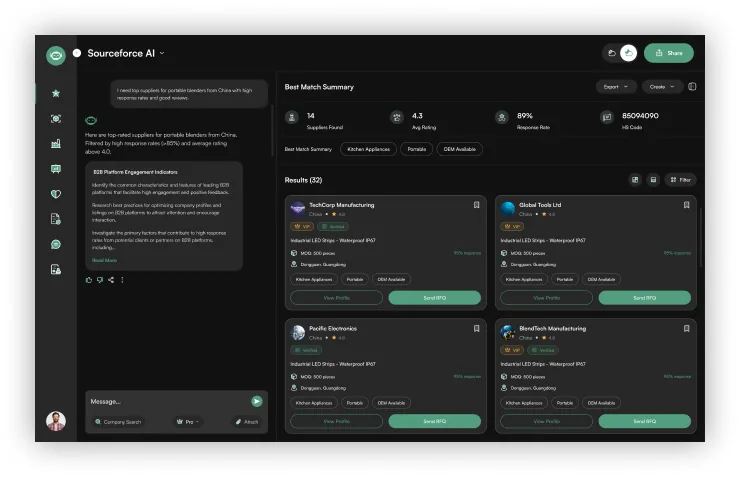
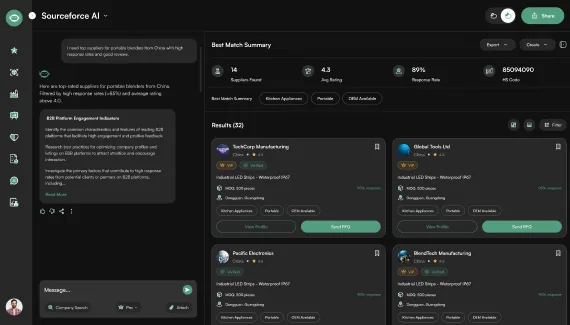
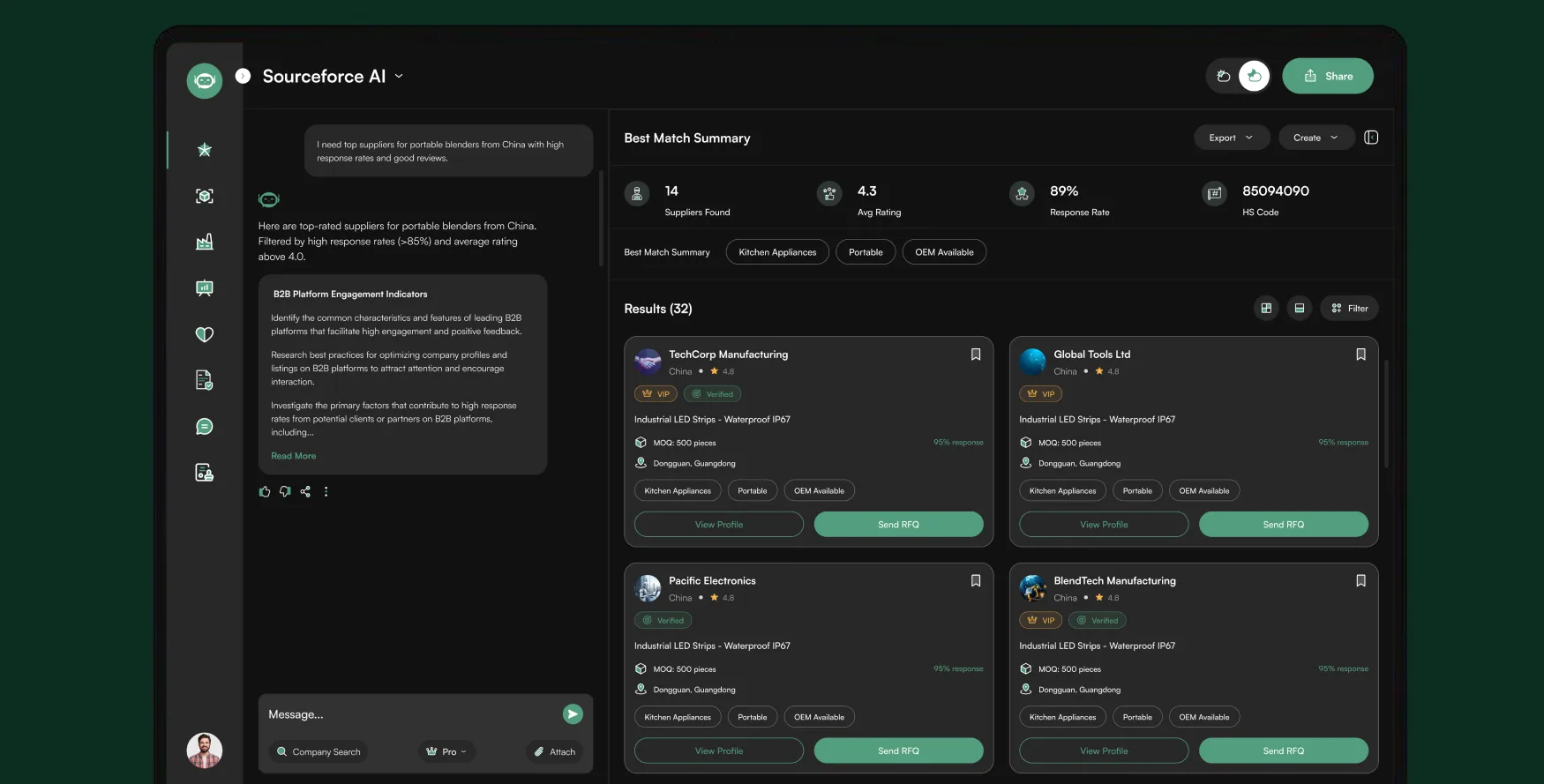
The Sourceforce AI search screen: a plain-language request on the left, the best match summary and scored supplier cards on the right

Overview

57Screens

Sourceforce AI is a B2B sourcing platform where a buyer describes what they need in plain language and an AI assistant returns verified manufacturers, scored and ready to quote.

This case study covers a full UI/UX pass across the whole product on two platforms: an audit of what shipped, twenty-three copy and data defects fixed, a token layer built from the product's own palette, the four modules the sidebar promised but never had, and a second theme the file could not previously produce.

Client

An AI-assisted B2B sourcing platform, built under NDA.

The client's name and internal figures are confidential. Everything shown here is the design work itself: a UX audit of both platforms, the design system that came out of it, and the SaaS product design for the four modules the rail had promised.

Client
Confidential B2B sourcing client, name under NDA
Industry
B2B sourcing & procurement, AI-assisted supplier discovery
Market
Withheld under NDA
Scope
UI/UX audit and redesign, desktop + mobile
Deliverables
57 screens (28 desktop + 29 mobile), a themeable token layer, four new modules, clickable prototype
Timeline
2026
Container cranes and stacked shipping containers at a port, the trade Sourceforce buyers are sourcing for

Process

Audit both platforms first. Tokens before components, always.

The file already had text styles, paint styles and a hundred and twenty components; it was missing the layer underneath them. Building anything new before the tokens existed would have baked the inconsistencies in, so the work ran in five passes.

  1. Audit 49 frames, both platforms
  2. Fix 23 copy and data defects
  3. Build a token layer the product can theme
  4. Bind every fill and stroke to tokens
  5. Design the four missing modules

Problem

Missing modules, mixed identities, loose color, unchecked copy.

  • Four sidebar entries led nowhere.

    Manufacturer Directory, Market Intelligence, Compliance Check and Supplier Messages appeared in the rail of all forty-nine screens. Icons had been drawn for every one of them. None had a screen behind it.

  • The product had three different users.

    The sidebar belonged to James Forgey. Settings belonged to Smith English. The verification screen emailed [email protected]. Same session, three identities.

  • The palette had five ambers and three reds.

    Sixty-one distinct fills and no theme layer. #F5B14C, #F7A738, #FEC93E, #FEBC1F and #F2C042 were all doing the same job on different rating stars.

  • The copy had never been proofread.

    The headline on all seven auth screens read “Find High-Quality and Dependable”, with the word Suppliers missing. Eight lorem strings, a Faker.js address, and a refund policy that read “Available on MOQ defects”.

User persona

Two buyers open the same assistant: one needs a sentence, the other a filter set.

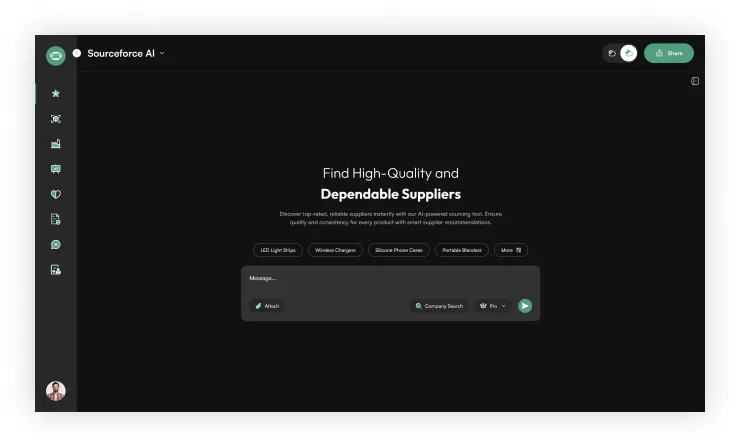
One sources twice a year and does not know what an HS code is. The other runs forty RFQs a month and knows exactly which certificate expires when. The assistant has to answer a sentence for one and a filter set for the other, which is why search returns a written summary above the results grid.

Priya Raman

Goals

  • Describe a product in a sentence and get manufacturers who can actually make it.
  • See a plain-English summary before a single table row.
  • Know a supplier is real before sending anything to them.

Frustrations

  • Does not know HS codes, MOQs or Incoterms, and does not want to learn them to buy once.
  • Cannot tell a good response rate from a bad one without a benchmark.
  • Sources twice a year, so every visit starts from scratch.
Daniel Okafor

Goals

  • Filter hard: certification, region, MOQ, price band, response rate.
  • Run forty RFQs a month without re-typing the same requirements.
  • Track which certificate expires when, per supplier.

Frustrations

  • Reads the results grid, not the summary; the assistant's prose is in his way.
  • Needs density: he works through forty RFQs a month, so every extra click adds up.
  • Had no screen for compliance, so certificate tracking lived in a spreadsheet.

Goals

Tokens, true navigation, one voice and two platforms in step.

  1. Every value resolves through a token

    The file had text and paint styles but no tokens. Styles name a value; tokens let a second theme swap it. Nothing ships with a hand-typed hex.

  2. Every rail entry opens a real screen

    If the rail lists eight modules, eight modules exist. A nav item that leads nowhere is a promise the product breaks on every screen it appears on.

  3. One voice, one user, one set of facts

    One signed-in identity, one date format, one ellipsis, one way to mark a field required. Inconsistency reads as carelessness long before anyone can name it.

  4. Both platforms stay in step

    Twenty-nine mobile screens and twenty-eight desktop ones describe the same product. Every fix and every new module landed on both.

Research

Forty-nine frames on two platforms, checked supplier screen by supplier screen.

We opened each of the forty-nine buyer and supplier frames, desktop and mobile, and logged every off-palette fill, broken string and dead link. “The sourcing flow feels messy” is hard to fix; sixty-one fills, eight placeholder strings and four dead modules are a backlog.

  • 49

    frames walked, desktop and mobile

  • 61

    distinct fills before consolidation

  • 7

    auth screens with a broken headline

  • 23

    copy and data defects found

  • 8

    placeholder strings replaced with copy

  • 4

    nav modules with no screen behind them

Primary flow

A sentence becomes a shortlist, a shortlist becomes a quote.

The product's whole promise is that a buyer never has to learn a taxonomy. Every stage below either narrows the field or adds evidence, and the two screens where an account is most likely to be lost (verification and the empty result) are the two that got the most attention.

  1. Access

    first session
    1. Sign inemail, then password
    2. Verify OTP4-digit code by email
    3. HomeAI prompt, no data yet
    4. Suggested promptsfour starting points
  2. Ask

    plain language in
    1. Describe the need“portable blenders, China”
    2. AI summarywritten before any table
    3. Results (32)cards, scored
    4. Best match strip4 headline metrics
  3. Narrow

    the filter set
    1. Open filterslocation, cert, MOQ, price
    2. Apply filters12 results
    3. Filtered gridsame card, fewer rows
    4. Save supplierbookmark to Saved
  4. Verify

    the evidence layer
    1. Supplier profiletabs, not screens
    2. AI Confidence 92%low risk · reliable
    3. CertificationsISO, CE, FDA, RoHS
    4. Compliance Checkaudit dates, expiry
  5. Request

    money starts moving
    1. Create RFQ7 required, 4 optional
    2. Senttracked per supplier
    3. Inboxquotes come back
    4. Replythread per supplier
  6. Decide

    and it closes
    1. Compare quotesprice, MOQ, lead time
    2. Message suppliernew module
    3. Market Intelligencebenchmark the price
    4. Awardsupplier saved
  • Entry point
  • Existing screen
  • Evidence / trust
  • New module

Grid system

One rail, two widths, and a grid that survives both.

The sidebar is not an overlay: it owns 120px collapsed and 300px expanded, and the working area re-flows around it rather than under it. Desktop runs a 12-column grid inside 1800px; mobile drops to 4 columns inside 327px with the same 24px gutter.

Components

A hundred and twenty components, now bound to tokens.

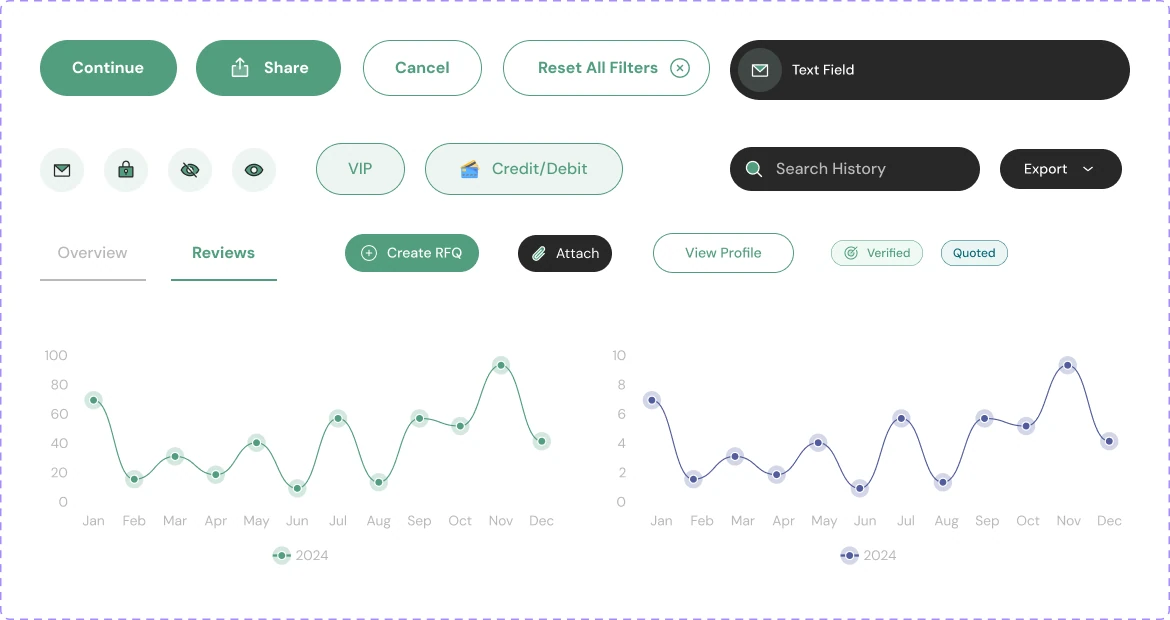
Every fill and stroke in Sourceforce now resolves to a named token built from its own green and amber, so a dark theme is a swap rather than a redraw. The four missing modules got their nav variants, and the file gained four elevation styles.

Sourceforce component board: buttons, icon chips, text and search fields, tabs, Verified and Quoted tags, and two line charts
  • 120 components
  • 15 component sets
  • all bound to tokens

Feature 01

Seven auth screens, and the headline on every one was broken.

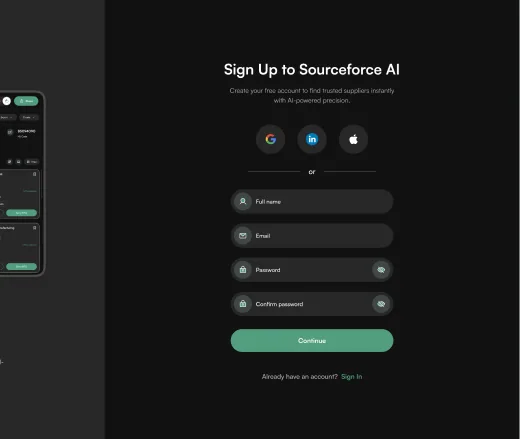
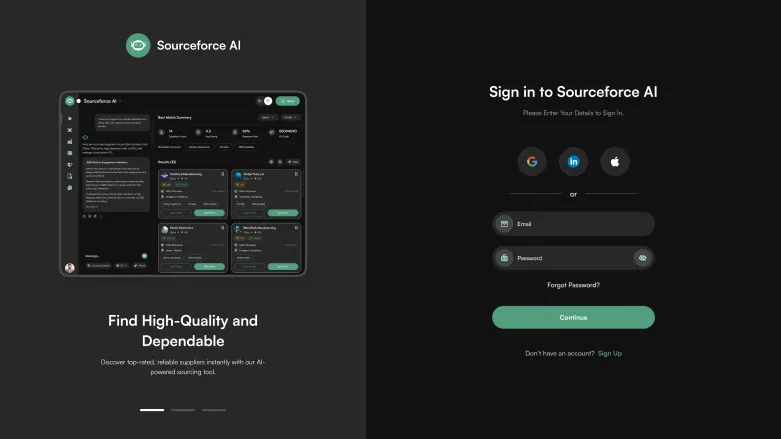
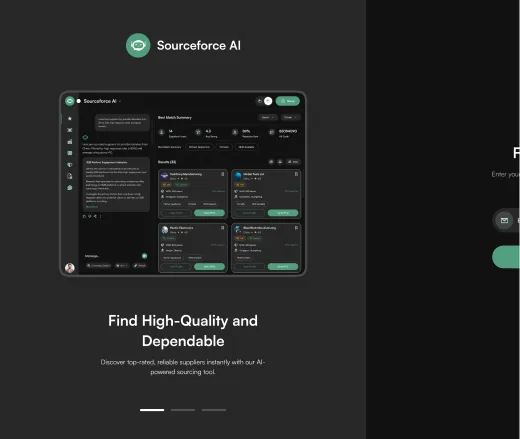
Sign in, sign up, forgot password, OTP, reset, verify and the confirmation are separate screens rather than one form that changes shape, so a buyer who reloads mid-verification lands back on the right step. The left panel carries the product promise on all seven, which is why “Find High-Quality and Dependable” missing its final word was a defect worth finding before anything else.

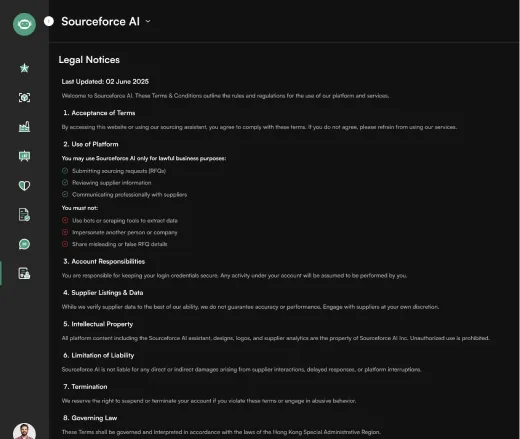
Sourceforce sign-in screen with the product promise on the left panelSourceforce verification screen: a four-digit code sent by emailSourceforce sign-up screen

Feature 02

The assistant answers in prose before it answers in rows.

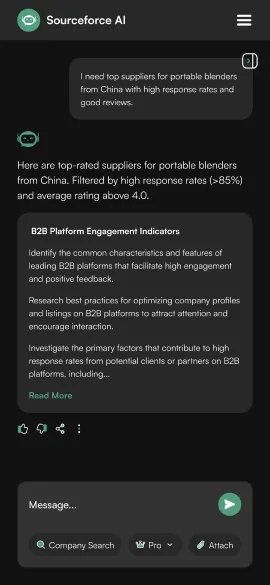
A buyer types a sentence, not a filter set. The response leads with a written summary and a four-metric strip (suppliers found, average rating, response rate, HS code) and only then opens the results grid. The chat panel stays docked on the left so the question that produced the list never scrolls away from it.

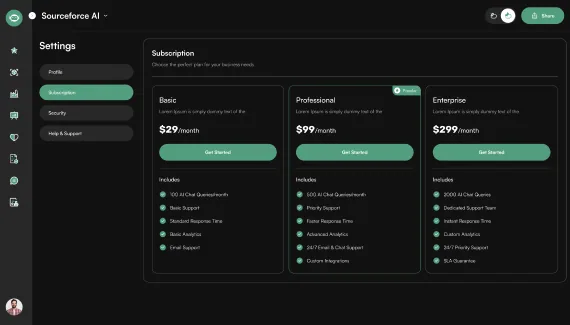
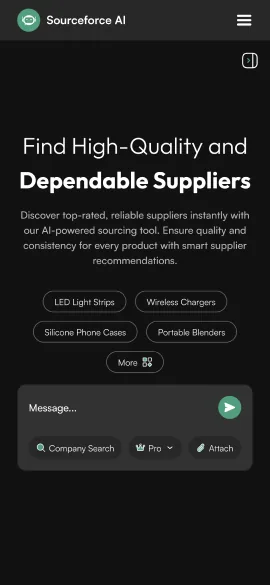
Sourceforce settings screen with the subscription plansSourceforce home screen: the AI prompt with four suggested starting pointsSourceforce search response: the written summary, the four-metric best match strip and the scored results grid

Feature 03

Nine filters in one panel, and a count that moves as you set them.

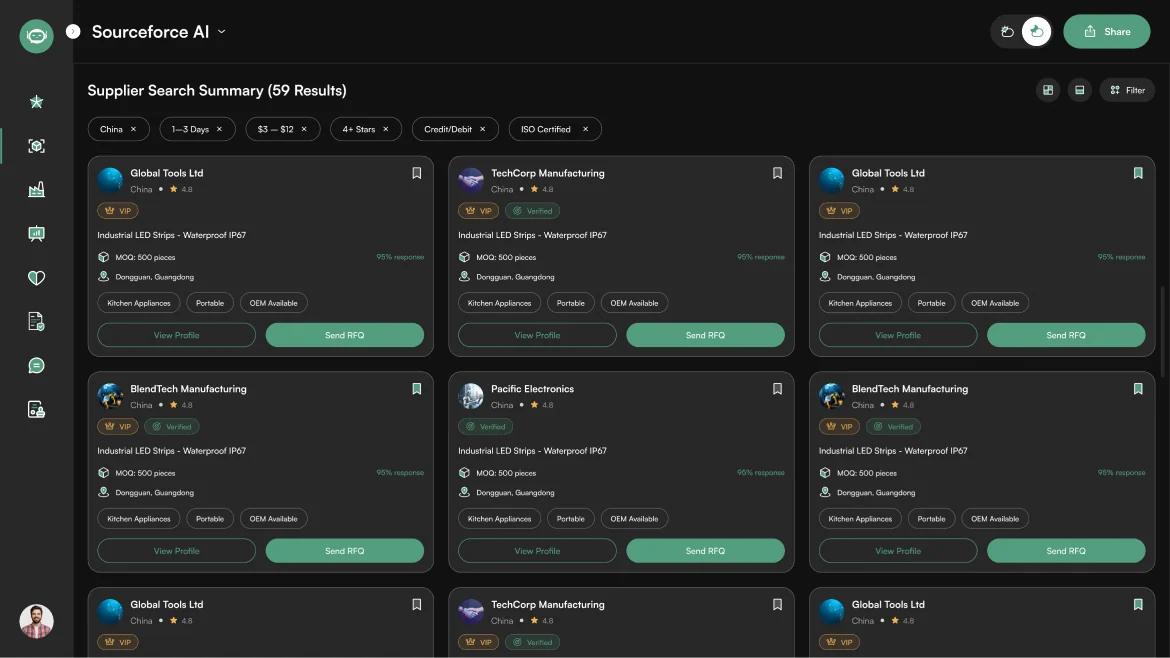
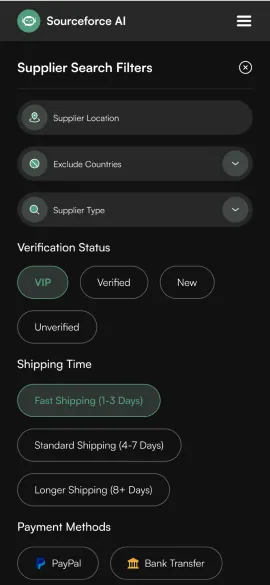
Location, excluded countries, supplier type, verification status, shipping time, payment method, certification, price range and minimum rating. The panel applies as a set rather than one at a time, because a buyer narrowing by four criteria does not want four page loads, and the header count tells them whether they have narrowed too far.

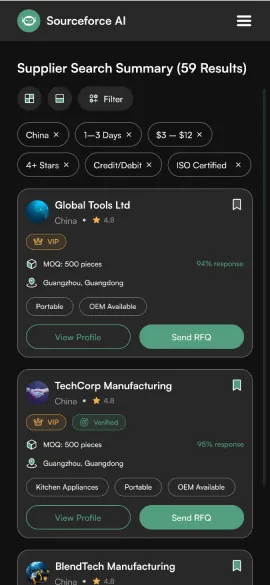
Sourceforce filtered results: active filter chips above the supplier card grid, 59 results in the header

Click map

Where buyers are designed to click.

A design-intent click map of the filtered results screen: heat sits only on interactive targets (buttons, tabs, links, menus), weighted by how central each action is to a buyer's day. It maps layout decisions, not recorded sessions.

The Sourceforce filtered results screen with heat spots over its interactive targets
  1. Send RFQ is the hottest card target

    It is the only filled button on each card, so it carries the decision. Heat fades down the grid: the first row gets the most attention, later rows less.

  2. Save supplier builds the shortlist

    The bookmark on each card saves a supplier to Saved without leaving the grid, so a buyer can build a shortlist while still comparing results.

  3. Filter chips are the second loop

    Each active chip carries its own remove control, so a buyer loosens one criterion without reopening the panel. Filter in the toolbar reopens the full set of nine.

  4. View Profile sits one step cooler

    The outlined button is the evidence path before an RFQ. It is deliberately weighted below Send RFQ, so it reads as secondary next to it.

  5. The rail, avatar and toggles stay cool

    Sidebar modules, bookmarks, layout toggles, theme switch and the workspace menu are reachable on every screen, but they are not the task on this one.

Design-intent map, not recorded data.

Feature 04

A supplier is a record with evidence, not a listing.

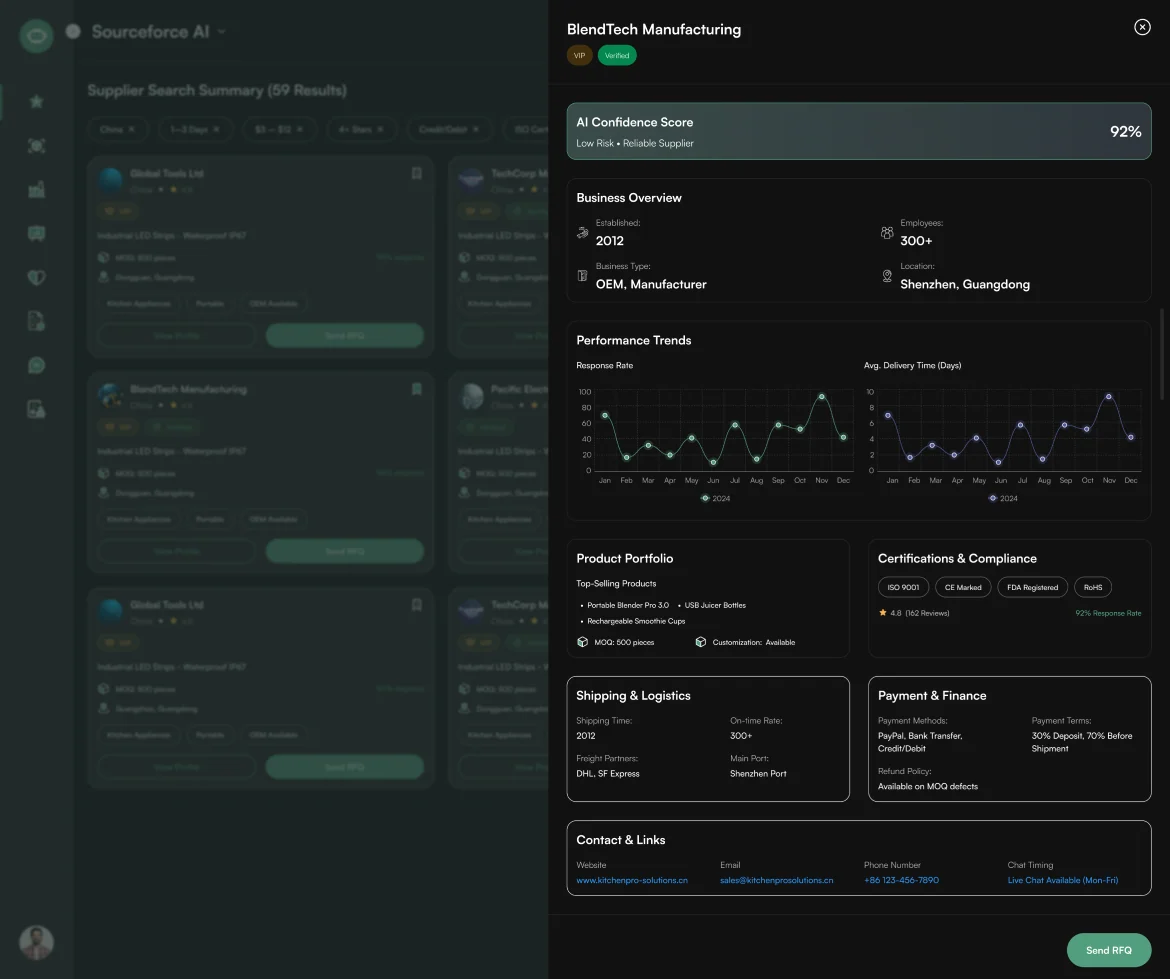
The profile opens over the results rather than replacing them, and leads with an AI Confidence Score and its reasoning (92%, low risk, reliable supplier) before any marketing copy. Business overview, performance trends, product portfolio, certifications, shipping, payment terms and contacts follow in that order, because that is the order a buyer's doubts arrive in.

Sourceforce supplier profile opened over the results: AI confidence score, business overview, performance trends and certifications

Feature 05

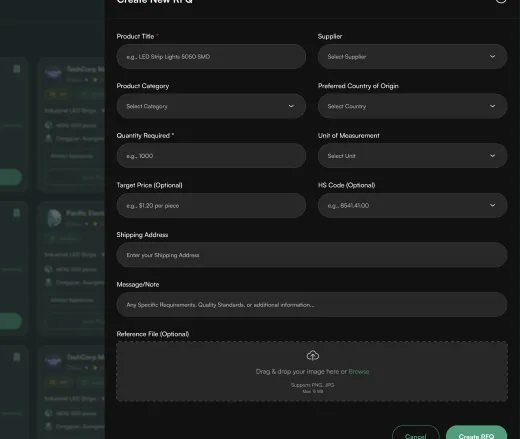
Eleven fields, and now every one says whether it is required.

The RFQ form had two fields marked with an asterisk, three marked optional, and six marked neither, so a buyer could not tell what would block submission. Seven are now required and four are explicitly optional. Sent and Inbox are separate tabs on the same center, so a quote request and the quote that answers it never live in different places.

Sourceforce Create RFQ form with seven required and four optional fieldsSourceforce results grid, the screen an RFQ is sent fromSourceforce account screen reached from the RFQ center

Feature 06

The sidebar promised eight modules. Four of them did not exist.

Manufacturer Directory, Market Intelligence, Compliance Check and Supplier Messages sat in the rail of every screen, with icons already drawn, leading nowhere. All four now exist on both platforms, built from the same container, top bar and card components as the search and RFQ screens: a browsable directory with category filters, a benchmark view with two trend charts and two data tables, a certification tracker with audit dates, and a supplier thread list.

Sourceforce Manufacturer Directory: the search response with scored supplier cardsSourceforce Market Intelligence view over the filtered supplier gridSourceforce Compliance Check: subscription and plan settings behind the certification trackerSourceforce Supplier Messages: the profile settings screen the thread list is reached from

Feature 07

Account, billing and support, written for buyers.

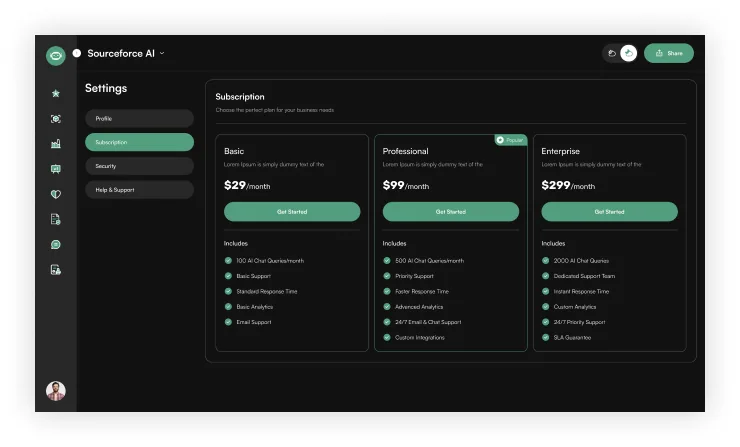
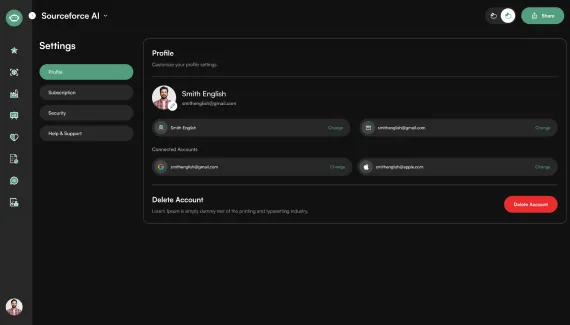
Profile, security, subscription, help and the legal notices are where a buyer decides whether to trust a sourcing platform with supplier data. Three plan descriptions were lorem ipsum, the enterprise tier quietly dropped “/month”, the support address was Faker.js output for a platform governed by Hong Kong law, and the delete-account warning had never been written.

Sourceforce profile settings with the delete-account warningSourceforce subscription settings: Basic, Professional and Enterprise plansSourceforce security settings
An engineer at a laptop on an electronics production line, the kind of manufacturer Sourceforce verifies

Responsive

Two platforms, designed together rather than derived.

Twenty-nine mobile screens and twenty-eight desktop ones were drawn as a pair, not scaled from one another. The rail becomes a drawer, the results grid becomes a single column, the filter panel becomes a full-height sheet, but the card, the badge and the button are the same components at both widths.

Sourceforce mobile home screen with the AI prompt and suggested searchesSourceforce mobile search response with the written summarySourceforce mobile filter sheet: verification status, shipping time and payment methodsSourceforce mobile results as a single column of supplier cards
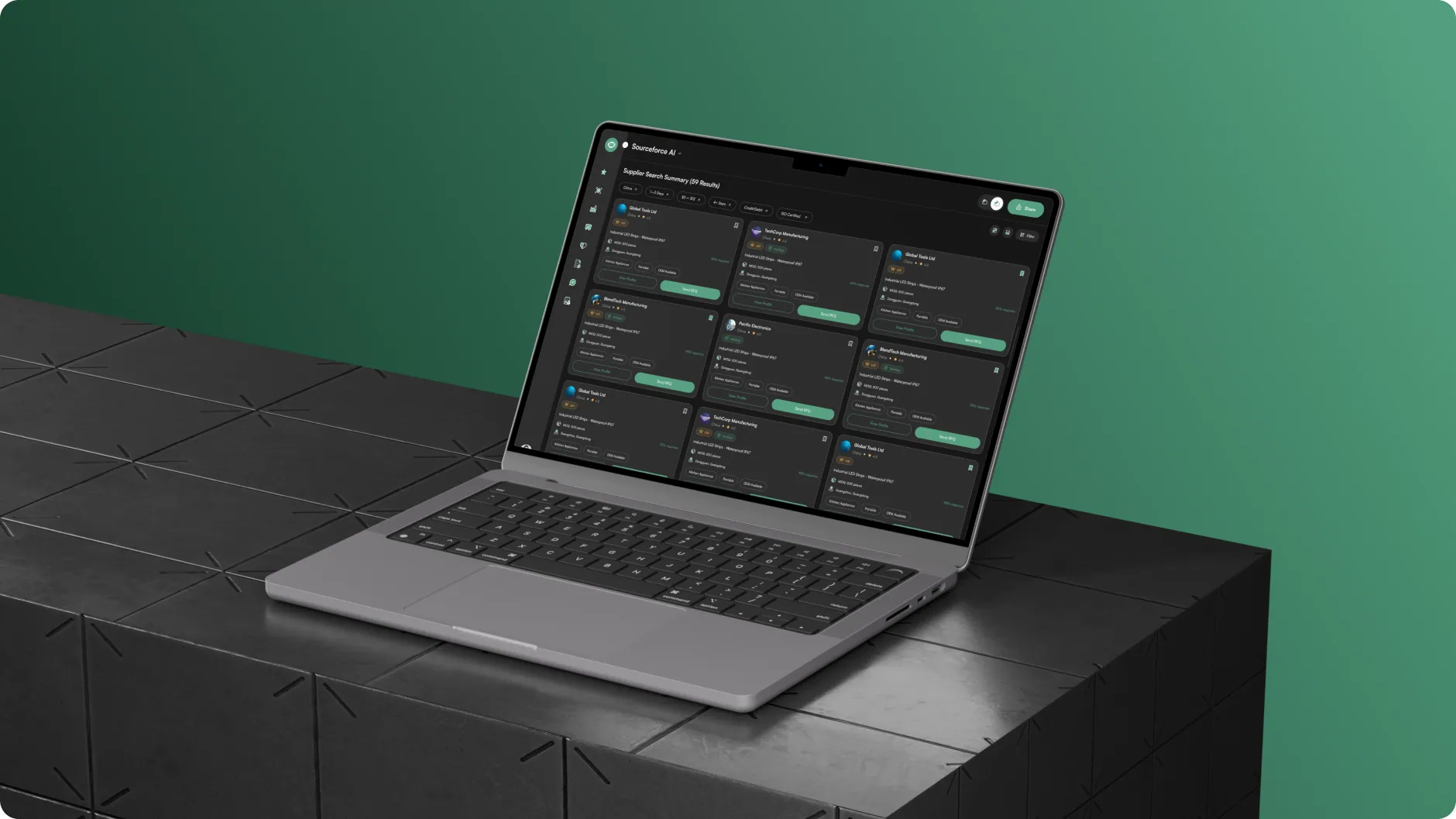
The Sourceforce supplier search on a laptop on a dark plinth against a green wall

Visual language

One green, one amber, DM Sans throughout.

The palette was lifted from what shipped, not invented for the deck. A single green does every interactive job, one amber carries attention, and the grays build a dark surface stack the product had been drawing by hand. Type is DM Sans in three weights across seventeen styles.

  • #529E7E
  • #111111
  • #B8B8B8
  • #272727
  • #F5B14C

DM Sans

Regular · Medium · Bold

Before / After

What changed between the audited sourcing flow and the redesign.

Navigation

Before
  1. Rail lists 8 modules
  2. Click Compliance Check
  3. No screen behind it

Four of the eight rail entries led nowhere, on all forty-nine audited frames.

After
  1. Rail lists 8 modules
  2. Click any of them
  3. A designed screen

Directory, Market Intelligence, Compliance Check and Messages now exist on both platforms.

Signed-in identity

Before
  1. Sidebar: user one
  2. Settings: user two
  3. Verify email: user three

Three different identities appeared in a single session.

After
  1. Sidebar
  2. Settings
  3. Verify email

One signed-in user, the same everywhere they appear.

Color

Before
  1. 61 distinct fills
  2. 5 ambers, 3 reds
  3. No theme layer

Hand-typed hex values doing the same job on different screens.

After
  1. One amber, one green
  2. Named tokens
  3. Dark theme ready

Every fill and stroke resolves through a named token, and a second theme is possible.

Results & Impact

A product that is ready to build and ready to scale.

Every paint in Sourceforce now resolves through a named token, the navigation is true on both platforms, and the product has a second theme it could not previously produce. The four modules the rail had been promising since the first screen now exist.

  • 4new modules, on both platforms
  • 2platforms in sync, desktop and mobile
  • 23copy and data errors fixed
  • Darktheme ready to switch on

Design-level outcomes measured against the source files. Live product data will follow launch.

Learnings

What designing for two kinds of buyer taught us.

  1. Read the navigation before reading the screens

    Four modules had been advertised on every screen for the entire life of the file and nobody had clicked them. The rail is the cheapest possible audit: it is a written list of what the product claims to be, and it took ten minutes to find four things that were not there.

  2. Styles are not a system

    This file looked systematic: seventeen text styles, sixteen paint styles, a hundred and twenty components. It still had sixty-one fills and five near-identical ambers, because a style is a shortcut and a variable is a contract. Only the binding pass could tell the difference.

  3. One search has to serve two kinds of buyer

    One buyer sources twice a year and does not know what an HS code is; the other runs forty RFQs a month. Leading with a written summary and keeping the full results grid one scroll below let the same screen answer a sentence for one and a filter set for the other.

  4. Copy defects hide in the panel you stop looking at

    The broken headline sat on the left panel of all seven auth screens. It had been reviewed dozens of times. It survived because it was decoration by then, which is exactly why a copy pass has to read the parts of the screen that never change.

Let's work together

Building a B2B sourcing platform? We can help you ship it.

Team up with us

[email protected]See more case studies

The Sourceforce filtered supplier results, the screen most of this redesign was measured against

Thanks for reading.

Have a product like this? Let's talk. Book a call

Write to [email protected], or see more case studies, including WorkHub, an HR platform designed on the same template.

Skip to content
Wait! Is Your Website Losing Customers?

Get a free UI/UX audit and discover what’s holding your site back