
Case study
WorkHub
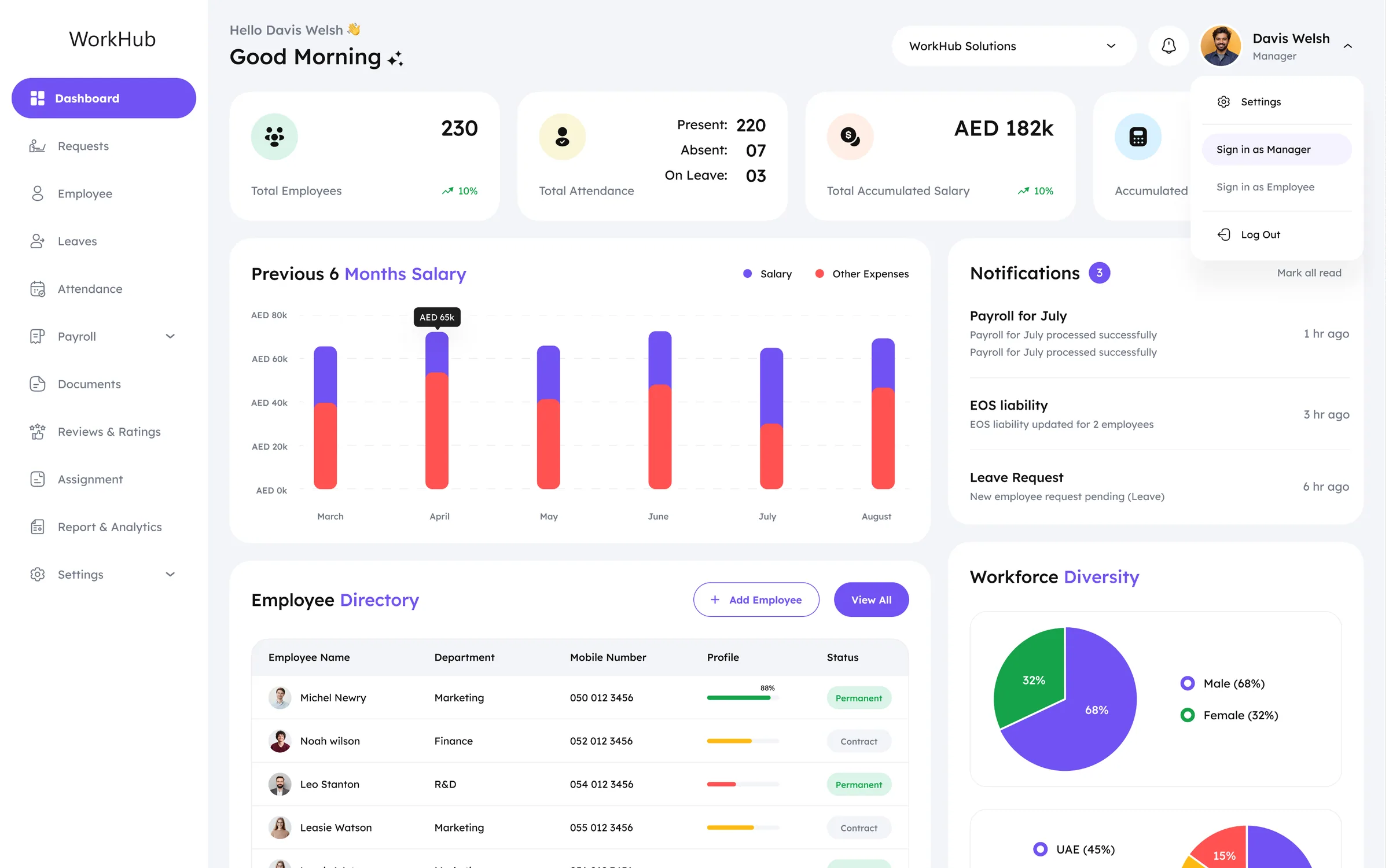
An HR platform that runs a Gulf-based workforce end to end: attendance, leave, payroll and WPS compliance, through two role-scoped apps built from one system.

Scope
Eleven modules, scoped to a UAE workforce.
- 11product modules designed
- 02role-scoped applications
- 09request types supported
- 06settings surfaces
Client
A UAE HR and payroll platform, built under NDA.
The client's name and internal figures are confidential. Everything shown here is the design work itself: product design for two roles, a design system shared by both, and the dashboard design that opens each one.
- Client
- Confidential HR-tech client, name under NDA
- Industry
- HR, attendance & payroll software
- Market
- UAE · AED payroll, WPS, MOHRE, English + Arabic RTL
- Scope
- UI/UX design, responsive web for Owner/Manager and Employee roles
- Deliverables
- 148 screens across both roles, 72 mirrored for Arabic RTL, design system
- Timeline
- 2025–26
Problem
One product, two audiences, and a compliance regime that cannot bend.
Two audiences, one login.
A manager opening the product wants headcount, payroll exposure and an approval queue. An employee wants their leave balance and today's clock-in. A single shared shell would either overwhelm one or under-serve the other.
Compliance is a gate, not a feature.
WPS agent setup, IBAN validation, SIF submission and MOHRE jurisdiction rules all have to be configurable, without turning Settings into a spreadsheet that only the person who built it can operate.
Nine request types, one queue.
Leave, attendance correction, loan, reimbursement, overtime, document, return-from-leave, extend-leave and end-of-service all land in the same place and need triage without nine bespoke screens.
A daily habit and a monthly event.
The same attendance data serves a clock-in tap and an AED 182k payroll run. The interface has to make a two-second action and a month-end reconciliation feel equally proportionate.
Two roles
One system, two front doors.
The Owner/Manager console opens on headcount, payroll exposure and an approval queue: 230 employees, AED 182k accumulated salary, three pending notifications. The Employee app opens on the four numbers that person actually owns: leave balance, leave taken, loan balance and this month's salary. Same design system, same components, different first screen.
Goals
Four targets set the bar for every module.
Give each role its own front door
The manager lands on headcount, payroll exposure and the approval queue. The employee lands on balance, punctuality and their own requests. Neither has to filter past the other's work.
Make compliance configurable, not hard-coded
WPS agent bank, routing code, IBAN validation, SIF pre-submission checks and MOHRE jurisdiction all live in Settings as guarded fields: editable by an administrator, not by a developer.
Route nine request types through one queue
A single list carrying employee, department, request type, submitted-on and status, so triage never depends on remembering which of nine forms was used.
Keep money legible
Every salary, loan and end-of-service figure carries its AED unit and its comparison period, so a number is never shown without the frame of reference that makes it mean something.
Constraints
Payroll here is a regulated chain, not a button.
Paying a salary in the UAE runs through the Wage Protection System: an approved agent bank, a validated SIF file, and jurisdiction rules set by MOHRE. Every one of those steps needed a home in the interface, which is why Settings carries as much design weight as the dashboard.
- Employee recordSalary, IBAN,
contract type - Payroll runPrevious 6 months,
other expenses - SIF fileAuto-validate before
submission - WPS agent bankEmirates NBD
Routing 305420101 - MOHREDubai Mainland
FY 2024–2025
Information architecture
Eight shared doors, three for managers.
Eight destinations are shared. Three exist only for the Owner/Manager (Employee, Reviews & Ratings and Assignment), so an employee never sees a door they cannot open, and the manager never has to hunt for the ones only they can.
Owner / Manager
- Dashboard
- Requests
- Employee
- Leaves
- Attendance
- Payroll
- Documents
- Reviews & Ratings
- Assignment
- Report & Analytics
- Settings
Employee
- Dashboard
- Requests
- Leaves
- Attendance
- Payroll
- Documents
- Report & Analytics
- Settings
Outlined: manager-only destinations.
Design system
The buttons, badges and fields behind every WorkHub module.
Module 01 · Dashboards
Headcount, payroll exposure and the queue, above the fold.
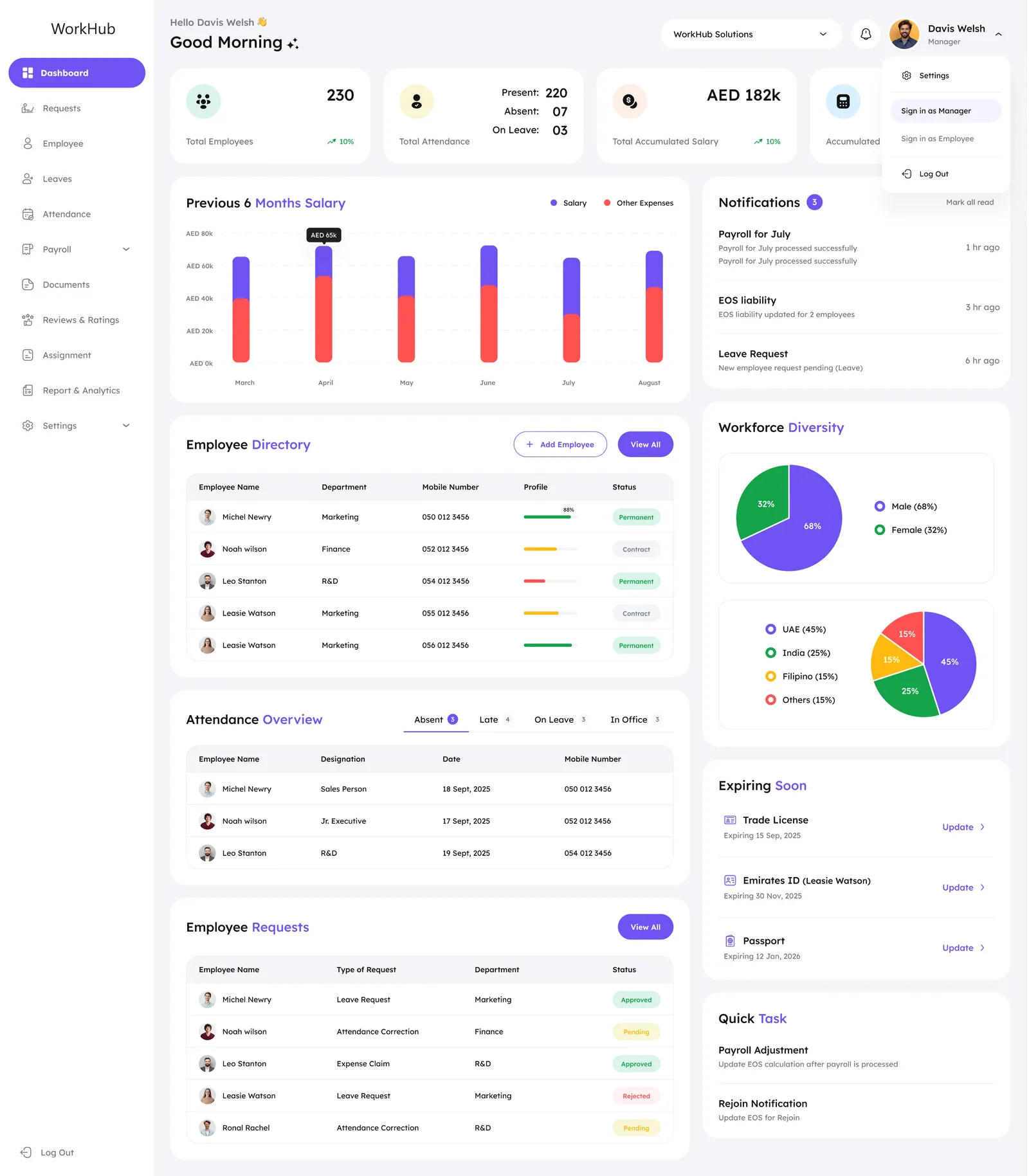
The manager's dashboard answers three questions before any click: how many people, how much money, what needs approving. 230 employees with today's present / absent / on-leave split, AED 182k accumulated salary against AED 177,400 end-of-service liability, and a six-month salary-versus-expenses chart. Notifications sit to the right as a queue, not a badge.
Module 02 · Attendance
A roster for one role, a timeline for the other.
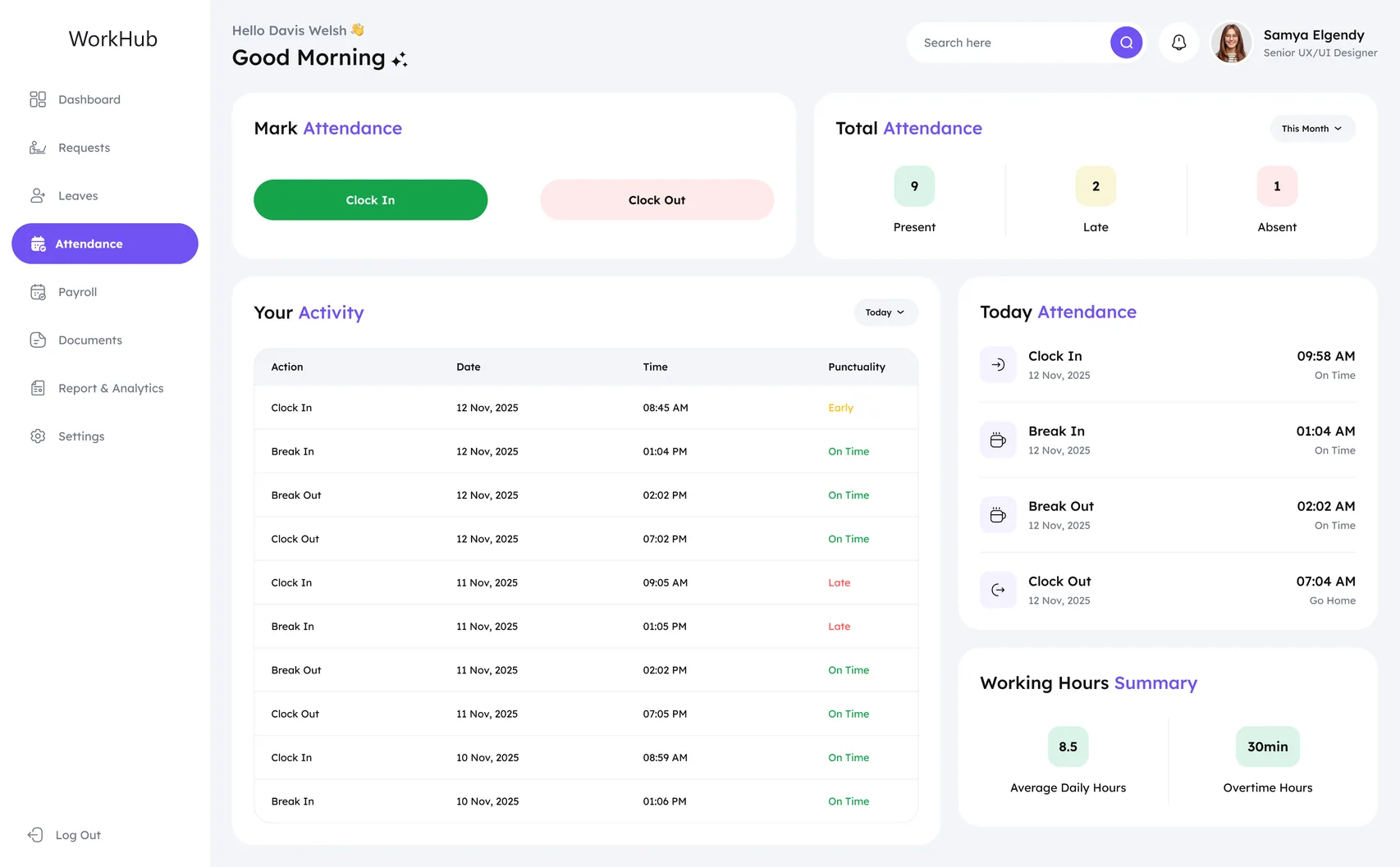
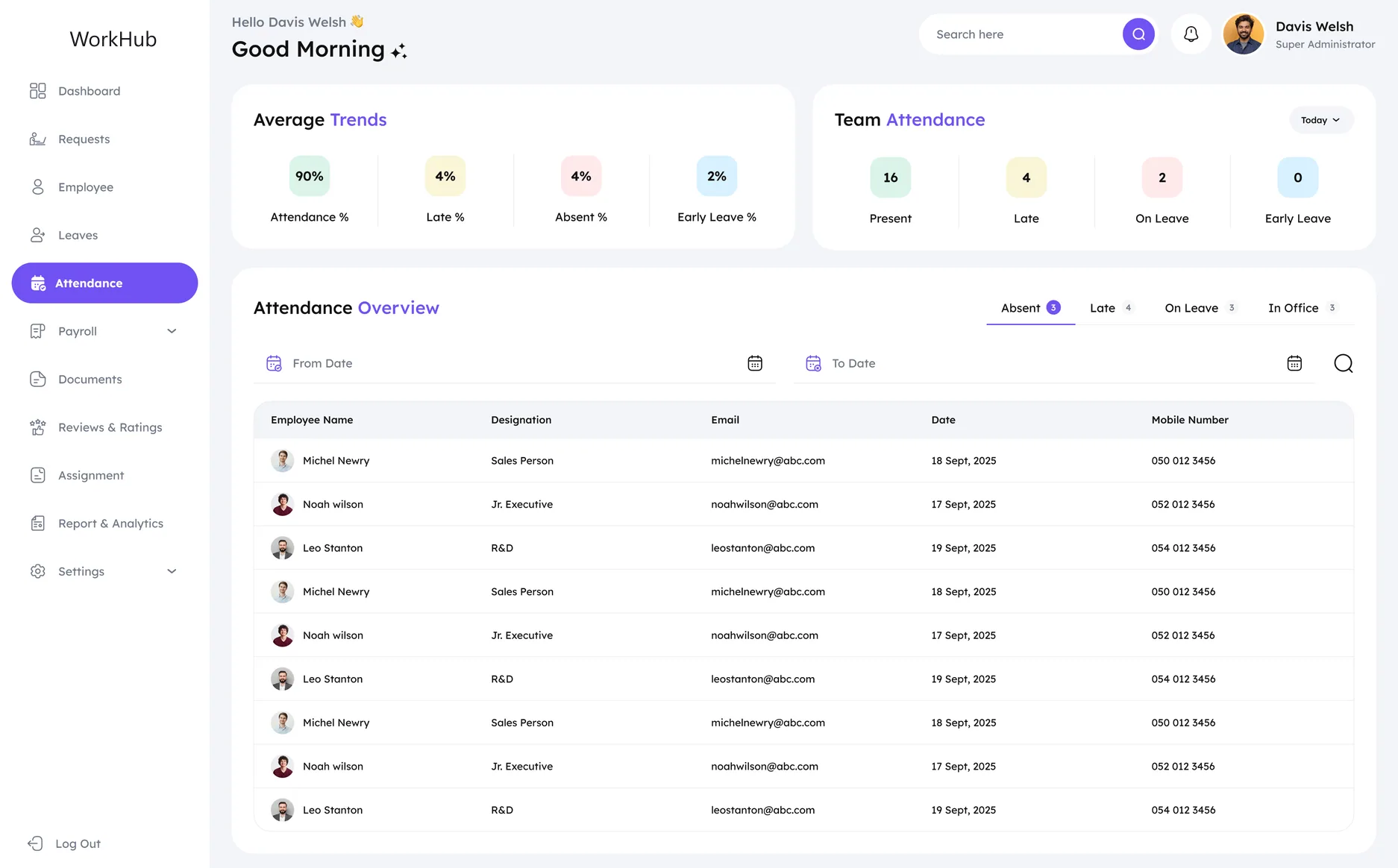
The manager needs the day in aggregate: who is present, absent, late or on leave across 230 people. The employee needs their own day in sequence: clock in, break in, break out, clock out, each stamped On Time or Late. Same underlying records, two completely different readings.
Click map
Where managers are designed to click.
A design-intent click map of the Owner/Manager dashboard: heat sits only on interactive targets (buttons, tabs, links, menus), weighted by how central each action is to a manager's day. It maps layout decisions, not recorded sessions.
View All on Employee Requests runs hottest
It is the filled button beside the approval list, and approving requests is the manager's most frequent daily job.
Add Employee and View All sit side by side
Adding a person and browsing the directory are the two jobs the Employee Directory card exists for, so both stay one click from the dashboard.
Attendance tabs stay warm
Absent / Late / On Leave / In Office is how a manager re-reads today's roster, so the tabs take steady clicks all day.
Expiry links and notifications pull action
Update beside Trade License, Emirates ID and Passport, plus the Leave Request notification, turn alerts into one-click tasks.
Sidebar, switcher and profile stay cool
Eleven sidebar destinations, the WorkHub Solutions selector, bell and avatar catch occasional navigation clicks, with Requests the warmest link.
Design-intent map, not recorded data.
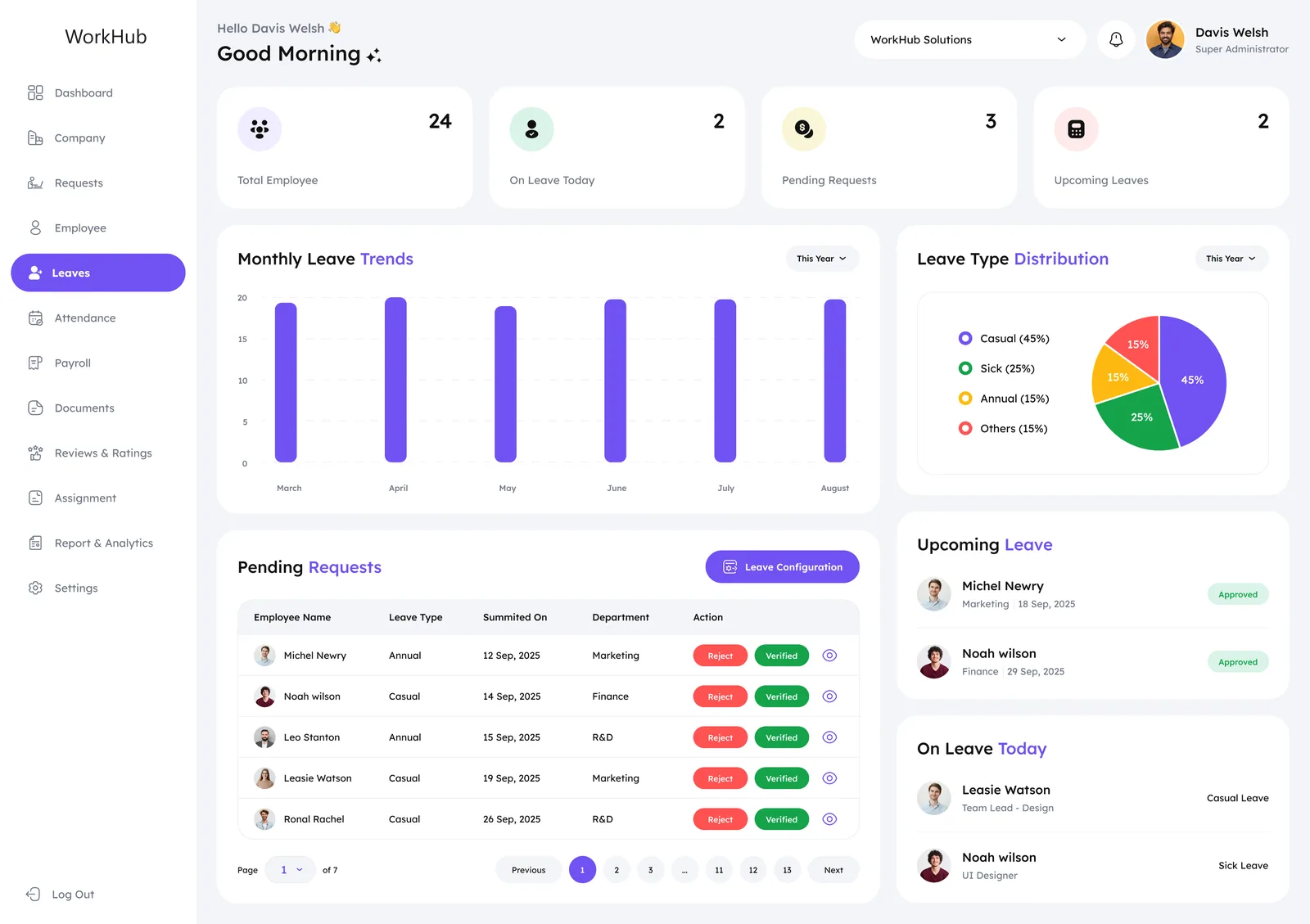
Module 03 · Leave
Leave has a lifecycle, not a form.
A leave request does not end when it is approved. It can be edited, returned from early, extended, or governed by a policy the employee never set. Each of those states is its own screen in the product, so the spine below is the actual sequence a request travels, not a simplification of it.
- Leave Policy
- Apply Leave
- Manager Approval
- Return from Leave
- Extend Leave
Five destinations in the product: Leave Policy, Apply Leave, Leave Manager approval, and Return from Leave / Extend Leave Request.
Module 04 · Requests
Loans, leave and corrections share one approval queue.
Leave, loan, reimbursement, overtime, attendance correction, document, return from leave, extend leave and end of service: nine separate forms, each with its own fields. Every one of them lands in the same place: a single Requests list with one Action column, under four counters that read Total, Pending, Approved and Rejected. A manager does not learn nine interfaces, they learn one row.
- Leave Request
- Loan Request
- Reimbursement Request
- Overtime Request
- Attendance Correction
- Document Request
- Return from Leave
- Extend Leave
- End of Service
- Pending
- Approved
- Rejected
Request Volume on the live screen splits that one queue back out by type: leave 30%, correction 25%, expense claims 15%, other 30%.
Module 05 · Payroll & WPS
Payroll that has to pass a government file check.
UAE payroll runs through the Wage Protection System: the payroll module produces a SIF file an agent bank submits, under MOHRE rules that differ between mainland and freezone. Those are conditions the pay run has to satisfy, not preferences, so WPS & Compliance is a first-class tab beside Company Settings, Policy Setup and Payroll Config.
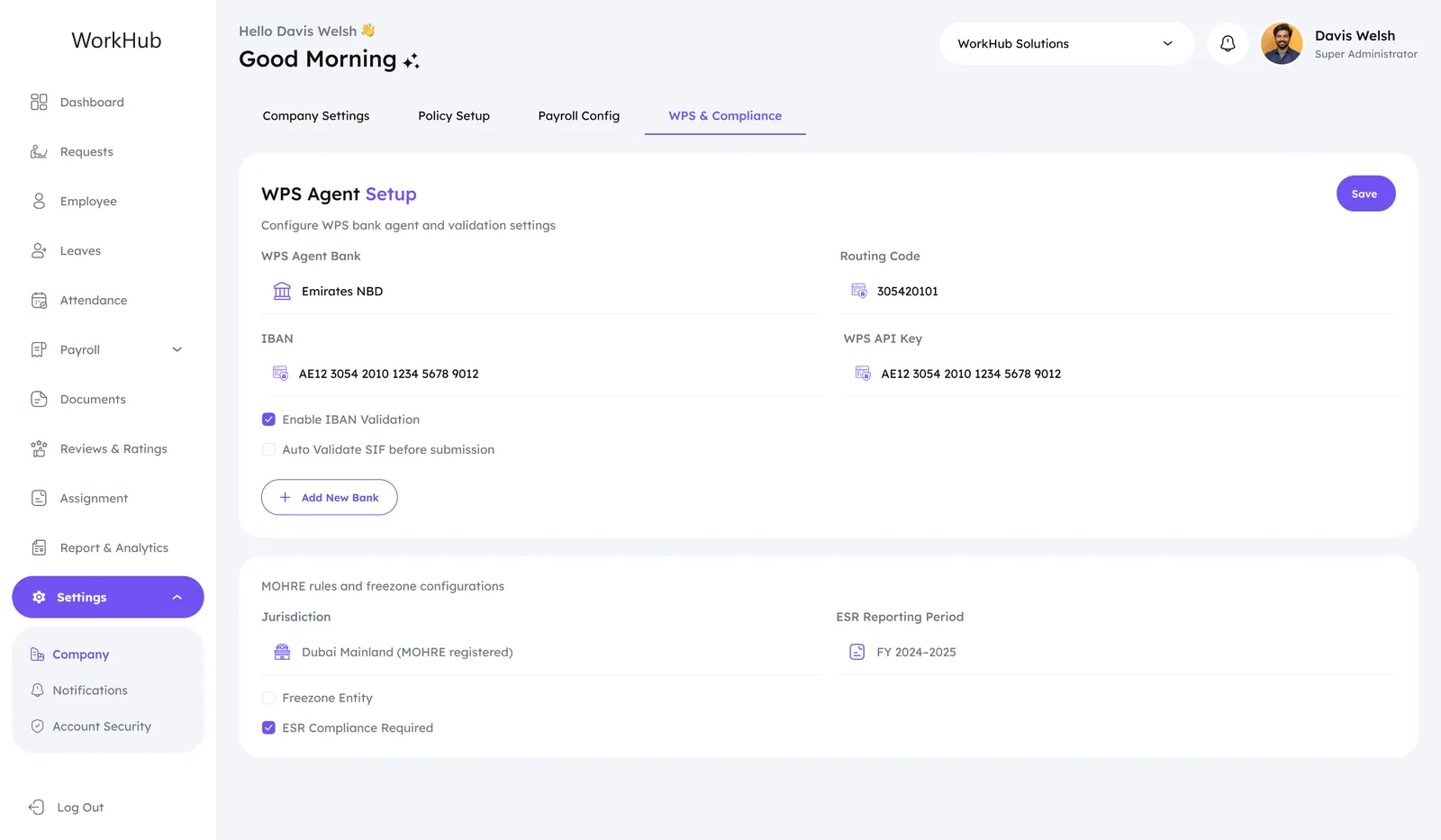
- Agent bank, routing code, IBAN and API key sit on one card: they are checked together or not at all.
- The two validations that guard the file, IBAN validation and SIF validation before submission, are checkboxes directly under the fields they check.
- Jurisdiction is a stated setting: Dubai Mainland (MOHRE registered) and Freezone Entity are different rule sets, and the ESR period is recorded as a financial year.
Module 06 · Documents & Reporting
Documents expire. Reporting has to prove they didn't.
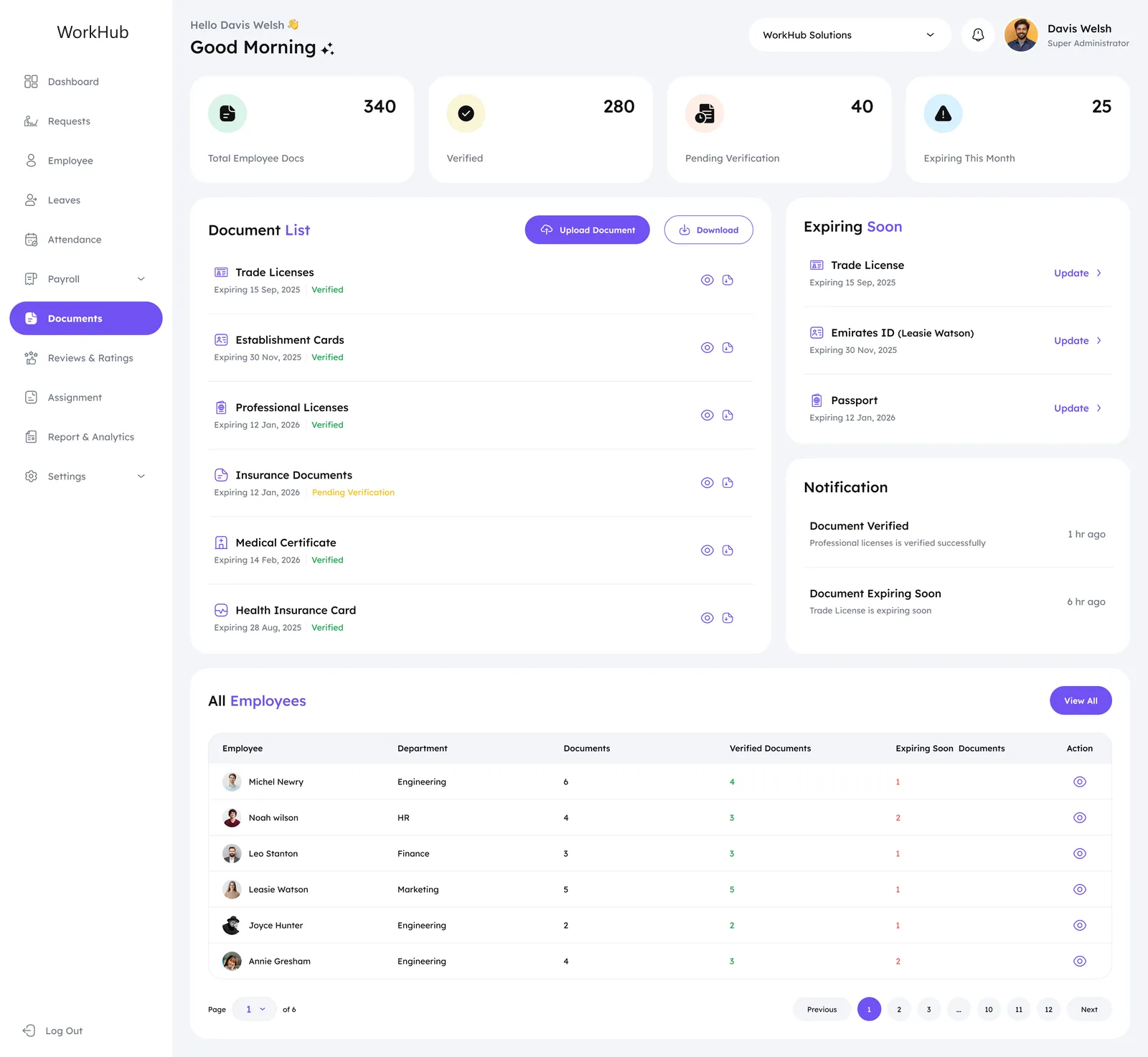
A UAE employer holds documents that lapse on a date and carry a consequence when they do. Every type in the register (six of them) has an expiry field, so Documents is not a file store: it separates verified from pending verification, surfaces what lapses next, and pushes an Update link straight into the Expiring Soon panel. Report & Analytics then closes the loop, with Attendance, Leave, Payroll and Compliance as four tabs over one exportable table.
Trade License
Expiry date · verified
Establishment Card
Expiry date · verified
Professional License
Expiry date · verified
Insurance Documents
Expiry date · pending verification
Medical Certificate
Expiry date · verified
Health Insurance Card
Expiry date · verified
Every type carries an expiry field, which is why the register is ordered by what lapses next rather than alphabetically.
System · Visual language
One status palette, doing three jobs.
Green, amber and red turn up in three unrelated places (punctuality on attendance, verification on documents, outcome on requests) and in all three they mean the same thing: settled, waiting, failed. That consistency is what lets a manager read a table without reading it. Violet is spent only on the one primary action per screen, and the whole product stays on Lexend, with weight rather than size carrying hierarchy.
- Primary action
#7152F3 - Deep brand
#2B1B7A - Attention
#FDBA11 - Settled
#16A34A - Failed
#DC2626 - Ink
#111111 - Secondary text
#717986 - Surface
#F3F5F9
Typography
Before / After
What changed between the brief and the design.
Three problems in the brief shaped most of the structure. Each one is shown as it was framed, and as the delivered design answers it.
Front doors
- One login
- One shared shell
- Both roles
A single shared shell would either overwhelm the manager or under-serve the employee.
- Owner/Manager console
- Employee app
Two role-scoped apps from one design system: 8 shared destinations, 3 manager-only.
Requests
- Leave
- Loan
- Reimbursement
- Overtime
- +5 more forms
Nine request types, each its own form, each risking its own review screen.
- 9 forms
- One Requests list
- One Action column
Every type lands in one list under four counters. A manager learns one row, not nine interfaces.
WPS compliance
- WPS agent
- IBAN
- SIF file
- MOHRE
Compliance rules at risk of becoming a Settings spreadsheet only its builder can operate.
- WPS & Compliance tab
- One agent-bank card
- Inline IBAN + SIF checks
A first-class tab beside Payroll Config, with each validation directly under the field it checks.
Outcome · Scope delivered
One system that runs the month for one role and the day for the other.
Both roles are designed end to end: an owner or manager can run a month, and an employee can do everything they need without asking HR for it. 72 of the 148 screens are also mirrored for Arabic RTL. The figures below measure the delivered system, not its adoption.
- 148Screens designed across both roles
- 1 → 2Front doors, one per role
- 11 → 8Destinations an employee sees
- 9 → 1Review surfaces for nine request types
- 4 → 1WPS fields checked together on one card
- 6 → 1Document types in one expiry-ordered register
- 4 → 1Report tabs behind one Export
- 0Manager-only destinations visible to employees
Design-level outcomes measured against the source files. Live product data will follow launch.
Reflection · Learnings
An HR system is judged on the days when nothing goes wrong.
Two roles is not one product with permissions.
The manager’s dashboard answers “what needs me today” and the employee’s answers “where do I stand”. Designing them as two compositions was cheaper than one layout with half its rows hidden.
Compliance is interface, not configuration.
WPS agent banks, MOHRE jurisdiction and ESR periods had to sit where a finance lead would go looking: a tab beside Payroll Config, not a sub-page of Settings.
A queue is cheaper than nine screens.
Nine request types converge on one list with one Action column, so the cost of adding a tenth is a form, not a new review surface for someone to learn.
Color has to mean exactly one thing.
Green, amber and red answer three unrelated questions across attendance, documents and requests. Holding their meaning constant is what lets a manager read a table without reading it.
Reviews and ratings close the year the same way payroll closes the month.
Average rating per department beside an Awaiting Review list, the same pattern as every other module: the aggregate on the left, the thing that needs a person on the right.
The product had to be legible to a finance lead closing payroll and to an employee checking whether their leave was approved, on the same afternoon, in the same interface.
WorkHub · UI/UX case study
Role
Product design: research, IA, UI, visual language
Scope
Two roles, eleven modules, nine request types
Platform
Responsive web, 1920 base · English and Arabic RTL
Tools
Figma, Lexend type family
Thanks for reading.
Have a product like this? Let's talk. Book a call
Or see more case studies, including Minxpay, a digital wallet designed on the same template.