Skip to content

UX audit & design-system plan

Gaolo

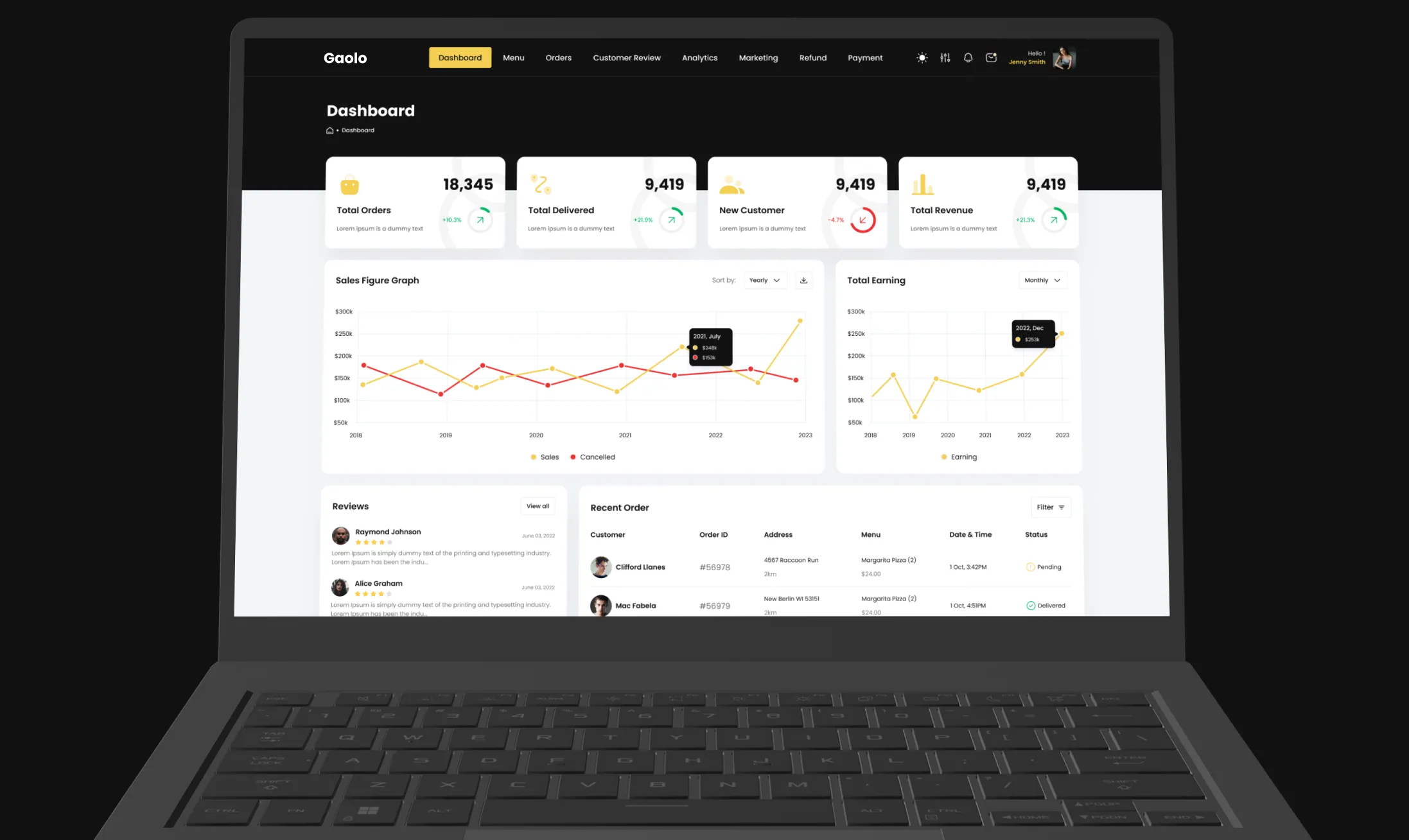
The Gaolo owner dashboard open on a laptop: four KPI cards, the sales figure graph and total earning chart

Overview

A restaurant-management platform, audited end to end.

A UX audit and design-system plan for a restaurant-management platform. Gaolo carries two operator roles behind one product. A Restaurant Owner runs a single kitchen: menu, orders, reviews, coupons, refunds. A Platform Admin runs the estate above it: restaurants, users, couriers, support and billing. The file covers 129 screens across desktop and mobile, in three bands. What it does not carry is a system: no variables, no styles, and not a single component.

  • Role

    UX audit & design-system plan

  • Scope

    Interface audit · Design system review

  • Surfaces

    Desktop 1920 · Mobile 375

  • Operators

    Restaurant Owner · Platform Admin

Client

A restaurant-management platform, audited under NDA.

We keep the client's name and internal figures confidential; every finding here comes from the product file itself, read as a UX audit and turned into a design system plan for the dashboard both operators share.

Client
Confidential restaurant-technology client, name under NDA
Industry
Restaurant management and food ordering
Market
Withheld under NDA
Scope
Interface audit · Design system review
Deliverables
129 screens audited: 52 desktop at 1920, 77 mobile at 375
Operators
Restaurant Owner · Platform Admin
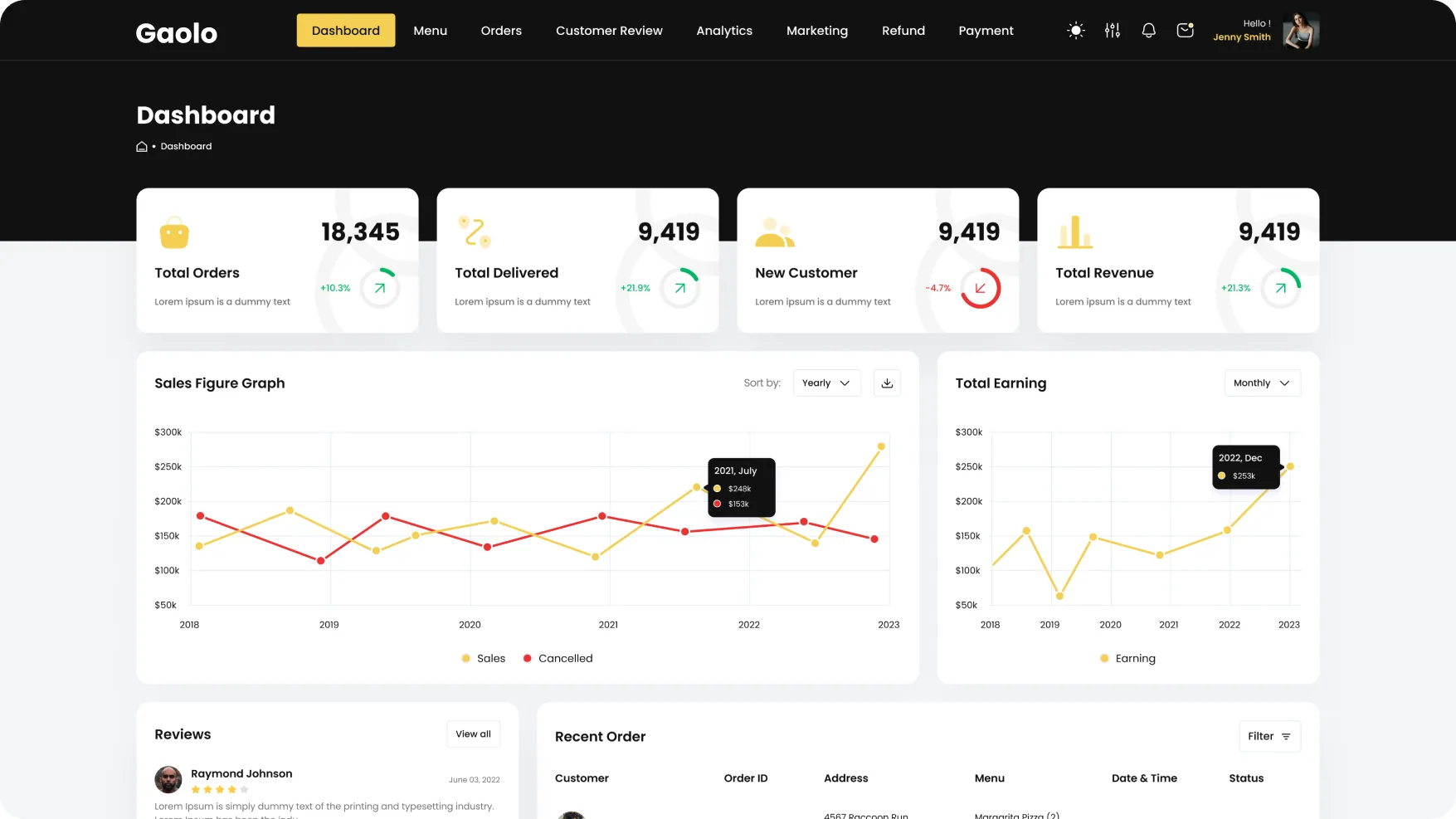
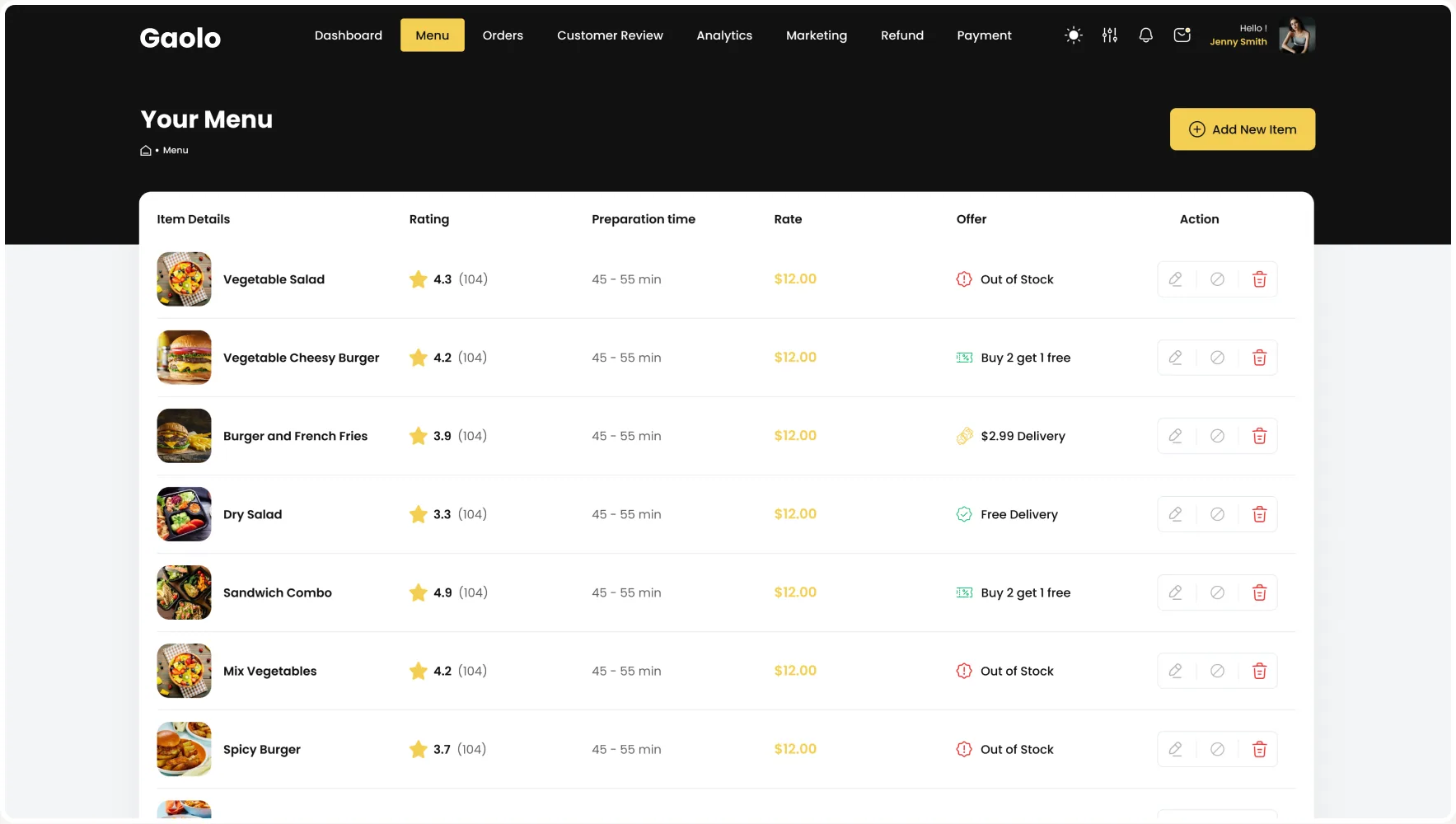
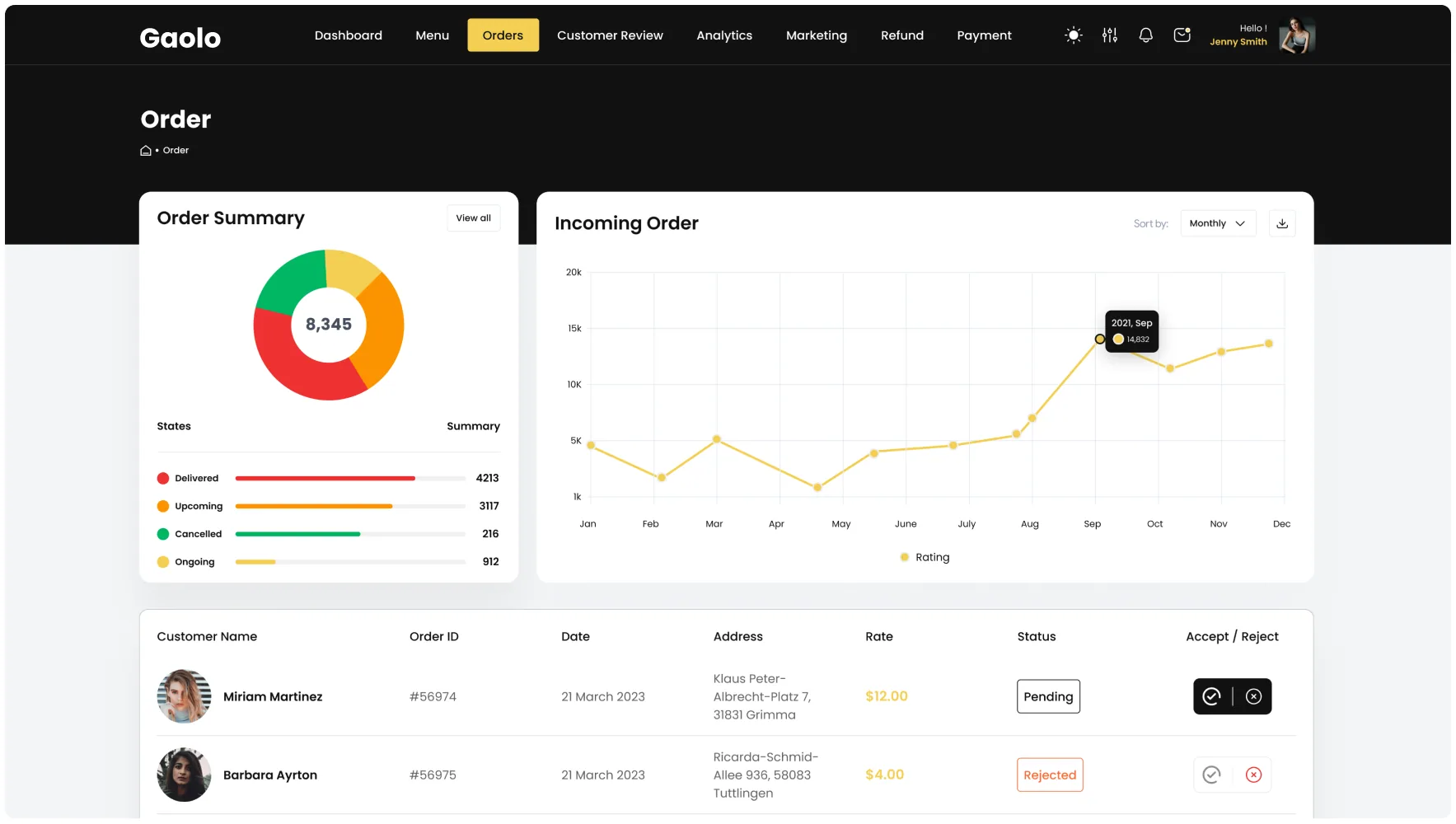
The Gaolo owner dashboard with four KPI cards and two chartsThe Gaolo Your Menu tableThe Gaolo Order screen with the order summary donut
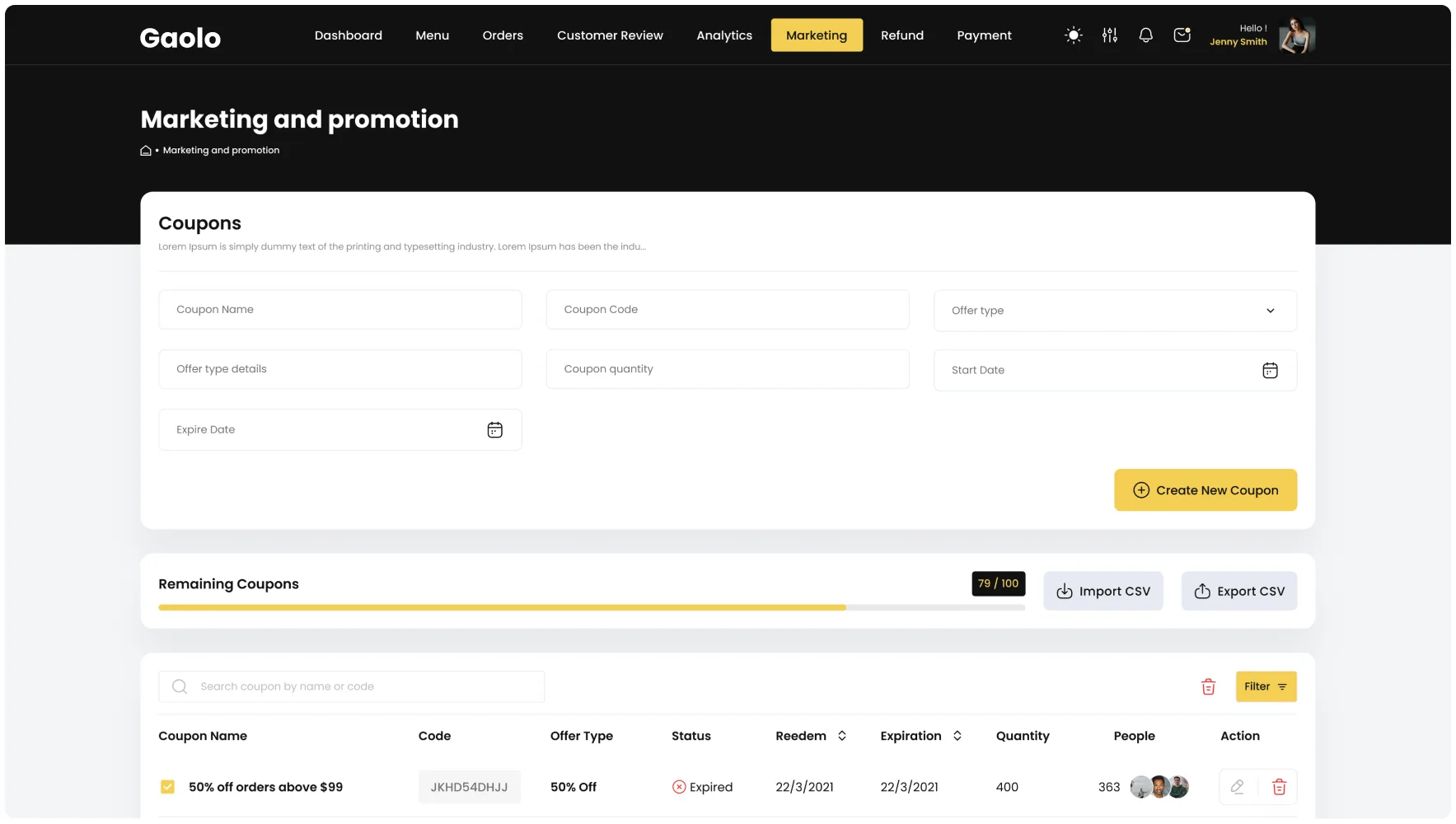
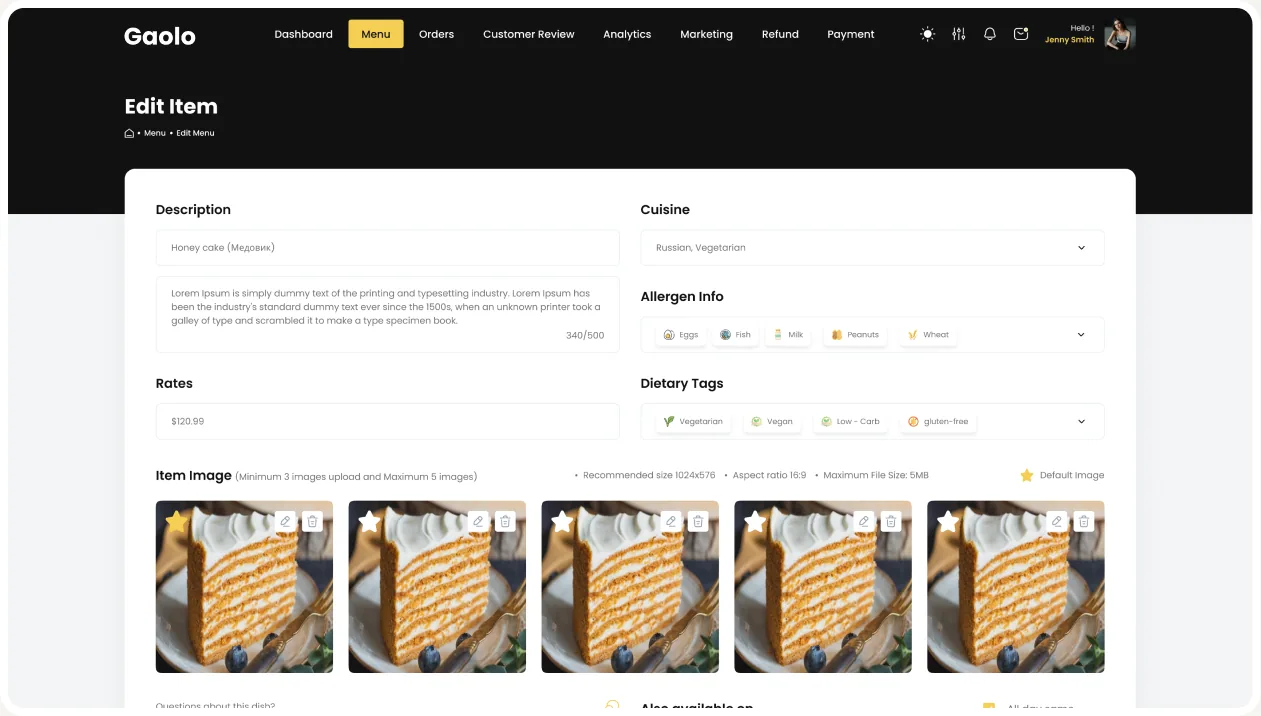
The Gaolo Marketing and promotion coupons screenThe Gaolo Analytics and reporting pageThe Gaolo Edit Item form with five identical honey-cake photos

The problem

129 screens and not one component.

The surface is finished and consistent to look at. Underneath, every button, field, table row and card is a hand-copied frame. That is why the same metric can read one number on desktop and a different number on mobile, and why one name ends up on nine different screens.

  • Nothing is reusable

    129 screens, 0 shared components. A change to the primary button is 129 manual edits.

  • Nothing is named once

    24 frame names are used more than once. “Delivery Management” names nine different screens; “Settings_notifications” names three, including Billing and Payment Method.

  • Nothing agrees

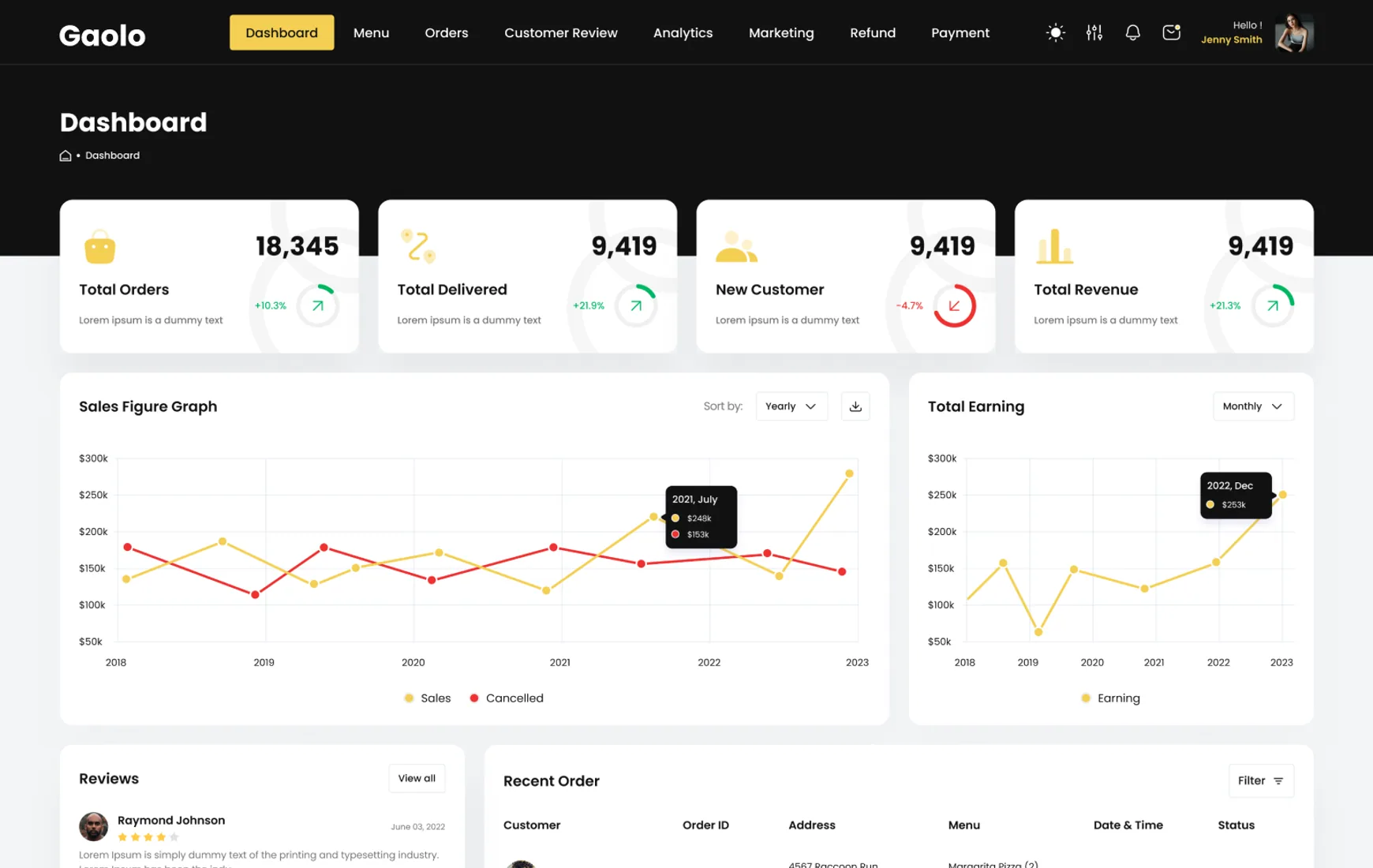
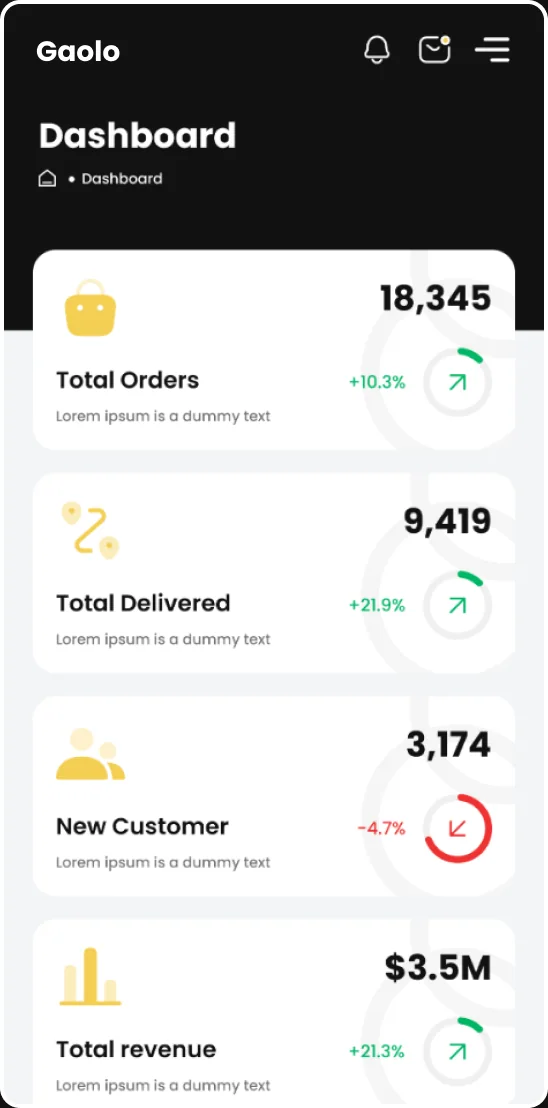
    New Customer reads 9,419 on the desktop dashboard and 3,174 on the mobile one. Total Revenue reads 9,419 with no currency, and $3.5M on mobile.

Who it serves

Two operators, one product, opposite jobs.

The same interface shell serves a kitchen and a head office. The Owner works inside one restaurant and needs today's numbers to be right. The Admin works across all of them and needs every record to be findable. Both profiles below are drawn from what the screens actually ask for.

Jenny Smith

Goals

  • Read today’s orders, revenue and new customers at a glance
  • Keep the menu accurate: price, prep time, stock, offers
  • Answer reviews and run coupons without leaving the dashboard
  • Process refunds and see why each one was raised

Frustrations

  • Four KPI cards where three show the identical number
  • A sales chart whose axis starts at $50k, not zero
  • “Lorem ipsum is a dummy” where the metric description belongs
Laura Brennan

Goals

  • Approve and manage restaurants, users and menus across the platform.
  • Find any user, restaurant or order record without re-checking IDs.
  • Track couriers on the live delivery map and close support tickets.

Frustrations

  • Nine screens named Delivery Management, so none can be found by name.
  • User IDs reuse the refund order range, so two kinds of record collide.
  • A Delivered order still says the driver is on the way, with an ETA.

Goals

Four goals for the design-system plan.

  1. Give it a system

    Move 242 loose fill colors, 34 size-and-weight pairings and 20 line-height values onto named tokens and styles, in one collection with a dark mode.

  2. Componentize the atoms

    Nothing in the file is an instance. The button, field, table row, status chip, food card and KPI tile carry the whole interface and should be six components.

  3. Make the data tell one story

    Desktop and mobile must agree on the same metric, coupon codes must be unique, and a Delivered order must stop saying the driver is on the way.

  4. Finish dark mode

    Eight of 129 screens have a dark variant and all eight are mobile. Either complete it as a mode or drop it: a dark theme on 8 of 129 screens is worse than none.

Audit

What a full pass through 129 screens turned up.

Every screen, flow and piece of copy was read before anything was concluded. Each count below is measured from the file, not estimated.

  • 0shared components across 129 screens
  • 242distinct fill colors
  • 20line-height values, 606 on auto
  • 6%of screens have a dark variant
  • Placeholder copy shipped

    “Lorem ipsum is a dummy text” sits under all four dashboard KPIs, in every customer review, on every Top Selling Item card and in the delivery tracker’s description.

  • One dataset, two meanings

    Refund order IDs run #56974 to #56982. The Admin user table reuses the identical range for User IDs, with the same nine names: refunds and user accounts share one list.

  • Values that repeat

    Three of four dashboard KPIs read 9,419. Nine menu items each show exactly (104) reviews. Eight restaurants each rate 4.5. One coupon code, JKHD54DHJJ, is issued to four different coupons.

  • Status that contradicts itself

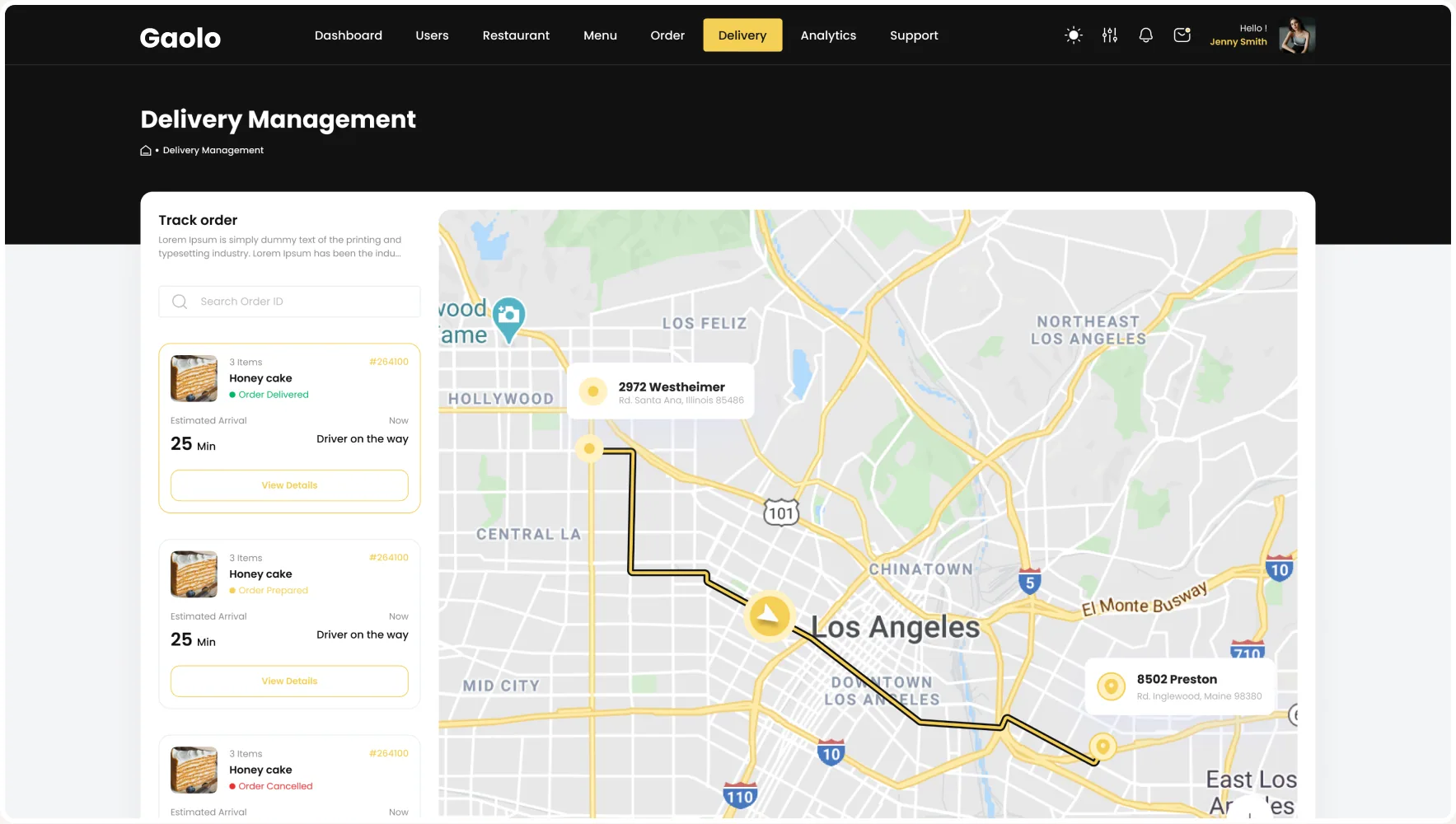
    Delivery cards read “Order Delivered” and “Order Cancelled” while both still show “Driver on the way” and a 25-minute ETA, with “Estimated Arrival · Now” above it.

  • Names reused across screens

    24 frame names are used more than once. “Delivery Management” alone names nine different screens, so no screen can be found by name.

  • A truncated chart axis

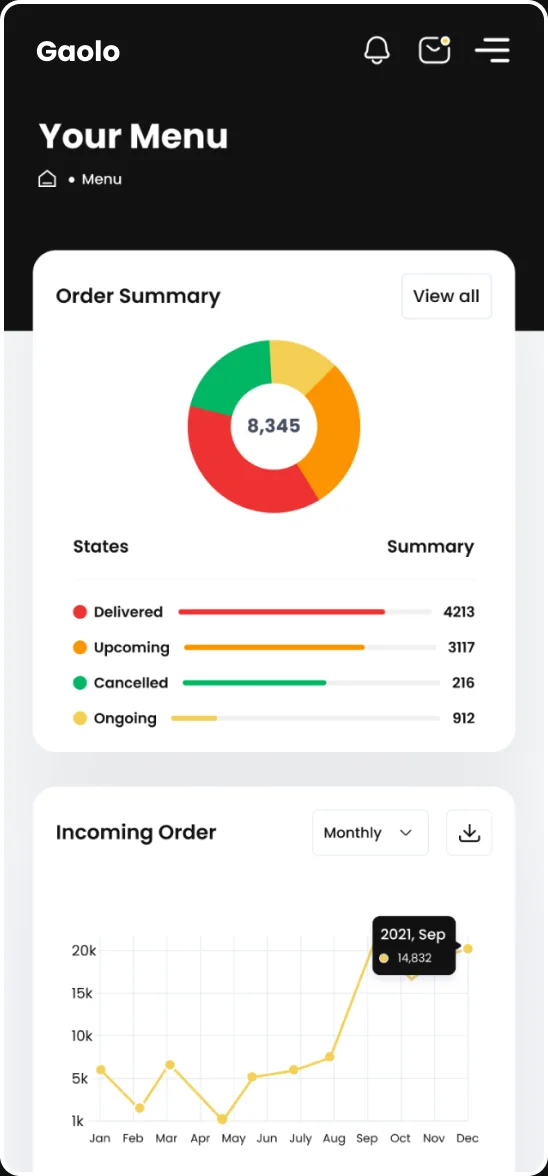
    Both headline charts start their Y-axis at $50k rather than zero, and the order axis mixes 1k and 5K capitals.

Architecture

Three bands, twenty-two modules.

Onboarding is shared. Below it the product forks into two operator shells with different navigation, then converges again on the same records pattern: list, detail, create, delete.

  • Onboarding, shared

    • Login
    • Sign Up
    • OTP
    • Successfully
    • Forgot Password
    • OTP Verification
    • Reset Password
  • Restaurant Owner

    • Dashboard
    • Menu management
    • Add new item · 4 steps
    • Edit Menu
    • Order
    • Customer Review
  • Owner, insight and money

    • Analytics and reporting
    • Top Selling Item
    • Top Menu Items
    • Loyal Customers
    • Coupons · 3 states
    • Refund · details, reject
  • Platform Admin

    • User management
    • Restaurant Management
    • Menu Management
    • Order Management
    • Delivery Management
    • Support
    • Settings · 3 tabs

Foundations

Two canvases, three bands, 129 screens.

Desktop screens are drawn on a 1920 frame; mobile on 375. Screen heights run from a 720px popup to a 3,900px analytics page, so the product is built to scroll rather than paginate.

  • Desktop521920 canvas · dark top nav · 8 items
  • Mobile77375 canvas · drawer nav · 8 dark variants
  • Deepest Screen3,900Analytics and reporting, mobile

Components

Six shapes carry Gaolo, and none is a component.

Six shapes carry the entire product: the pill button, the search field, the table row, the status chip, the food card and the KPI tile. Not one of them is a component: the file holds zero instances, so every one of them has been copied by hand into 129 screens.

  • 0component instances
  • 34size and weight pairings
  • 34corner-radius values
  • 4font families, three of them strays

Feature 01

One entrance, seven screens, two destinations.

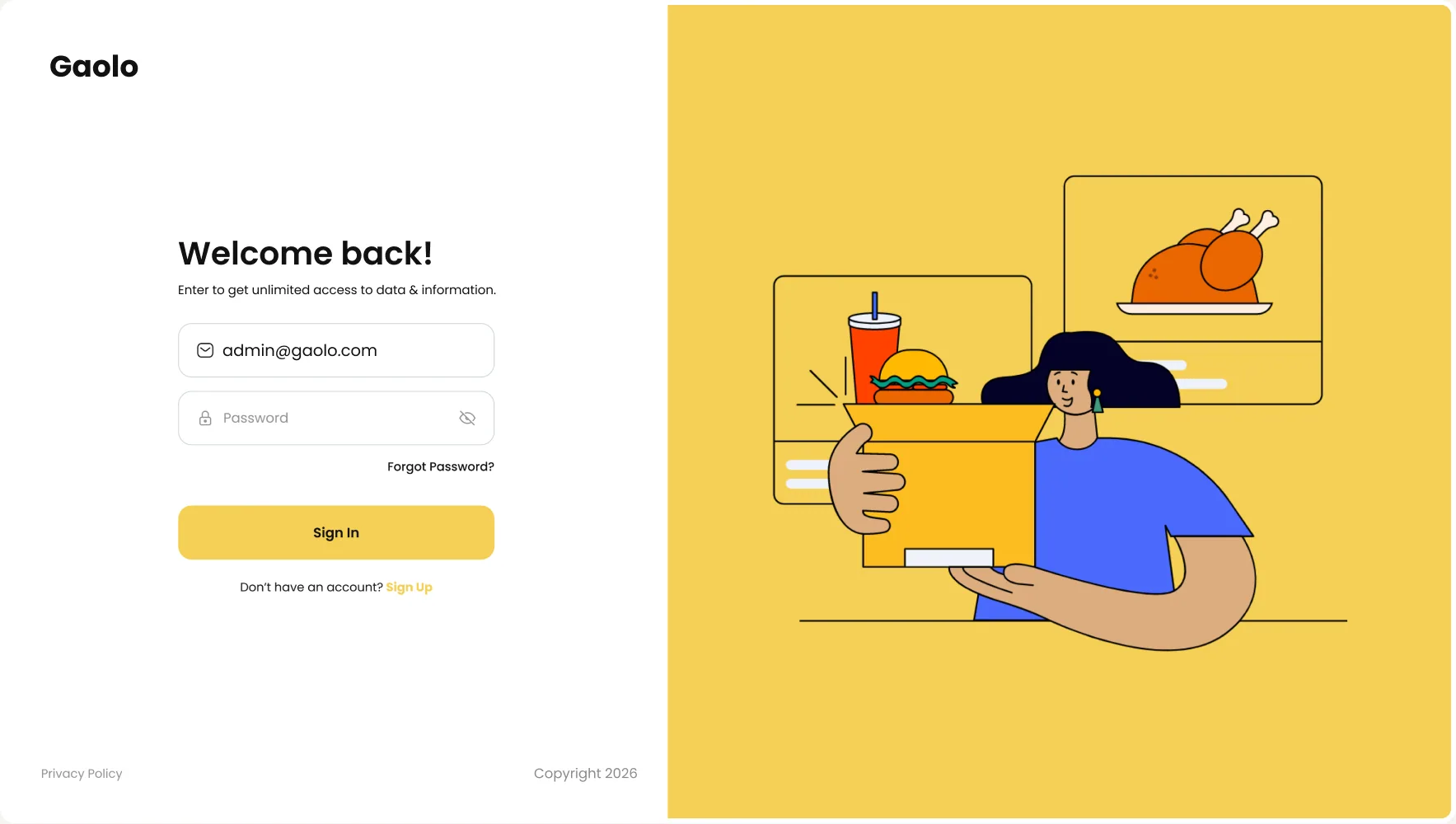
Sign-in, sign-up, OTP, success, forgot-password, verification and reset: the full loop, in both canvases. The same shell then routes to two entirely different products depending on who signed in.

The Gaolo desktop sign-in screen: Welcome back form beside the yellow food-delivery illustration

Feature 02

Four cards, three of them the same number.

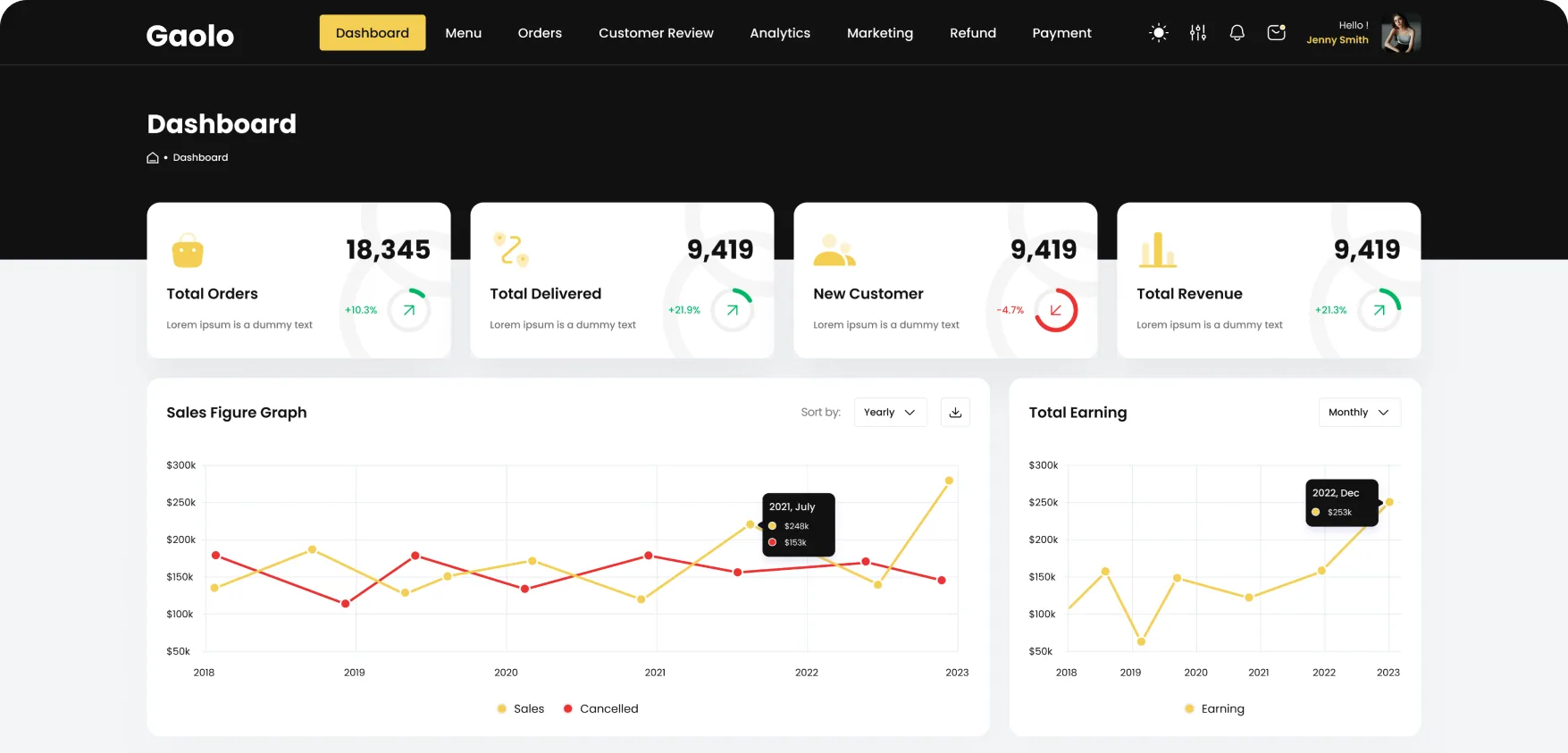
The owner's landing screen leads with Total Orders, Total Delivered, New Customer and Total Revenue, then a sales curve, reviews, recent orders and top sellers. Three of the four KPIs read 9,419, Total Revenue carries no currency symbol, and all four descriptions still say “Lorem ipsum is a dummy text”. The mobile version of the same screen disagrees with every one of those numbers.

The top of the Gaolo owner dashboard: Total Orders 18,345 and three cards reading 9,419, above the sales figure graph

Click map

Where restaurant owners are designed to click.

A design-intent click map of the owner dashboard: heat sits only on interactive targets (buttons, tabs, links, menus), weighted by how central each action is to the owner's day. It maps layout decisions, not recorded sessions.

The Gaolo owner dashboard with heat spots over its tabs, period controls and the Recent Order filter
  1. Orders tab

    The owner reads orders all day, so Orders carries the hottest spot in the top navigation. It sits third in an eight-item bar, behind the Dashboard and Menu tabs.

  2. Menu and Customer Review

    Keeping the menu accurate and answering reviews are the owner’s next most frequent jobs, so both tabs run warm. Analytics and Marketing cool off from there.

  3. Filter on Recent Order

    The only control on the order table, and the fastest way to narrow today’s list. It earns heat close to the Orders tab.

  4. Yearly and Monthly controls

    Two period controls sit right on the charts, so the owner can change a chart’s range in one tap without leaving the dashboard.

  5. Utilities stay cool

    Bell, mail, settings, avatar, download and View all are checked rather than worked in. Dashboard is the current page, so its tab gets little. KPI tiles and charts carry no heat.

Design-intent map, not recorded data.

Feature 03

The kitchen’s source of truth.

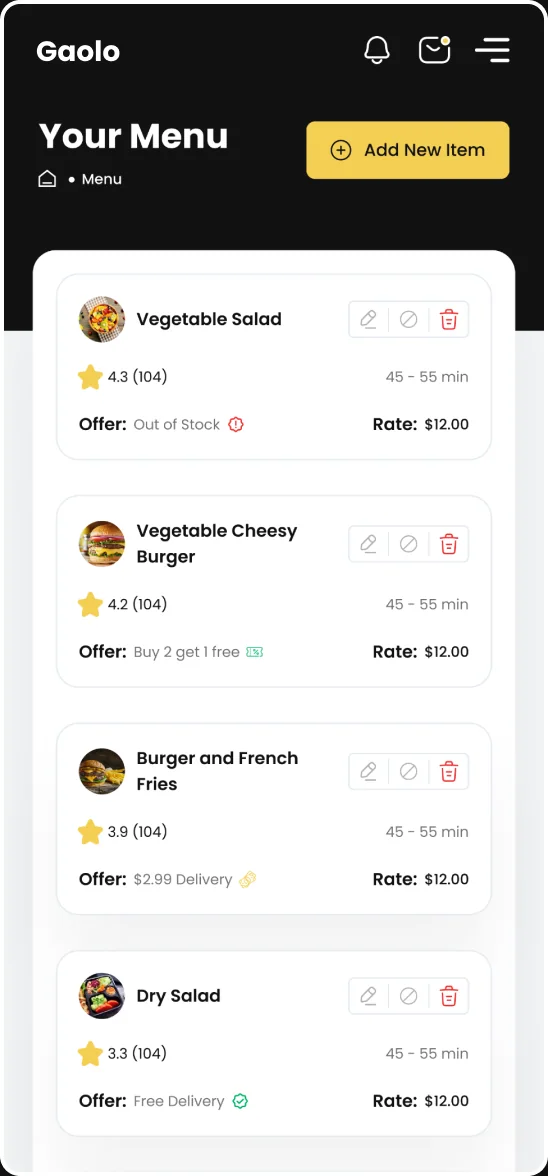
Menu management carries item, rating, preparation time, price, offer and stock state, with a four-step add flow and edit, disable and delete confirmations behind it. The pattern is sound; the data under it is not: every one of the nine items reports exactly (104) reviews, and the offer column mixes “Out of Stock” with “Buy 2 get 1 free” as if they were the same kind of value.

The Gaolo Your Menu table: item, rating, preparation time, rate, offer and action columns, every item at (104) reviews

Feature 04

Where the day actually happens.

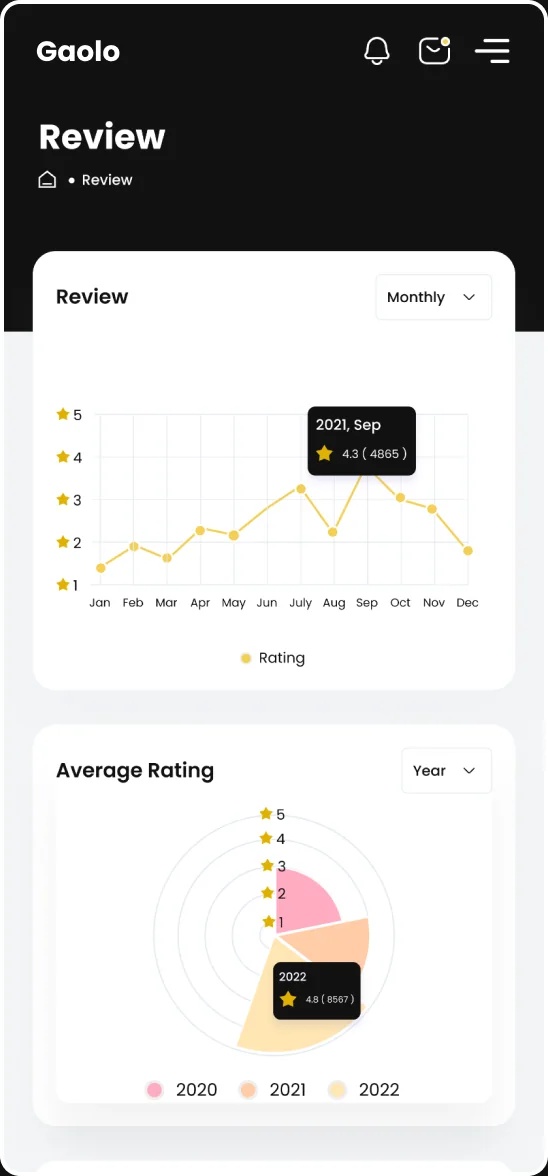
Order pairs a live summary donut (delivered, upcoming, cancelled, ongoing) with an incoming-order curve and the order table beneath. Customer Review sits alongside it with rating distribution and a monthly trend. The order axis reads 1k, 5K, 10K, 15K, 20k: two different capitalizations of the same unit, and a first step of 4k where every other step is 5k.

The Gaolo Order screen: order summary donut, incoming-order curve and the order table beneath

Feature 05

Six charts, two period controls, one problem.

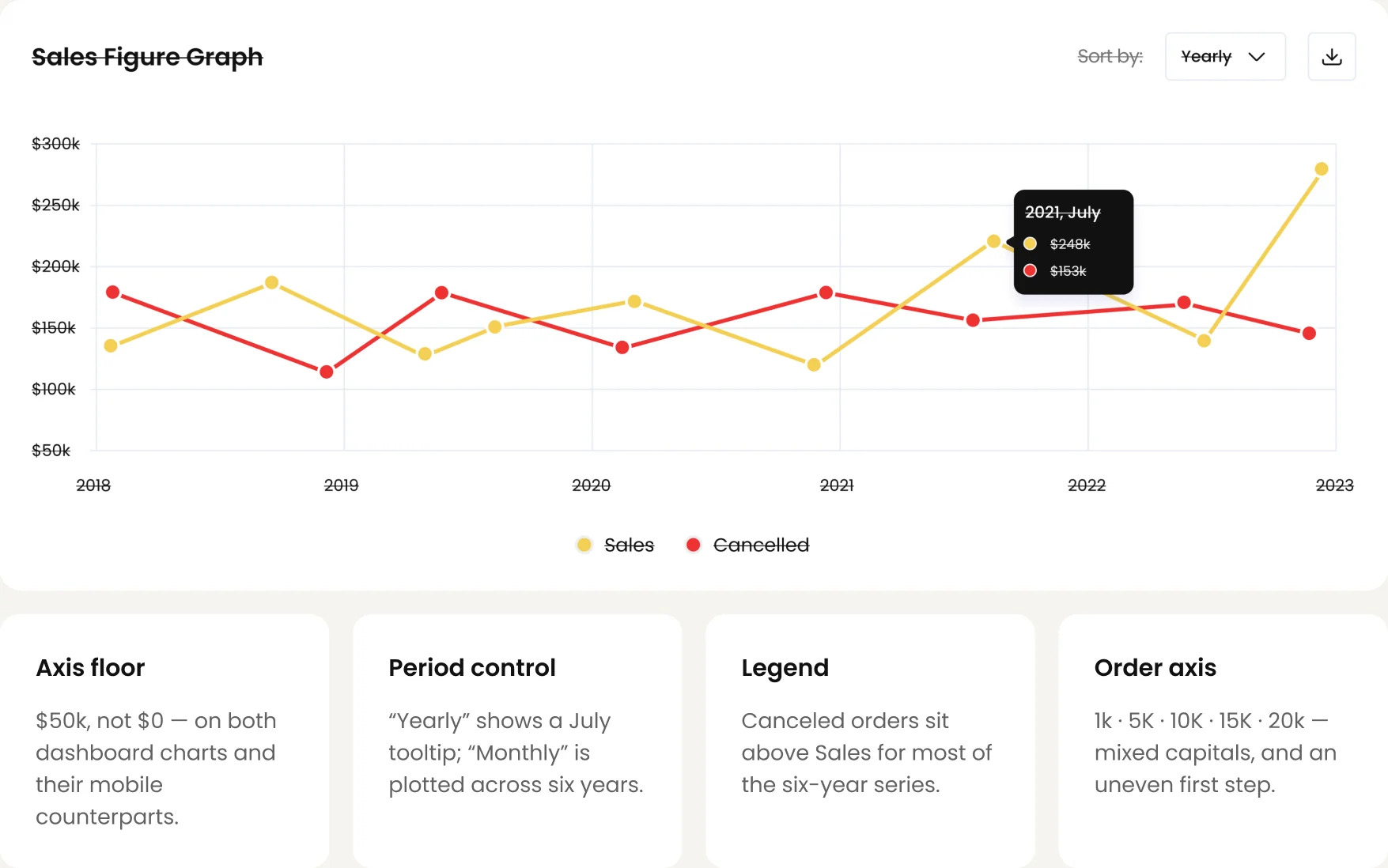
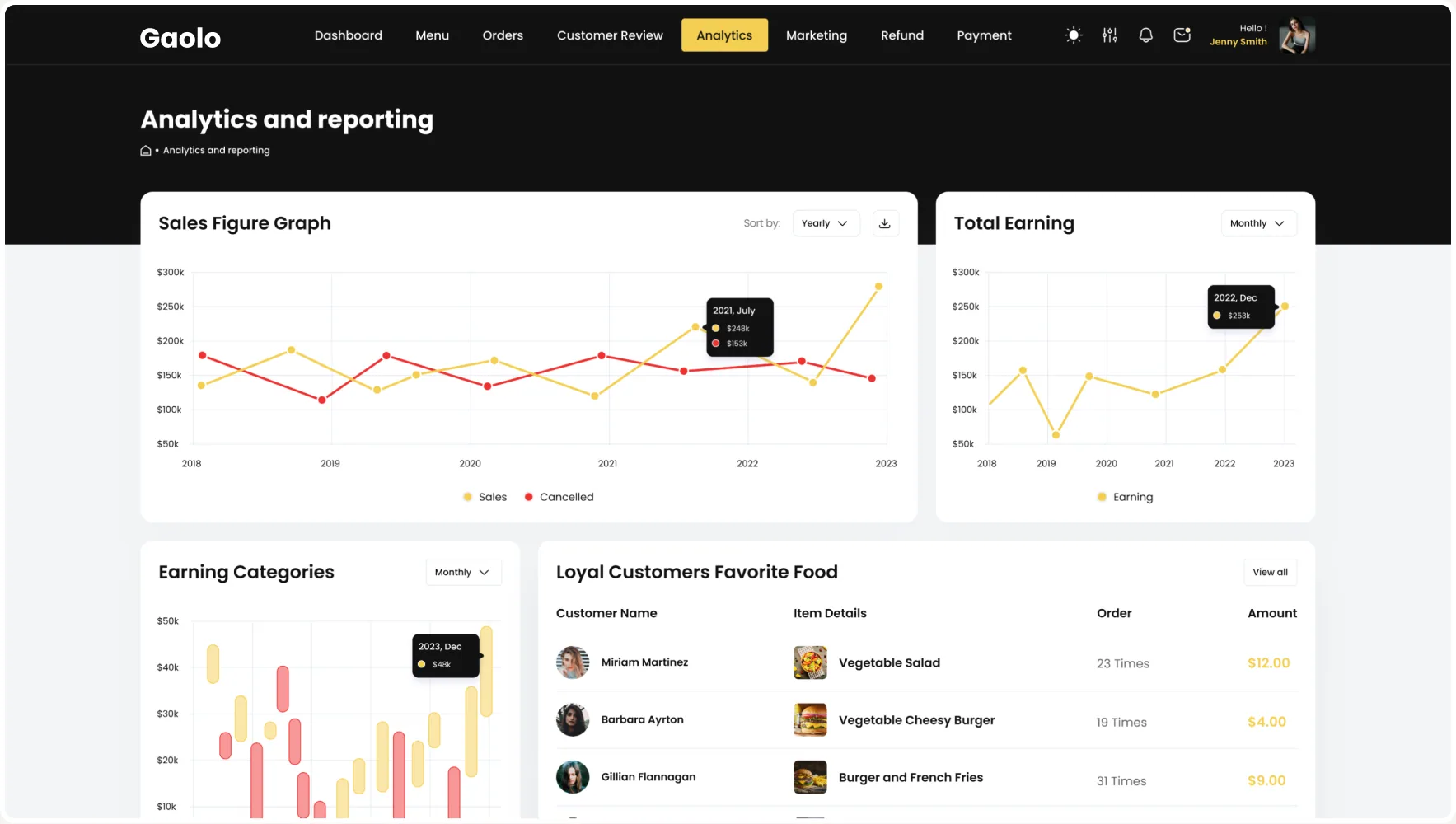
Analytics and reporting stacks sales, earnings, categories, loyal customers, top sellers and top menu items into a single page: 2,737px on desktop, 3,900px on mobile, the deepest screen in the product. Both headline charts start their Y-axis at $50k rather than zero, which flatters every rise on them, and their period controls are swapped: the one labelled Yearly is showing a July tooltip.

The Gaolo Analytics and reporting page: sales figure graph, total earning, earning categories and loyal customers

Feature 06

Coupons that share a code.

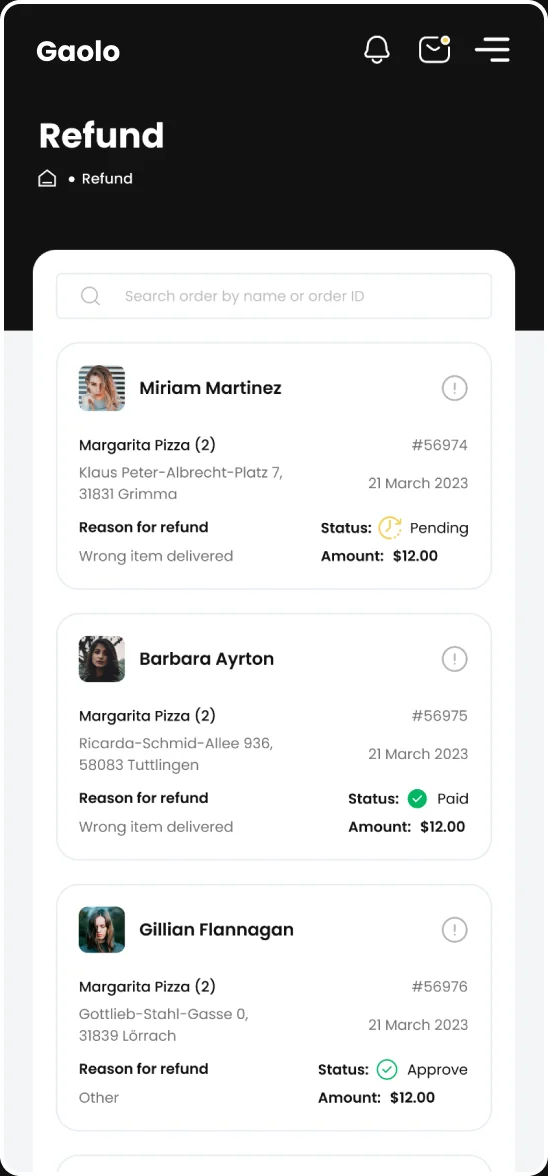
Marketing and promotion covers coupon creation, a remaining-quantity meter, CSV import and export, and the redemption table, with Refund, refund details and rejection sitting next to it. Four different coupons in the list are issued the identical code, JKHD54DHJJ, and the same offer name appears three times, so the table cannot be read as a list of distinct promotions.

The Gaolo Marketing and promotion screen: coupon form, remaining-coupons meter, CSV import and export, and the coupon table with code JKHD54DHJJ

Feature 07

Nine screens, one name.

The admin shell swaps the owner’s navigation for users, restaurants, menus, orders, delivery, analytics and support. Delivery Management is its most complex surface: a live map with courier routing beside a tracking list. Nine separate frames share that single name, all three cards show order #264100, and a card marked “Order Delivered” still reports a driver on the way with a 25-minute ETA.

The Gaolo Delivery Management screen for the Platform Admin: a track-order list beside a live Los Angeles courier map

Data integrity

The same metric, two different answers.

The owner dashboard exists in a desktop and a mobile version. They are not showing the same numbers. New Customer reads 9,419 on one and 3,174 on the other; Total Revenue reads 9,419 with no currency symbol on desktop and $3.5M on mobile. Whichever is right, the product currently ships both, and all four cards still carry the same placeholder description.

Desktop
The desktop Gaolo dashboard: New Customer 9,419 and Total Revenue 9,419 with no currency symbol
Mobile
The mobile Gaolo dashboard: New Customer 3,174 and Total revenue $3.5M

Charts

A truncated axis and a swapped control.

Both headline charts begin their Y-axis at $50k instead of zero, so every peak looks larger than it is and a flat year reads as growth. The control above this one says Yearly while its tooltip reports “2021, July”, and the neighboring Total Earning chart says Monthly above an axis labeled 2018 to 2023: the two period controls are the wrong way round. The tooltip also reports $248k against a point sitting nearer $220k.

The Gaolo Sales Figure Graph with its axis labels, legend and Yearly control struck through: the Y-axis starts at $50k and the tooltip reads 2021, July
  • Axis floor

    $50k, not $0: on both dashboard charts and their mobile counterparts.

  • Period control

    “Yearly” shows a July tooltip; “Monthly” is plotted across six years.

  • Legend

    Canceled orders sit above Sales for most of the six-year series.

  • Order axis

    1k · 5K · 10K · 15K · 20k: mixed capitals, and an uneven first step.

Mobile & dark

Seventy-seven mobile screens, eight of them dark.

Mobile is not a cut-down of desktop here: it is 77 screens with its own drawer navigation, its own card stacking and, on the analytics page, a 3,900px scroll. Dark mode is the gap: eight screens carry a dark variant, all eight are mobile, and no desktop screen has one. A dark theme on 8 of 129 screens is harder to ship than none, because it has to be maintained twice and finished later.

  • 77mobile screens
  • 52desktop screens
  • 8dark variants, all mobile
  • 0dark desktop screens
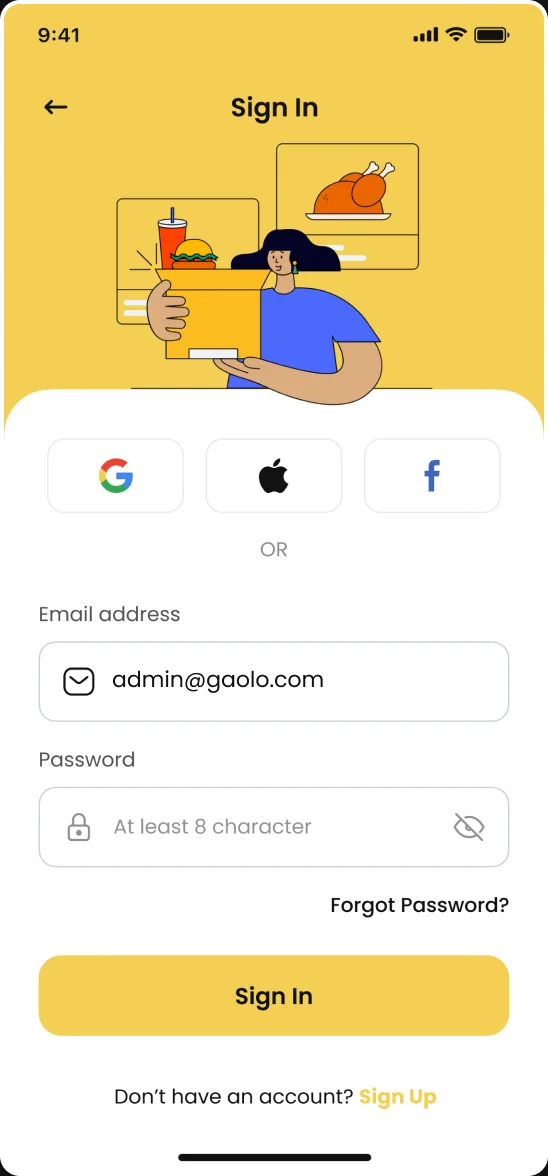
Gaolo mobile Sign In screenGaolo mobile Review screen with the rating trend and average ratingGaolo mobile Order Summary and Incoming Order chartsGaolo mobile Your Menu list, each item at (104) reviewsGaolo mobile Refund list with reasons and status

Visual language

One warm yellow, near-black chrome, Poppins.

Gaolo runs a single warm yellow against a near-black chrome, with the food photography carrying most of the color. That pairing is the product's strongest asset, and the reason the 242 loose fill values underneath it are worth consolidating: seven roles are doing the work, and 235 near-duplicates are along for the ride. Type is set in Poppins, with Inter, Outfit and Open Sans appearing on 98 stray nodes.

  • #F4CF53
  • #111111
  • #626264
  • #F3F5F7
  • #FFFFFF
  • #01B763
  • #EE3131

Typography

Before / After

What the audit found, and what the next pass changes.

Changing the primary button

As found
  1. Edit the button
  2. Repeat on every screen
  3. 129 manual edits

0 shared components across 129 screens. Every button, field, row and card is a hand-copied frame.

Proposed
  1. Edit one component
  2. Every instance updates

Six components (pill button, search field, table row, status chip, food card, KPI tile) carry all 129 screens.

Reading the dashboard

As found
  1. Desktop: New Customer 9,419
  2. Mobile: 3,174
  3. Two answers

Three of four desktop KPIs read 9,419, Total Revenue has no currency, and every description is lorem ipsum.

Proposed
  1. One KPI set
  2. One component
  3. Both canvases agree

Pick the correct KPI set once and let one component render it on desktop and mobile.

Finding a screen

As found
  1. “Delivery Management”
  2. Nine different screens

24 frame names are used more than once; “Settings_notifications” names three screens.

Proposed
  1. One name
  2. One screen

Unique names make a 129-screen file navigable and make a duplicate obvious.

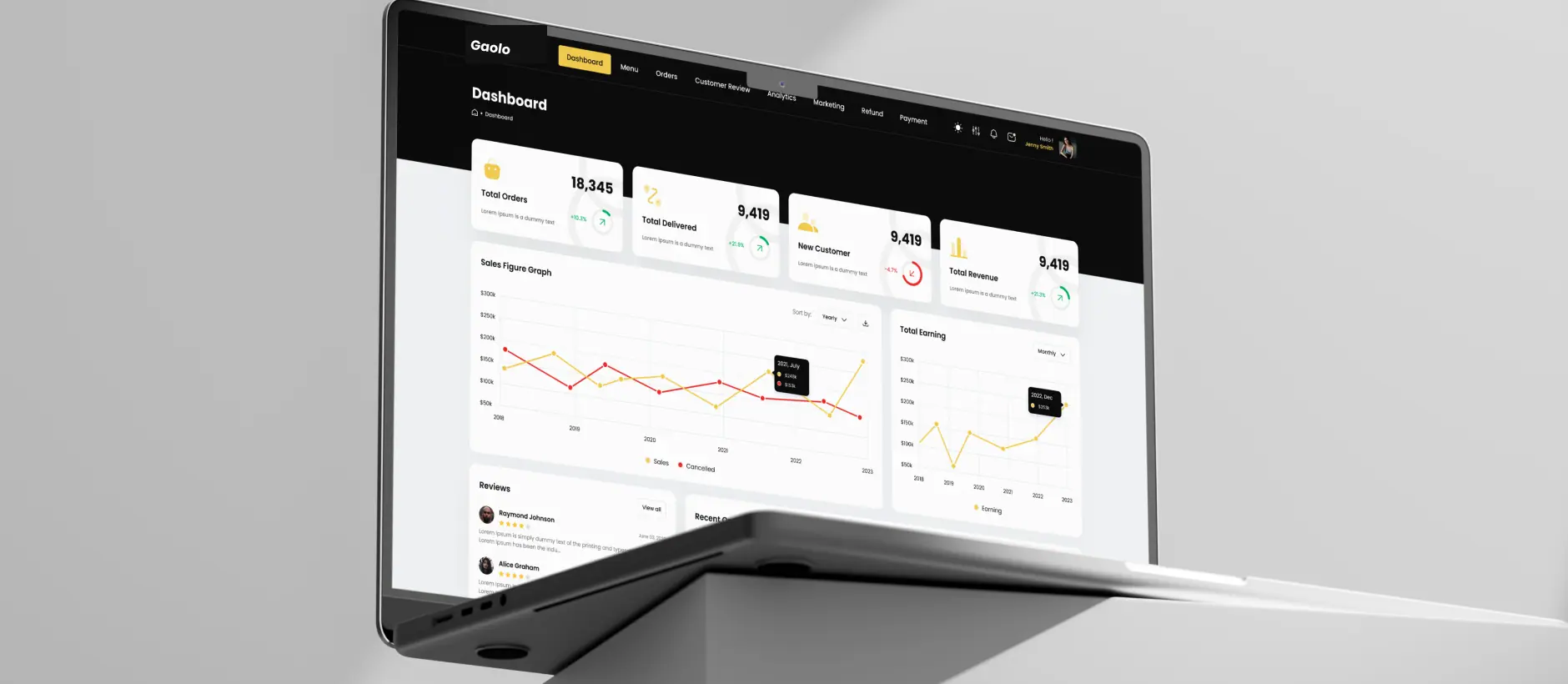
The Gaolo owner dashboard on a laptop, propped on a grey block

Design-system plan

The plan: what 129 hand-copied screens become.

Every count is measured from the file. Each pair reads as found → proposed for the next pass; none of it has shipped yet.

  • 0 → 6components: button, field, row, chip, food card, KPI tile
  • 129 → 1edits to change the primary button
  • 24 → 0frame names reused across screens
  • 2 → 1dashboard KPI sets, desktop and mobile
  • 3 → 0KPI cards repeating the same 9,419
  • $50k → $0axis floor on the dashboard charts
  • 4 → 1font families, three of them strays
  • 129screens read end to end in the audit

Design-level findings from the audit. Proposed targets, not shipped results.

Recommendations

Six fixes, in the order Gaolo should take them.

  1. Componentize six shapes first

    The pill button, search field, table row, status chip, food card and KPI tile carry all 129 screens. Six components remove most of the duplication.

  2. One name, one screen

    24 names are reused; one covers nine screens. Naming is what makes a 129-screen file navigable, and what makes a duplicate obvious.

  3. Make the dashboards agree

    Pick the correct KPI set once, then let one component render it on both canvases. Two hand-built dashboards will always drift apart.

  4. Start the axis at zero

    A $50k floor flatters every chart on the page. If the range genuinely needs truncating, say so on the axis rather than hiding it.

  5. Finish or drop dark mode

    Eight mobile screens is not a theme. Tokens make it a switch; leaving it partial makes it a maintenance cost with no user benefit.

  6. Replace placeholders before review

    Lorem ipsum under the KPIs, reviews and top sellers survived to a finished-looking file. A pre-handoff copy pass catches every one.

Thanks for reading.

Have a product like this? Let's talk. Book a call

Or see more case studies, including WorkHub, an HR platform designed on the same template.

Skip to content
Wait! Is Your Website Losing Customers?

Get a free UI/UX audit and discover what’s holding your site back