Skip to content

Case study

Coursedesk

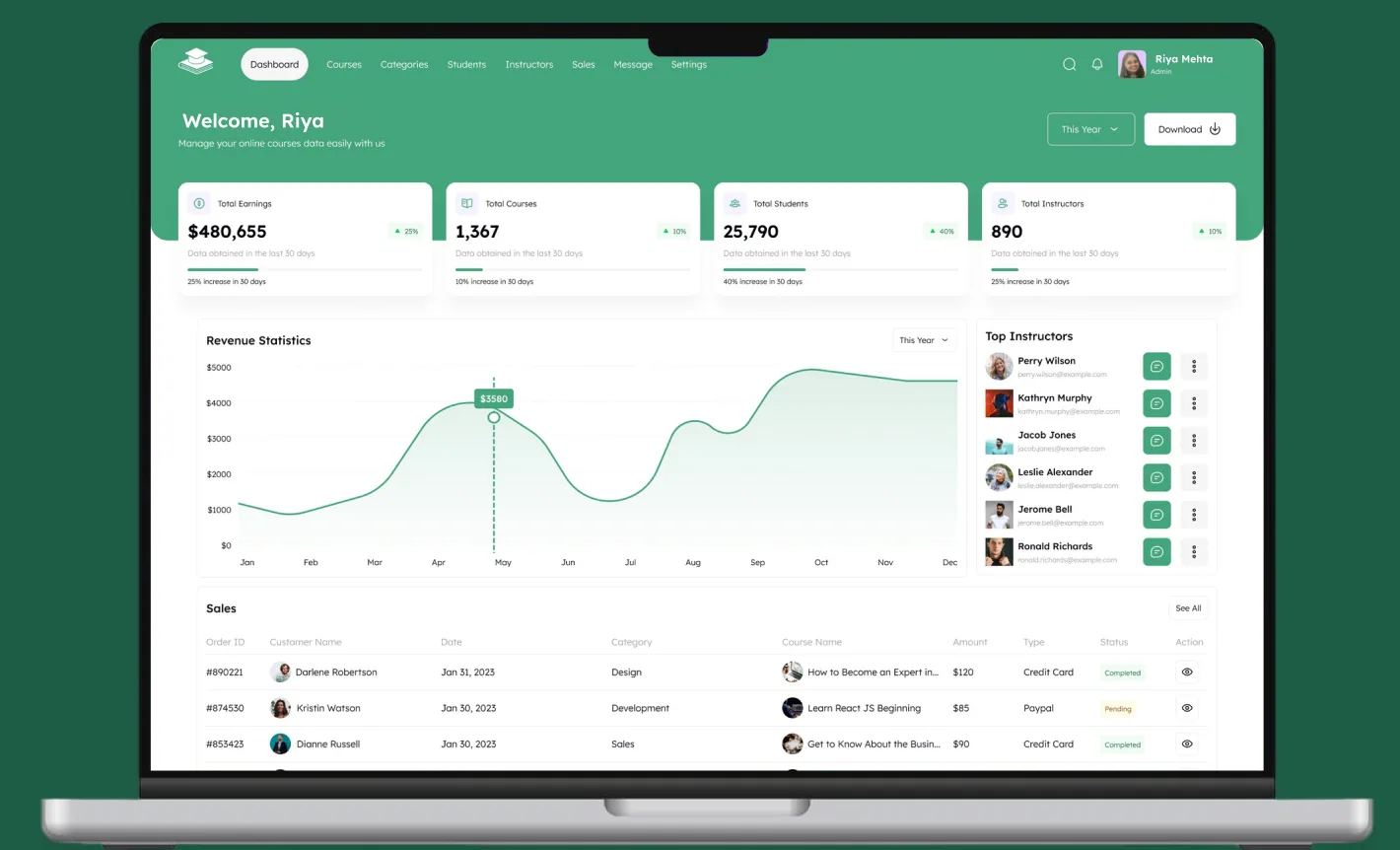
The Coursedesk admin dashboard open on a laptop: earnings, courses, students, the revenue chart and recent sales

An admin dashboard for an online course business: courses, categories, students, instructors, sales and messaging, audited screen by screen and rebuilt on one token layer.


Overview

An admin dashboard for an online course business.

Coursedesk is an admin product for running an online course business: courses, categories, students, instructors, sales and messaging. The client came to us with a file that already covered 19 modules in Light, Dark and Mobile, but had no system underneath: no shared colors, no text styles, nothing reusable. Dark mode was 19 hand-duplicated screens. We audited every screen, then rebuilt the foundations and fixed what we found.

Role
Product & UI Design
Scope
Audit · Design System · Prototype
Surfaces
Desktop 1920 · Mobile 375
Modes
Light & Dark

Client

An online education admin product, built under NDA.

The client's name and internal figures are confidential. Everything shown here is the design work itself: a UX audit of 57 screens, the design system built underneath them, and the SaaS product design that closed every dead end the audit found.

Client
Confidential education client, name under NDA
Industry
Education: admin for an online course business
Market
Withheld under NDA
Scope
Audit · Design System · Prototype
Deliverables
57 screens audited, 19 modules, Light & Dark, Desktop 1920 · Mobile 375
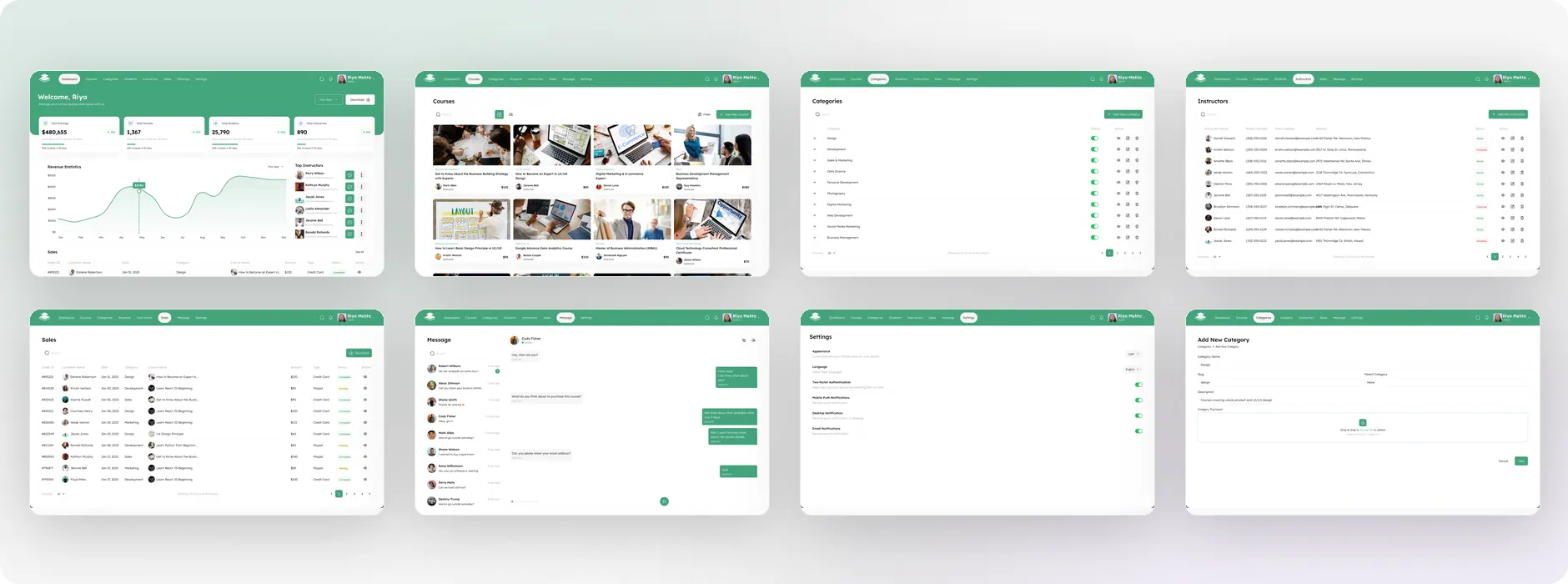
Eight Coursedesk desktop modules side by side: Dashboard, Courses, Categories, Instructors, Sales, Message, Settings and Add New Category

The problem

A tidy-looking file with nothing underneath.

Every color was a loose hex, every text node carried its own size and line-height, and dark mode existed only as copies. The copies had already drifted: the status chips still wore their light backgrounds on a near-black table, because nobody had repainted them.

  1. Theming was manual

    A brand change meant editing 19 screens by hand.

  2. Nothing to hand off

    No tokens, no styles: 34 hex values read off individual layers.

  3. Dead ends broke trust

    A reset flow stopping at OTP, deletes with no confirmation, an axis that lied.

Who it serves

One admin runs Coursedesk's catalog and its money in the same tab.

Everything here is operated by a single signed-in administrator, Riya, the account in every header. The screens pull her work in two directions: watching numbers that have to be trustworthy, and maintaining records that have to be complete. Both profiles below are drawn from what the screens actually ask for.

Riya Mehta

Goals

  • Read earnings, enrollments and instructor counts at a glance
  • Reconcile every pending sale before payouts run
  • Keep the catalog tidy: categories, statuses, thumbnails

Frustrations

  • A revenue axis that overstated its own growth
  • One order ID repeated across 54 rows
  • A reset flow that stopped at the OTP screen
Jerome Bell

Goals

  • Appear correctly in Top Instructors with a working contact
  • Have submitted courses reviewed and published
  • Be paid against sales that reconcile

Frustrations

  • Listed under two different spellings of the same address
  • No course detail screen to be reviewed on
  • Deletion with no confirmation step

Goals

Four aims set the limits of the Coursedesk rebuild.

  1. Fix without redesigning

    Correct every defect while leaving the existing visual language untouched. The look was working; the foundations were not.

  2. Make dark mode a mode

    Move from 19 duplicated screens to one token layer, so a theme change becomes a variable edit.

  3. Close every dead end

    Design the screens the interface already promises: the reset step, the add and view screens, the delete confirmation, the empty state.

  4. Leave it buildable

    Named tokens, a type ramp, elevation styles and a working prototype, handed over as-is.

Audit

What a full pass through 57 screens turned up.

Every screen, layer name and text node was read before anything changed. The defects grouped into six kinds, and every count below is measured from the file, not estimated.

  • 54rows sharing one order ID
  • 2.18:1worst chip contrast, AA needs 4.5
  • 14line-height values, 12 left on auto
  • 57screens audited, none on a shared system
  • Broken flow

    Forgot Password → Enter OTP → nothing. There was no screen to set the new password, so the journey the product advertises could not complete.

  • Controls with no destination

    “Add New Category” and the per-row view icons opened nothing. 93 trash icons had no confirmation. The notification bell had nowhere to go.

  • Data that contradicted itself

    $4,80,655 used lakh grouping on a dollar figure. Sales rows ran out of date order. Pagination promised 50 records and reached four pages.

  • A chart that misreported

    The revenue axis ran $0, $500, $1000, $2000, $3000, $5000 at equal spacing, so half the plot covered $0 to 1,000 and the curve overstated its growth.

  • Template residue

    Filter tiles were still named Mobiles, Laptops, Headphones and Smart Watch, offering three categories that did not exist in the product.

  • No system at all

    No shared colors, text styles or effects. 34 raw hexes, 17 corner radii including two fractional, and dark mode duplicated by hand.

Architecture

Nineteen modules behind one flat navigation.

Eight top-level destinations, with the records modules repeating a single list → view → add → delete pattern. Naming the pattern is what exposed the gaps: screens shown in green did not exist before this project.

  • Authentication

    • 01 Login
    • 02 Forgot Password
    • 03 Enter OTP
    • 04 Create New Password
  • Overview

    • 05 Dashboard
  • Courses

    • 06 Grid
    • 06 List
    • 07 Add New Course
    • 08 Filter
    • 20 View Course
  • Categories

    • 09 Categories
    • 21 Add New Category
    • 23 Delete Confirmation
    • 24 Empty State
  • Students

    • 10 Students
    • 11 Add New Student
    • 12 View Student
  • Instructors

    • 13 Instructors
    • 14 Add New Instructor
    • 15 View Instructor
  • Commerce & comms

    • 16 Sales
    • 17 Message
  • Account

    • 18 My Account
    • 19 Settings
    • 22 Notifications

Green: screens added in this project.

Foundations

One 1920 canvas on desktop, 375 on mobile.

Desktop screens are built on a 1920 frame with a 1824 content width and 32px gutters; mobile uses 375 with 16px gutters. Every screen exists in all three variants, Light, Dark and Mobile, so nothing is a cut-down of anything else.

Desktop
1920Content 1824 · gutter 32 · nav 8 items
Mobile
375Content 343 · gutter 16 · hamburger nav
Variants
7525 Light · 25 Dark · 25 Mobile

Components

The buttons and fields all 19 modules share.

The product draws on an existing component library. Rather than rebuild it, we built a token layer on top of it, so a button's fill and a field's border now resolve through variables in both modes and the library can be themed and maintained.

  • Primary button

    Add New Category
  • Row action

  • Status toggle

  • Search field

    Search
  • Checkbox

  • Status dot

Feature 01

A password reset that finishes.

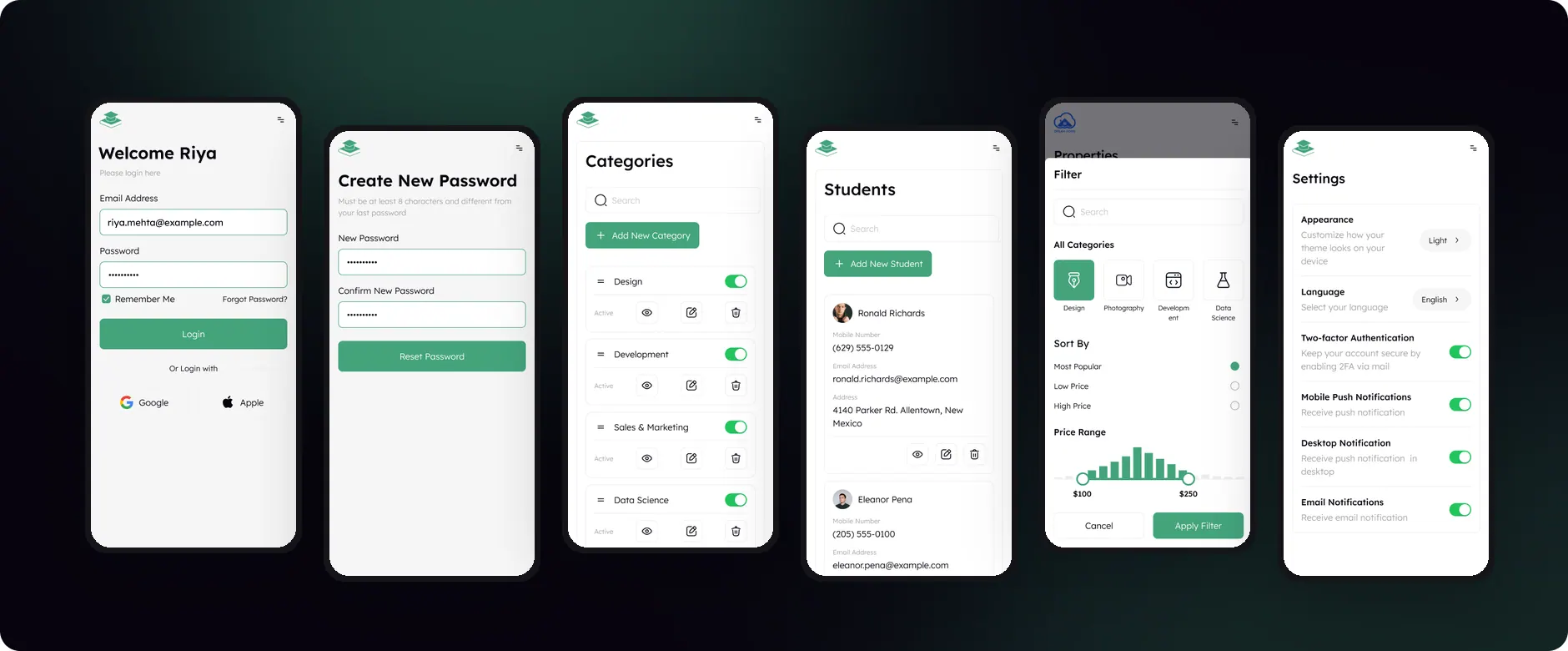
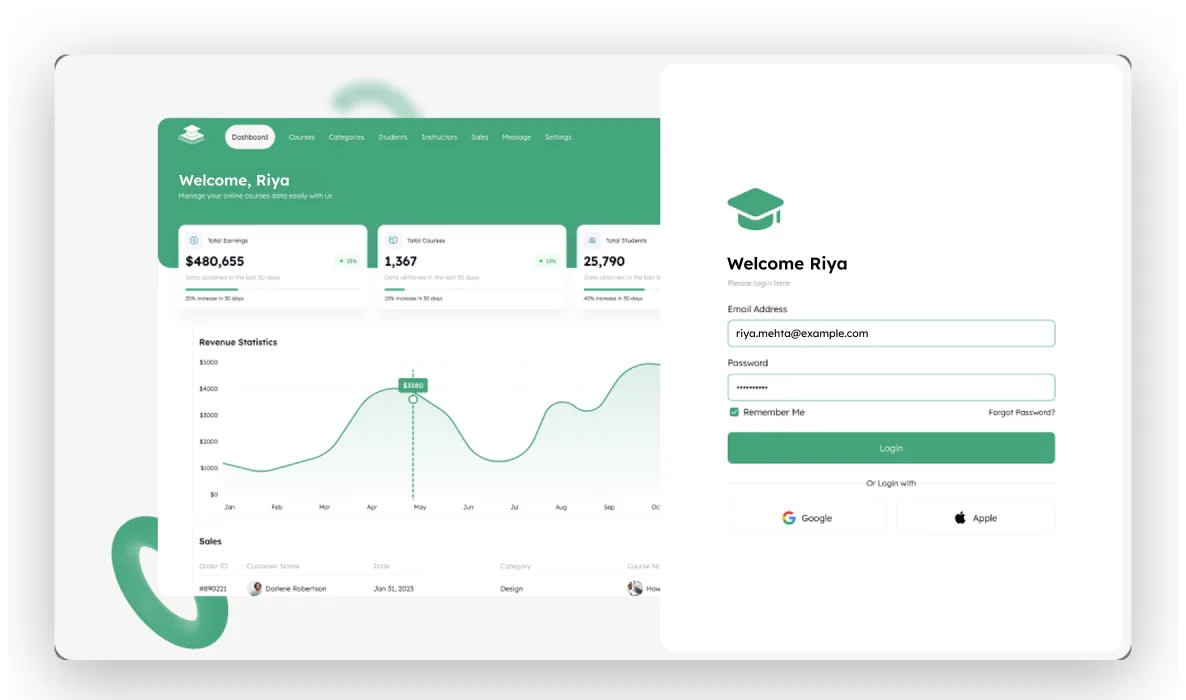
Login offered “Forgot Password?”, which led to an email step, which led to a five-box OTP screen, and then nothing. There was no screen to set the new password. The new step reuses the same split layout, the same Input Field component and the same button, so it reads as part of the original set rather than an addition to it.

The Coursedesk login screen: a dashboard preview on the left, the Welcome Riya form with email, password and Forgot Password on the right

Feature 02

The screen that has to be trusted first.

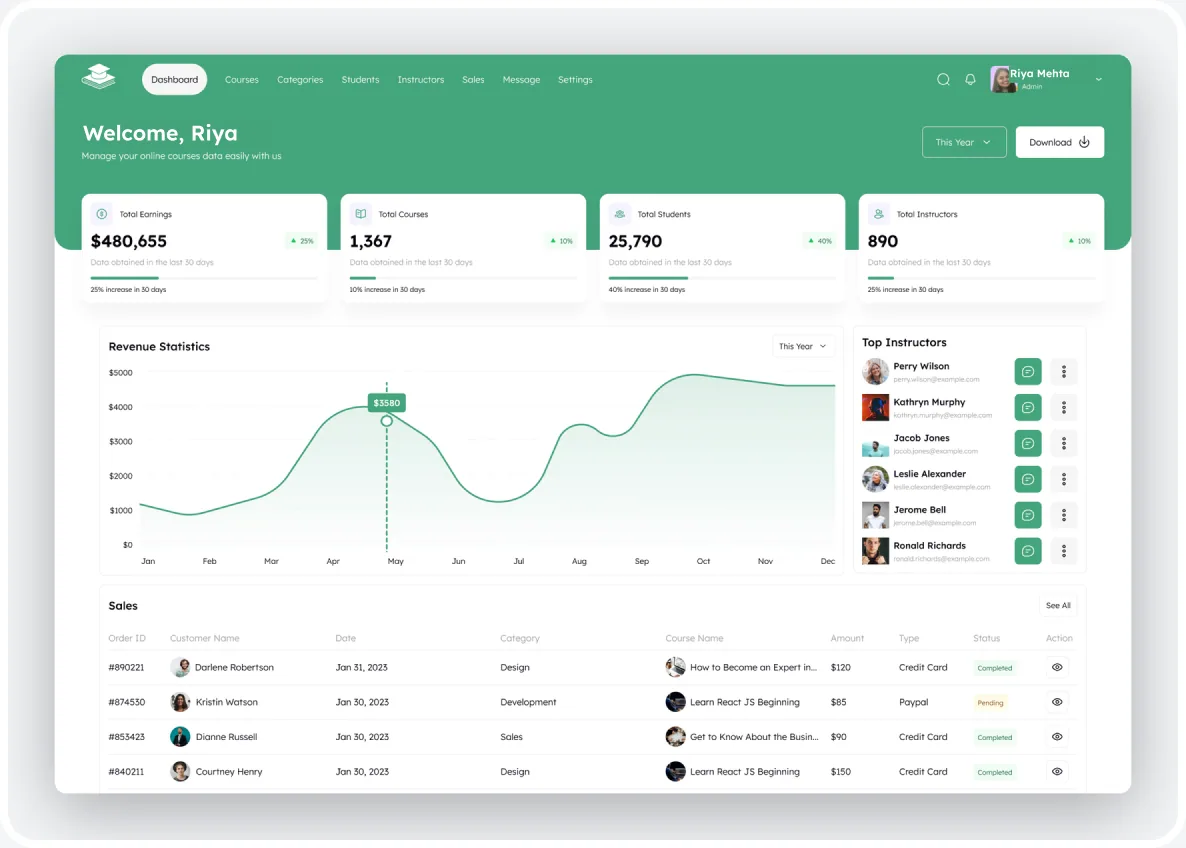
Coursedesk opens on the dashboard: earnings, course and enrollment counts, a twelve-month revenue curve, top instructors and the most recent sales. It was also where the worst data defects lived: a non-linear axis, a dollar figure in lakh grouping, and one order ID repeated down the whole table. All three are corrected here.

The Coursedesk dashboard: four KPI cards, the corrected twelve-month revenue chart, Top Instructors and the recent Sales table with unique order IDs

Click map

Where a Coursedesk admin is meant to click first.

A design-intent click map of the dashboard: heat sits only on interactive targets (buttons, tabs, links, menus), weighted by how central each action is to an administrator's day. It maps layout decisions, not recorded sessions.

The Coursedesk dashboard with heat spots over the Download button, the navigation tabs, the year filters, See All and the row actions
  1. Download is the one filled action

    It is the only solid white button on the green header, set apart from the year filter beside it, so it draws the hottest expected click on the screen.

  2. Courses, Sales and Students carry the nav

    The day runs through these records modules; Message and Settings sit at the end of the row and stay cool.

  3. Year filters sit beside their data

    The header and the revenue card each carry a “This Year” dropdown, placed next to the figures it scopes so the period being viewed is never ambiguous.

  4. See All and the row eye icons

    Recent sales hand off to the full Sales module through See All; per-row view icons get lighter heat, fading down the table.

  5. Instructor actions stay secondary

    The filled message buttons pull more than the “…” menus beside them; search, bell and avatar are utility clicks at the edge.

Low → high expected clicks. Design-intent map, not recorded data.

Feature 03

Two views, one route, and a filter from another product.

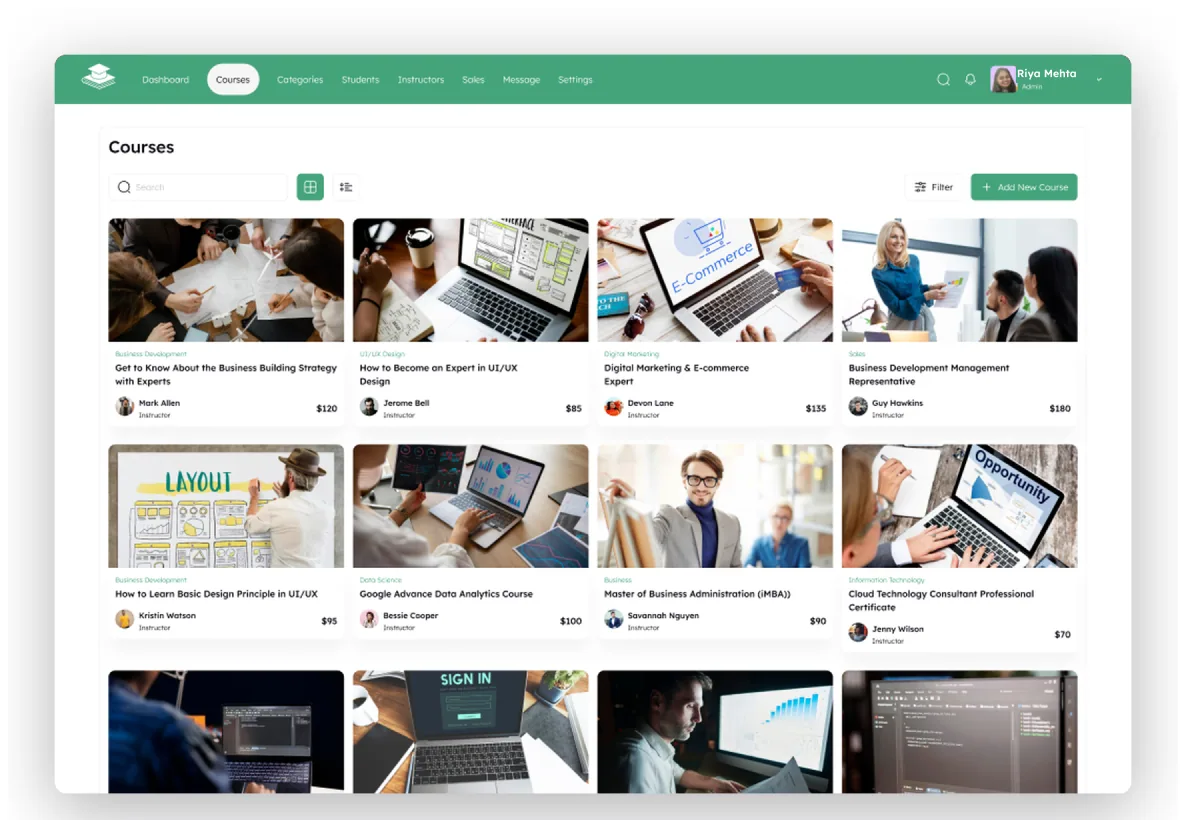
Courses runs a grid and a list off the same route, with search, a filter dialog and an add flow. The dialog was the clearest inherited debt in the file: its tiles were still named Mobiles, Laptops, Headphones and Smart Watch, three of its four categories did not exist, it floated with no backdrop, and it used checkboxes for three mutually exclusive sort options.

The Coursedesk Courses module in grid view: course cards with category, title, instructor and price, plus search, filter and Add New Course

Feature 04

The button that led nowhere.

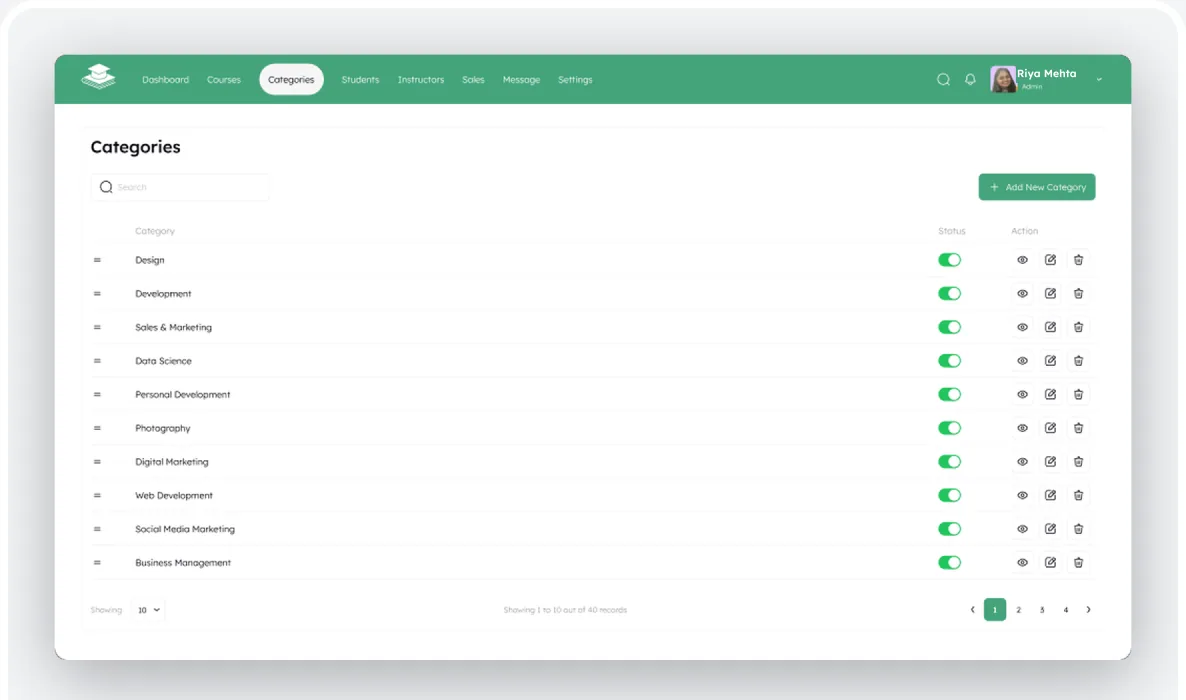
Categories shipped with an “Add New Category” button, a view icon on every row and a delete icon on every row. None of the three had a destination. The module now has its add screen, its delete confirmation and a zero-data state, and the toggle and row actions are reachable on mobile, which they had never been.

The Coursedesk Categories table: ten categories with a status toggle and view, edit and delete actions per row, and the Add New Category button

Feature 05

One records pattern, four entities.

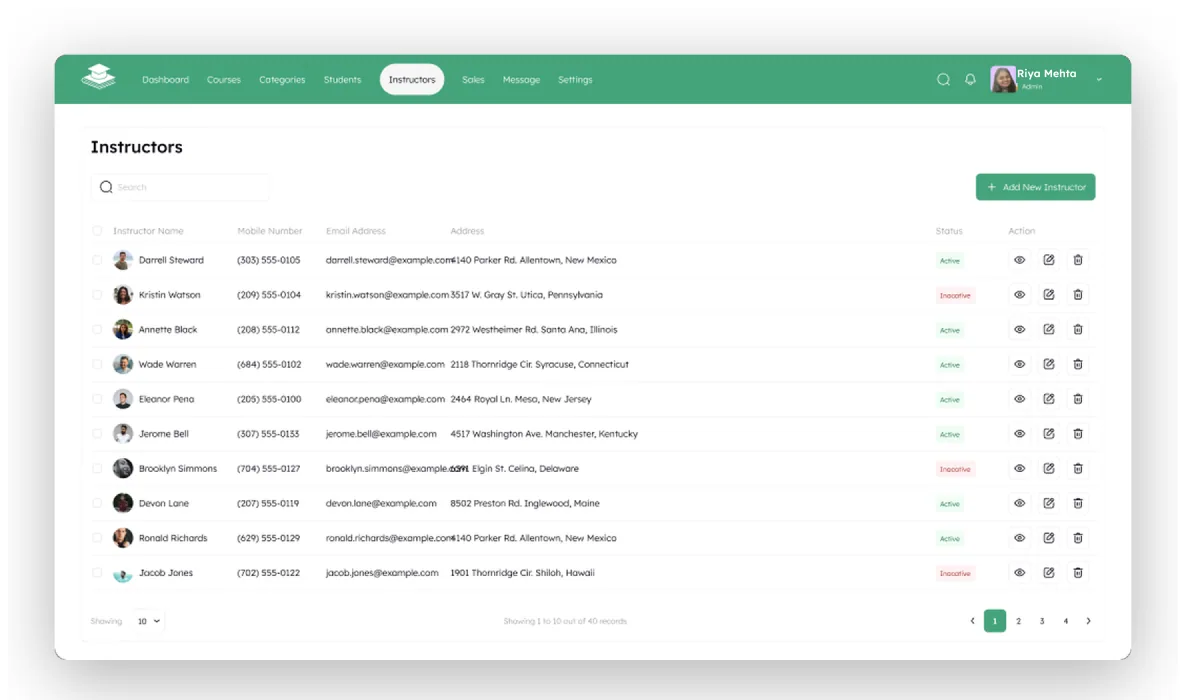
Categories, Students, Instructors and Sales all run the same table: search, a primary action, sortable columns, per-row view, edit and delete, and a footer counter. Making that pattern explicit is what surfaced the gaps, and what let five mobile tables be rebuilt as stacked cards without redrawing a single cell.

The Coursedesk Instructors table: name, mobile number, email, address, an Active or Inactive status chip and row actions, with the records footer

Feature 06

Where the numbers have to reconcile.

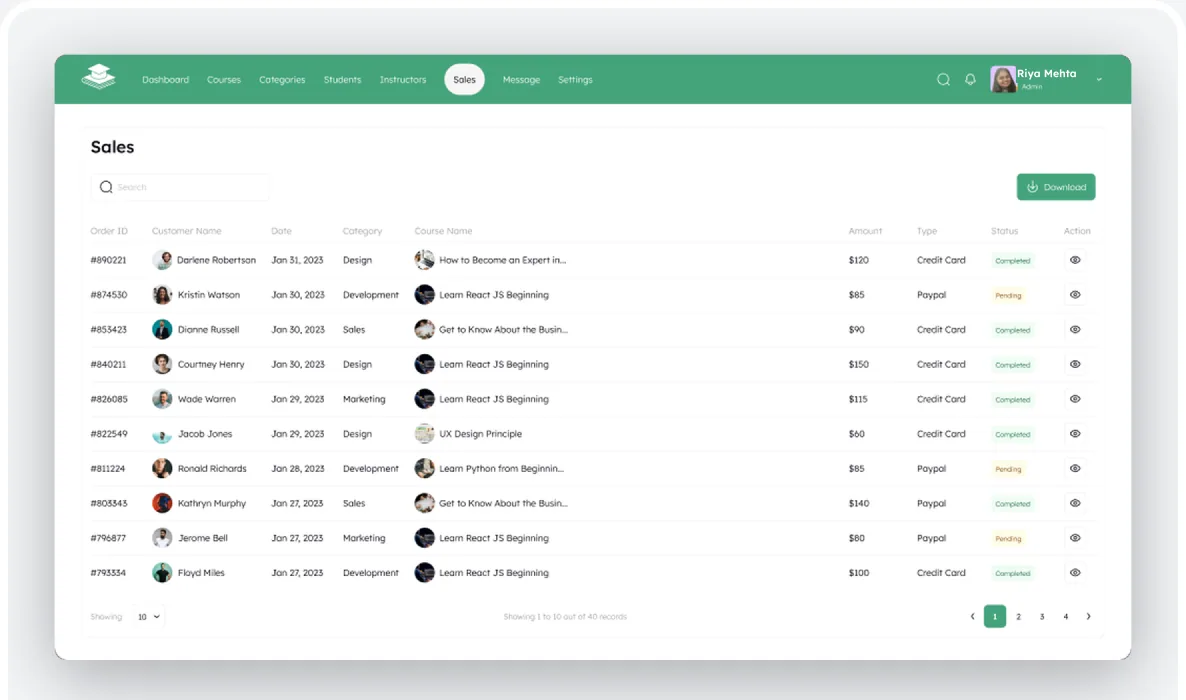
Sales is the module an administrator is judged on. It shipped with one order ID repeated 54 times, rows out of date order, and a footer promising fifty records across four reachable pages. Each row now carries a unique descending ID matched to its date, and the counts divide evenly into the pagination that is actually shown.

The Coursedesk Sales table with unique descending order IDs in date order, status chips and a footer counter that fits the pagination

Feature 07

Six modules the interface already promised.

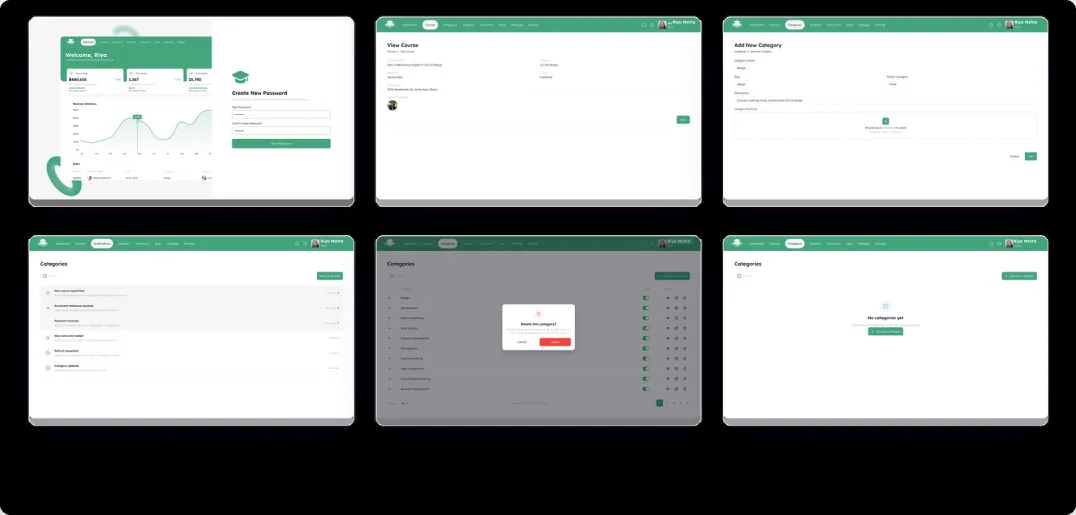
Every one of these was implied by a control that already shipped: a button, an icon, a bell. All six were built by cloning the nearest existing screen so the navigation, spacing, components and tokens came along unchanged, then reworked through component properties rather than redrawn.

The six new Coursedesk screens: Create New Password, View Course, Add New Category, Notifications, the delete confirmation dialog and the Categories empty state

Data integrity

The axis was not linear.

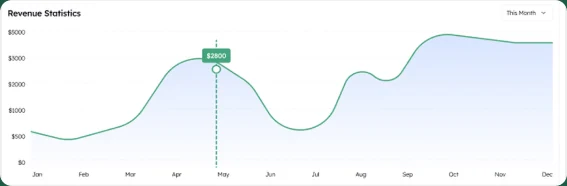
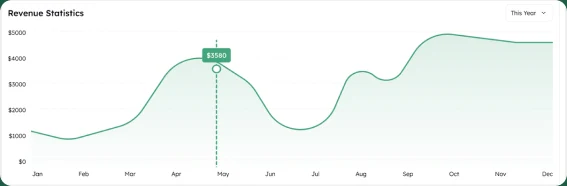
The revenue chart's gridlines were evenly spaced but labeled $0, $500, $1000, $2000, $3000, $5000. Half the plot area covered $0 to 1,000 and the other half covered $1,000 to 5,000, so the curve overstated its own growth. The area fill was also blue under a green line, and the period control read “This Month” above twelve months of data.

BeforeThe source Revenue Statistics chart: a blue area fill under a green line, a This Month control and an axis of $0, $500, $1000, $2000, $3000, $5000 at equal spacing

$0 · $500 · $1000 · $2000 · $3000 · $5000 at equal spacing

AfterThe corrected Revenue Statistics chart: a green area fill, a This Year control and a linear axis from $0 to $5000 in $1000 steps

$0 · $1000 · $2000 · $3000 · $4000 · $5000, marker recomputed to $3,580

Accessibility

Status chips failed AA in both modes.

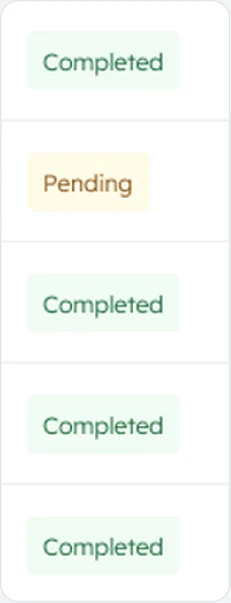
Every status chip used its accent color as the label on its own tint. Adding a dedicated text token per status, rather than reusing the accent, fixed all three, and gave dark mode a real value at the same time.

Completed

#22C55E on #F0FDF42.18:16.81:1

Pending

#EAB308 on #FEFCE81.85:16.62:1

Failed

#EF4444 on #FEF2F23.44:17.60:1
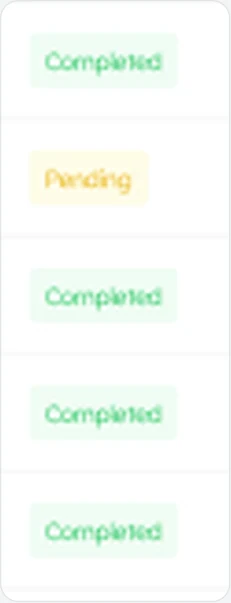
A column of Completed and Pending status chips as shipped: pale labels on pale tints
Before
The same status chips after the fix: darker status text on the same tints
After

Contrast ratios measured on the light-mode chips; AA for small text needs 4.5:1.

Mobile

Tables that hid their own controls.

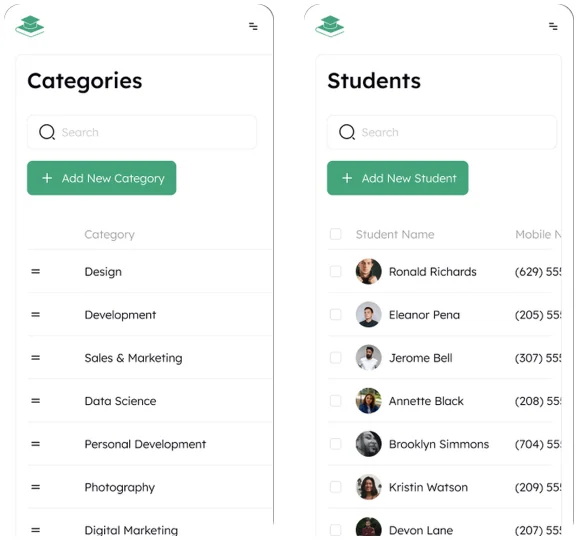
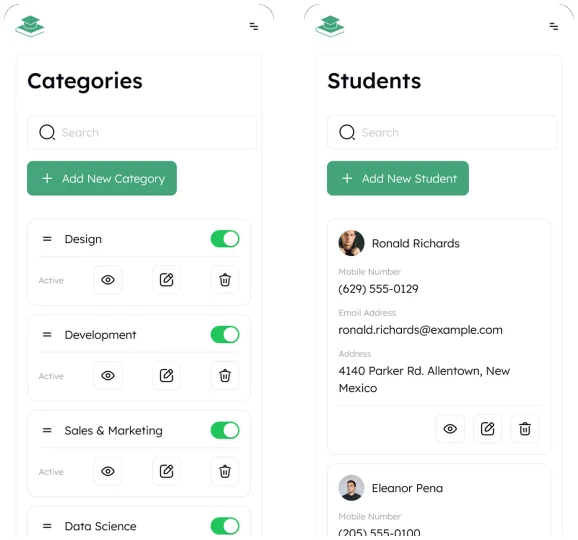
The records screens kept their desktop column layout on mobile: a 1,440px table inside a 375px viewport. Because the container clipped, nothing looked broken; the interface was just quietly cut off. On Categories the status toggle and all three row actions sat past the right edge; on Students and Instructors, everything after the phone number did.

Coursedesk Categories and Students on a 375px phone as shipped: the desktop table columns run past the right edge and the row actions are cut off
Before: controls off-screen
Coursedesk Categories and Students on a 375px phone after the rework: each record is a stacked card with its toggle and actions in view
After: every control reachable
  • 1,440 → 375widest table, now viewport-width
  • 60record cards built
  • 5screens reworked
  • 0controls off-screen
Six Coursedesk mobile screens at 375px: Login, Create New Password, Categories, Students, the course Filter sheet and Settings

Visual language

One green, near-black ink, Lexend throughout.

The palette leans on a single green as the primary, the color the product already used for its header, primary buttons and success states, with neutrals for ink, borders and surfaces, leaving the status colors to do the real signaling in the interface. Type is set in Lexend, the family the product already shipped, now on a fifteen-step ramp instead of nineteen ad-hoc pairings.

  • Brand#44A47C
  • Ink#07040E
  • Secondary#A1A1A1
  • Surface sunken#F6F6F6
  • Border#EDEDED
  • Surface#FFFFFF
  • Completed#22C55E
  • Pending#EAB308
  • Failed#EF4444

Typography

Before / After

What changed between the source file and the redesign.

Three journeys, drawn as the source file had them and as the redesign ships them. Every step comes from the findings above.

Password reset

Before
  1. Login
  2. Forgot Password
  3. Enter OTP
  4. No next screen

The OTP step was the end of the line: there was no screen to set the new password.

After
  1. Login
  2. Forgot Password
  3. Enter OTP
  4. Set new password
  5. Login

One set-password step on the same split layout, Input Field and button.

Categories actions

Before
  1. Add New Category
  2. No destination
  3. Trash icon
  4. Deleted, no confirmation

The add button and row view icons opened nothing; 93 trash icons had no confirmation.

After
  1. Add New Category
  2. Add screen
  3. Trash icon
  4. Delete confirmation
  5. Empty state

An add screen, a delete confirmation and a zero-data state for the module.

Sales records

Before
  1. One order ID × 54
  2. Rows out of date order
  3. 50 records, 4 pages

The table repeated one ID and its footer promised more than the pagination reached.

After
  1. Unique descending IDs
  2. Matched to date
  3. Counts that fit the pages

Each row has its own ID in date order, and the counter divides into the pages shown.

Results & Impact

Seven defects fixed across 57 screens.

Every left-hand count is measured from the source file; the right-hand number is the redesign. The product keeps its visual language throughout.

  • 54 → 0rows sharing one order ID
  • 93 → 0deletes with no confirmation
  • 3 → 0controls with no destination
  • 34 → 0loose hex values, to named tokens
  • 19 → 1hand-copied dark screens to one token layer
  • 12 → 0line-heights left on auto
  • 3 → 0filter categories from another product
  • 57screens audited, every layer read

Design-level outcomes measured against the source files. Live product data will follow launch.

Learnings

What we took from the project.

  1. Read before you fix

    Not everything that looks wrong is wrong. Our first pass flagged many details that turned out to be intentional, so we captured each screen before changing it.

  2. Dead controls are a map

    The fastest way to find missing screens was to wire the prototype. Every button without a destination named one.

  3. Duplication hides drift

    Dark mode was built by copying screens, so nobody noticed the chips were never repainted. Tokens surfaced it in one pass.

  4. Accent is not text color

    Reusing the success green as chip fill and chip label read fine and failed AA at 2.18:1. Status needed its own token.

  5. Clipping hides breakage

    The mobile tables were not visibly broken; they were clipped. Measuring unclipped bounds exposed controls past the edge.

  6. Clone, then retarget

    Every new screen started as a copy of its nearest sibling, edited through component properties. Nothing drifted.

Thanks for reading.

Have a product like this? Let's talk. Book a call

Write to [email protected], or see more case studies, including WorkHub, an HR platform designed on the same template.

Skip to content
Wait! Is Your Website Losing Customers?

Get a free UI/UX audit and discover what’s holding your site back