
Skip to content

Case study

AstuteWheel

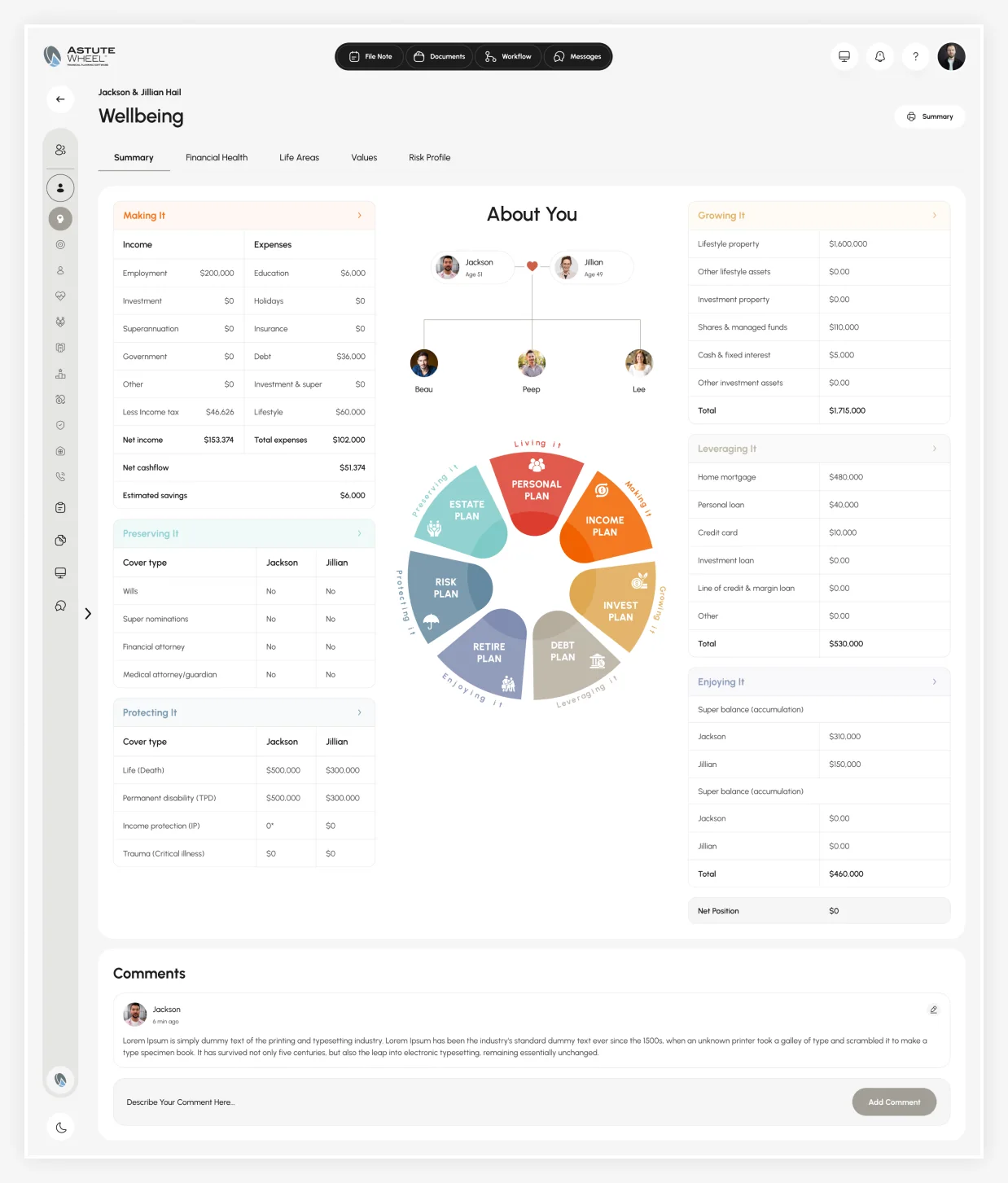
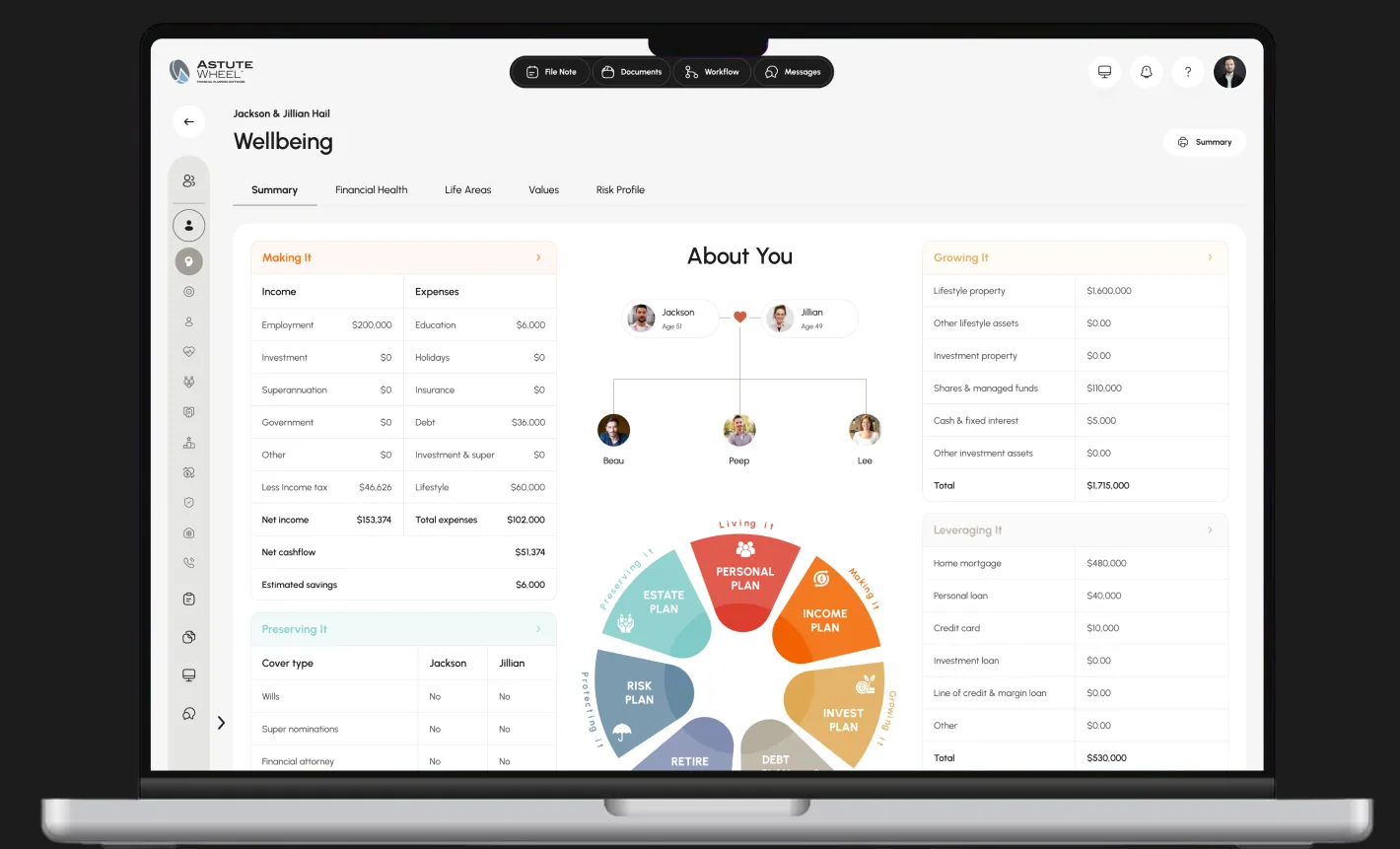
The AstuteWheel Wellbeing summary open on a laptop: the About You family tree, the seven-plan wheel and the Making It, Growing It and Leveraging It tables

Overview

296Screens

AstuteWheel turns a financial adviser's discovery conversation into a picture. A client answers a guided questionnaire, the answers become a wheel of seven plans, and the adviser works that same wheel back into a strategy.

This case study covers a UI/UX pass across three products in one file (practice onboarding, the client's guided journey and the adviser portal) at five breakpoints, with dark mode on the adviser portal. We audited the file, replaced every placeholder string with real copy, cleaned up type left over from scaling, built a token layer from the palette that already shipped, and drew the six modules the sidebar had been promising since the first screen.

Client

An Australian financial-advice platform, built under NDA.

The client's name and internal figures are confidential. Everything shown here is the design work itself: a UX audit of the three products, the design system that binds every paint to a token, and the SaaS product design for the six modules the rail had promised.

Client
Confidential financial-advice client, name under NDA
Industry
Financial advice and financial-planning software
Market
Australia: superannuation, SMSF, TPD cover and SOA / ROA advice documents run through the UI
Scope
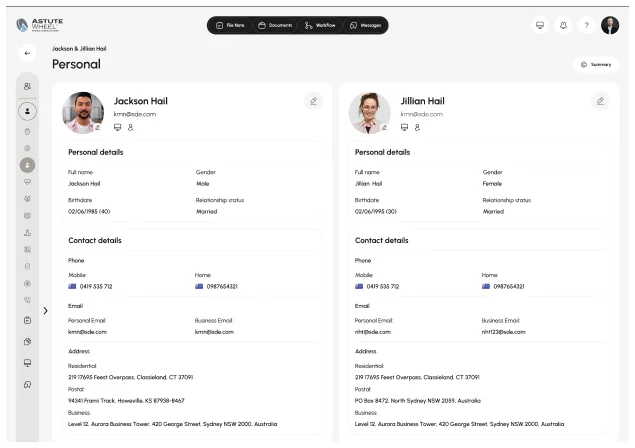
UI/UX pass across three products: practice onboarding, the client journey and the adviser portal
Deliverables
296 screens at five breakpoints, light throughout and dark on the adviser portal, six new modules and a token layer
Timeline
2026
A financial adviser and a client reviewing a plan together at a table

Process

The wheel waits until every color has a token behind it.

The adviser portal alone used eighty-four font sizes, 1,646 of them fractional, and thirty-one paint styles with nothing behind them. Drawing the six missing modules first would have added more hard-coded values, so we built the system first.

  1. Audit 3 products, 5 breakpoints
  2. Fix names, replace 471 lorem strings
  3. Clean up scaled type
  4. Bind every paint to tokens
  5. Draw the six missing modules

Problem

Lorem ipsum, dead links and scaled type kept AstuteWheel from a build.

  • Six navigation destinations led nowhere.

    Advice, Manage, Entities, Estate, Contacts and Administration sat in the rail of every screen. Estate was the sharpest: the wheel has an Estate Plan segment and the client journey has an Estate Plan screen, but the adviser had nowhere to work on it.

  • 471 lorem ipsum strings were still shipping.

    Two hundred and fifty-three on the client journey alone, across sixty screens: every About You, every plan, every values exercise. Even the onboarding sidebar’s three step descriptions were placeholder.

  • The breakpoints were scaled, not re-laid-out.

    Eighty-four distinct font sizes on the adviser portal, 1,646 of them fractional: the leftovers of scaling a 1920 frame down instead of laying it out again.

  • Dark mode was a copy of the file, not a theme.

    Thirty-one paint styles were already split into Light Mode and Dark Mode, but with no variables behind them every dark screen was a duplicate that had to be maintained by hand.

User persona

An adviser who needs depth, and a client who needs plain English.

Rachel Nguyen

Goals

  • Open a client and know within seconds which plan needs work.
  • Move between wellbeing, position, cashflow and insurance without losing the client.
  • Have the compliance trail (advice documents, entities, estate) in the same place as the numbers.

Frustrations

  • Ran the practice on the wheel but tracked estate and entities in spreadsheets.
  • Reads the portal on a laptop at a client’s kitchen table, not a 1920 monitor.
  • She runs this review with every client, so one wasted step costs her an hour a week.
Jackson Hall

Goals

  • Answer the questions once, in plain English, before the first meeting.
  • See the same picture the adviser sees: no jargon, no spreadsheet.
  • Know what is still waiting on him between meetings.

Frustrations

  • Does not know what an SMSF, an APL or a TPD definition is.
  • Fills the questionnaire on a phone in the evening, not at a desk.
  • Loses confidence when a screen says lorem ipsum where the explanation should be.

Goals

Four rules decided every adviser and client screen.

  1. The navigation must be true

    If the rail lists a module, the module exists. Six of them did not, and one of those, Estate, was already promised twice elsewhere in the product.

  2. Tokens before anything new

    Twenty text styles and thirty-one paint styles are a vocabulary, not a system. The six missing modules waited until every fill resolved through a variable.

  3. A breakpoint is a layout, not a percentage

    Scaling a 1920 frame to 402 produces fractional type and a design nobody can maintain. The fix here was to remove the artifacts; the next pass has to re-lay the small breakpoints properly.

  4. The client never reads jargon

    Every string a client sees was rewritten in plain English. If a sentence needed a financial-services glossary, it was the wrong sentence.

Research

We counted every font size before we changed one.

We opened all three products at each of the five widths and logged what an adviser and a client would actually meet on screen. That turned a vague sense that the portal felt uneven into eighty-four font sizes to bring down to one ramp.

  • 296screens across five breakpoints
  • 84distinct font sizes on the portal
  • 1,646fractional sizes from scaling
  • 471placeholder strings a client could see
  • 253of them on the client journey
  • 6nav destinations with no screen

Primary flow

An invite becomes a wheel, and the wheel becomes advice.

Everything in AstuteWheel is a step from an adviser's invite to an advice document the client can actually read. The client discovers and prioritizes in plain English, the wheel assembles from their answers, and the adviser models and delivers from that same picture. The modules the rail promised but never drew, Entities and Estate among them, are marked.

Inviteadviser sends the link

  1. Adviser invitesemail with a private link
  2. Introductionwho your adviser is
  3. Your detailsname, contact, household
  4. Security checkcode to email or mobile

Discoverthe client rates themselves

  1. Financial Healthseven areas, plain English
  2. Investment · Debtconfidence, not knowledge
  3. Risk · Retirementsame four-point scale
  4. Estatethe one advisers skip

Prioritizewhat matters, in order

  1. Life areaswhere life actually is
  2. Your valuespick what matters
  3. Narrow the focusdown to a handful
  4. Risk profilecapacity and tolerance

The Wheelone picture, seven plans

  1. Wellbeingthe wheel assembles
  2. About youhousehold and dependents
  3. Making · Growingincome and assets
  4. Preserving · Protectingestate and insurance

Modelthe adviser’s work

  1. Positionassets, liabilities, net worth
  2. CashflowMyFlow projections
  3. Projection datayear by year
  4. Retirement outlookthe quick answer

Deliverand it closes

  1. Advice documentSOA or ROA
  2. Entities · Estatethe compliance trail
  3. Client portalshared back to them
  4. Reviewnext wheel, next year
  • Entry point
  • Existing screen
  • Was unreachable
  • New screen

Grid system

Five widths, one rail, and a grid that has to survive a kitchen table.

Advisers do not sit at 1920. They open the portal on a laptop next to a client, so 1440 and 1280 are the real working widths and 834 is a tablet in a meeting. From tablet width up, the rail owns 72px collapsed and 280px open; it never becomes an overlay. On phones the rail gives way to a top bar with the logo, a dark-mode toggle and a menu button, and each screen stacks into a single column.

Components

Two hundred and fourteen components already existed. None were bound.

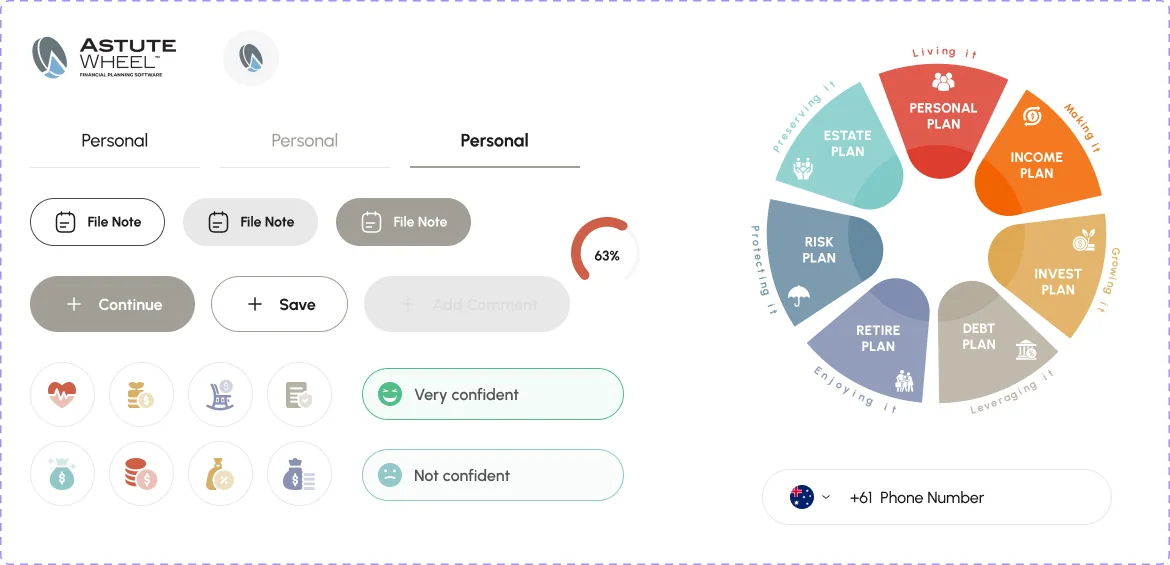
The adviser portal now draws every color from one shared set of tokens, so light and dark stay in step and a brand change is a single edit. The twelve type combinations the screens already relied on now have styles, and every shadow comes from four elevation styles.

AstuteWheel component board: logo, Personal tabs, File Note buttons, Continue, Save and Add Comment buttons, plan icons, Very confident and Not confident options, the seven-plan wheel and the phone-number field
  • 214 components
  • 32 text styles
  • 4 elevation styles
  • all bound to tokens

Feature 01

A practice signs itself up before it ever sees a client.

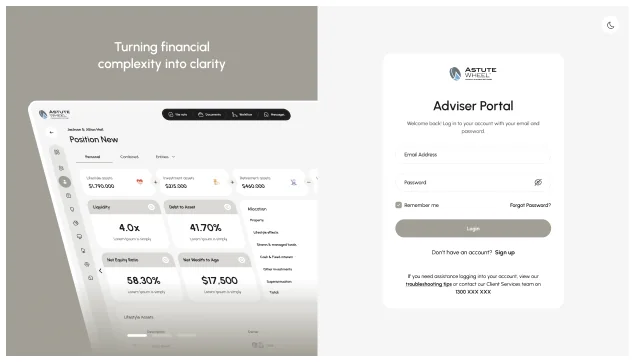
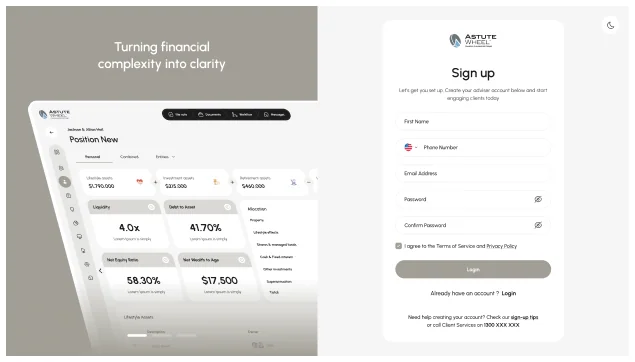
Login, sign-up, verification, role, invited users, practice and licensee details, payment, done. It is the least glamorous flow in the product and the one that decides whether a firm ever reaches the wheel, so every step is a screen with a single job, and the licensee details are pre-filled from the ASIC register rather than typed.

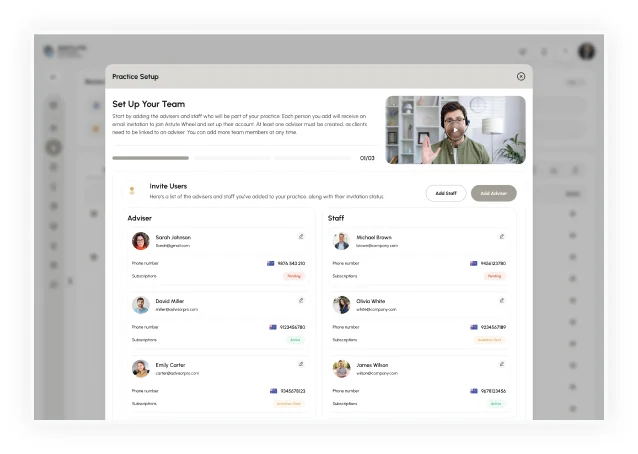
The AstuteWheel practice sign-up: licensee and practice details, with the step list on the leftThe AstuteWheel Practice Setup dialog: set up your team, invite adviser and staff users

Feature 02

The client journey is written for someone who does not speak finance.

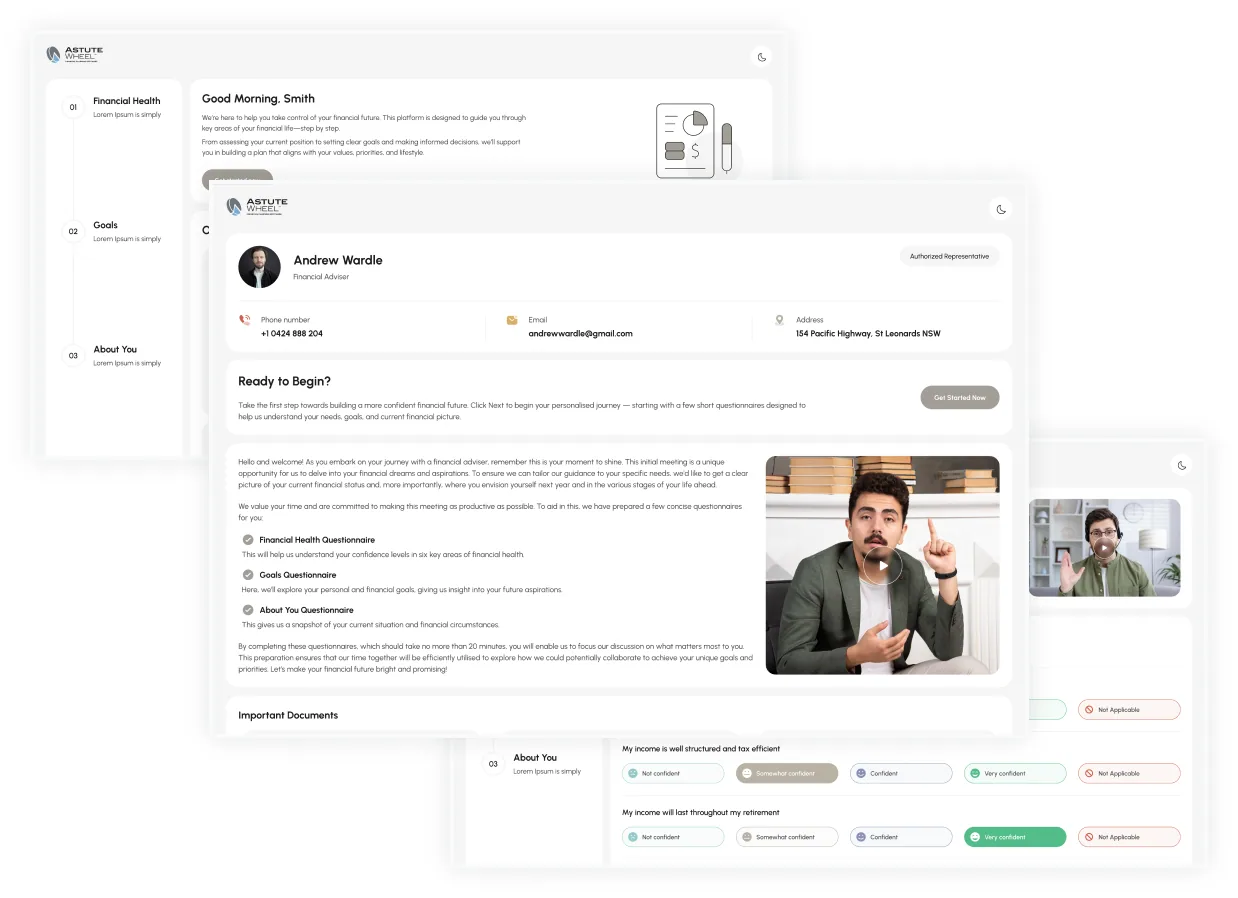
An invite becomes an introduction, a few details, a security code, and then a questionnaire that asks how confident you feel rather than what you own. Four options, plain English, no jargon, because the answers only matter if they are honest, and 253 of these screens were still showing lorem ipsum where the explanation should have been.

Three AstuteWheel client-journey screens: the Good Morning welcome with the three questionnaires, the adviser introduction with Ready to Begin, and the Financial Health questions with their four confidence options

Feature 03

Seven plans, one picture, and the whole product hangs off it.

Personal, Income, Invest, Debt, Retire, Risk, Estate and the ring that binds them: Making it, Growing it, Preserving it, Protecting it, Enjoying it, Leveraging it, Living it. The labels curve around the wheel letter by letter.

The AstuteWheel Wellbeing summary: Making It, Growing It and Leveraging It tables around the About You family tree and the seven-plan wheel

Click map

Where advisers are designed to click.

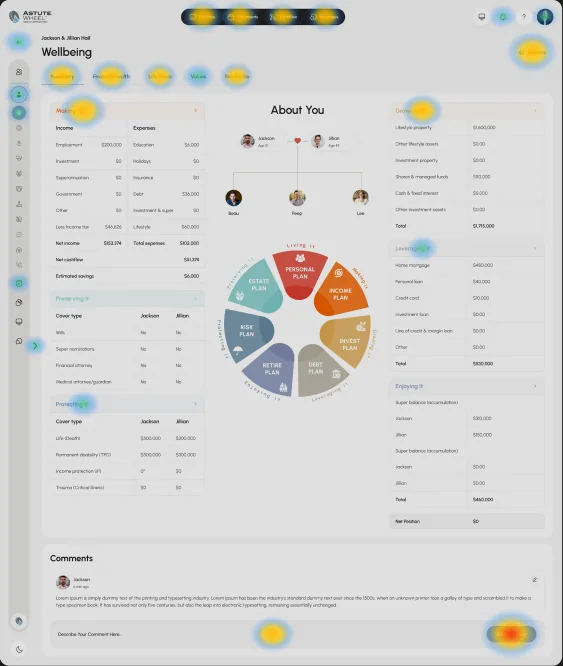
A design-intent click map of the Wellbeing summary: heat sits only on interactive targets (buttons, tabs, links, menus), weighted by how central each action is to an adviser's day. It maps layout decisions, not recorded sessions.

Design-intent click map over the AstuteWheel Wellbeing summary, with the strongest heat on the Add Comment button and the sub-tabs
  1. Add Comment is the only filled button

    It is the one primary CTA on the screen, so it carries the hottest spot. The comment field beside it is warm because every note starts there.

  2. Summary, Financial Health, Life Areas, Values, Risk Profile

    The sub-tabs are how an adviser moves through one client without leaving the page. Summary and Financial Health run warmest because they open every meeting.

  3. File Note, Documents, Workflow, Messages

    The dark pill at the top is the compliance trail. It stays warm on every screen because a file note follows nearly every client conversation.

  4. Plan headers: Making It, Growing It, Leveraging It, Protecting It

    Each table header opens its plan. Making It and Growing It sit at the top of the page and run warmer; the lower headers cool off with scroll depth.

  5. Rail, back arrow, bell and avatar

    Cool by design: the rail is for switching clients and modules, not for working one. The back arrow returns the adviser to the client list in a single click.

Design-intent map, not recorded data.

Feature 04

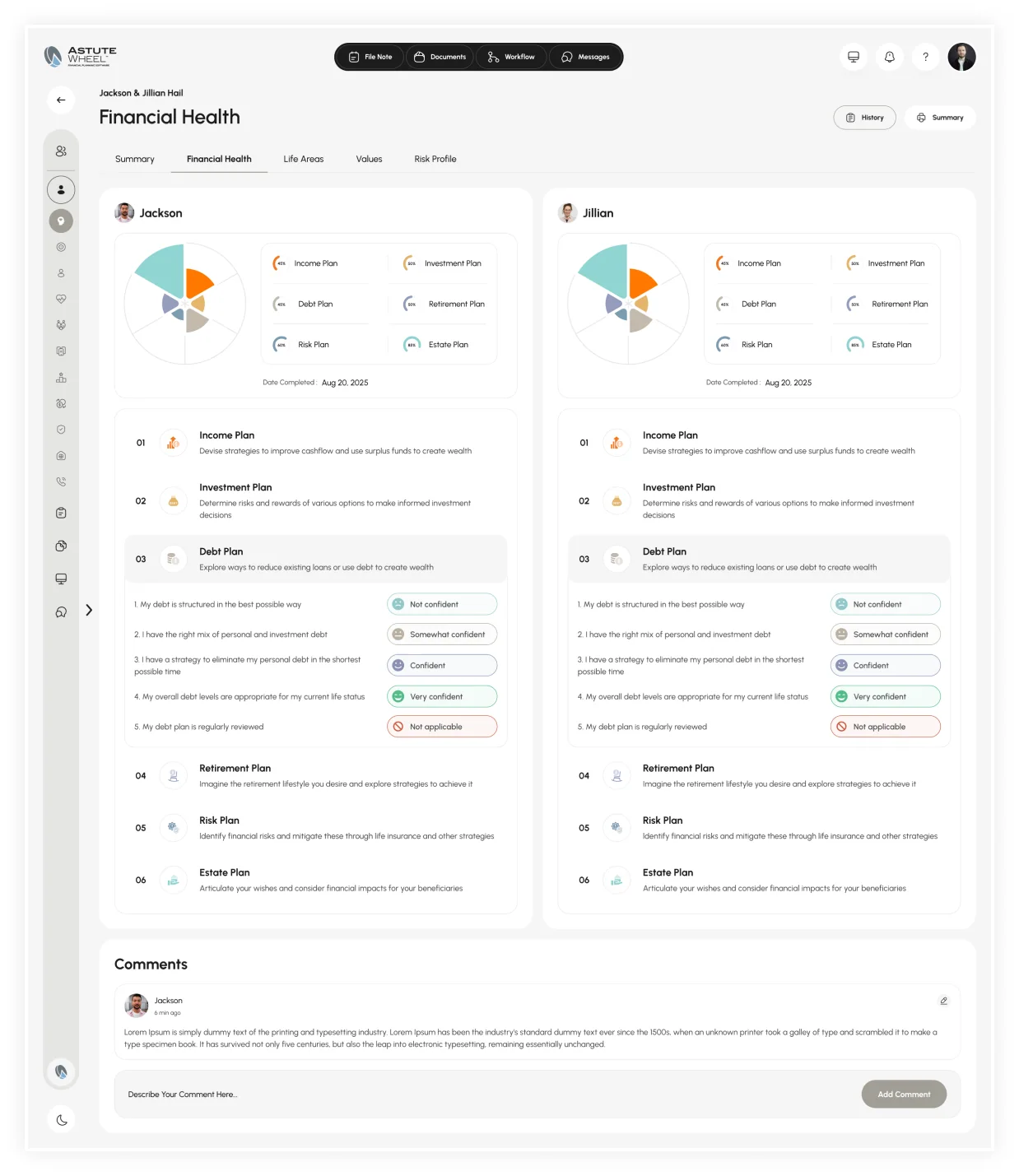
Financial health is a conversation starter, not a score.

The client rates seven areas on a four-point scale and the adviser sees exactly the same picture. Where the client rates themselves lowest is where the meeting begins. The history view keeps every previous wheel, so the second year's conversation starts by comparing two pictures rather than re-asking the same questions.

The AstuteWheel Financial Health view: seven areas rated on a four-point scale, with the history of previous wheels

Feature 05

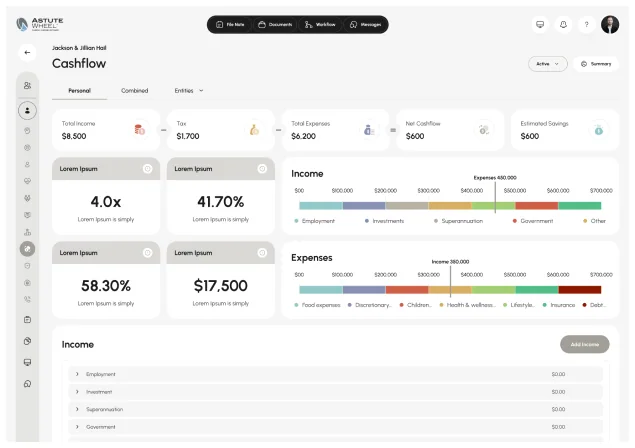
Behind the wheel sits the modeling the client never sees.

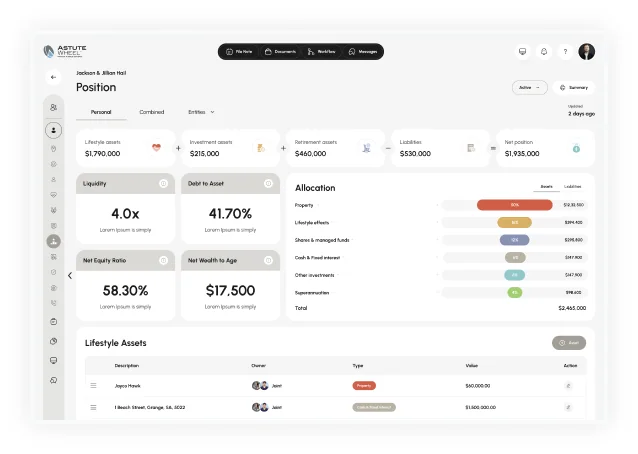
Position, allocation, liquidity, net wealth to age. Cashflow with MyFlow projections, year-by-year projection data and a quick retirement outlook. This is the adviser's half of the product: dense, table-heavy, and the only part of the file that ships in dark mode as well as light.

The AstuteWheel Cashflow screen with MyFlow projectionsThe AstuteWheel projection data, year by year, with the retirement outlook

Feature 06

The rail promised six modules that had never been drawn.

Advice, Manage, Entities, Estate, Contacts and Administration appeared on every screen and led nowhere. Estate was the worst of them: the wheel has an Estate Plan segment and the client journey has an Estate Plan screen, so the product asked the client about their will and then gave the adviser nowhere to record the answer. All six now exist on desktop and mobile, built from the same shell, rail and table components as the screens that shipped.

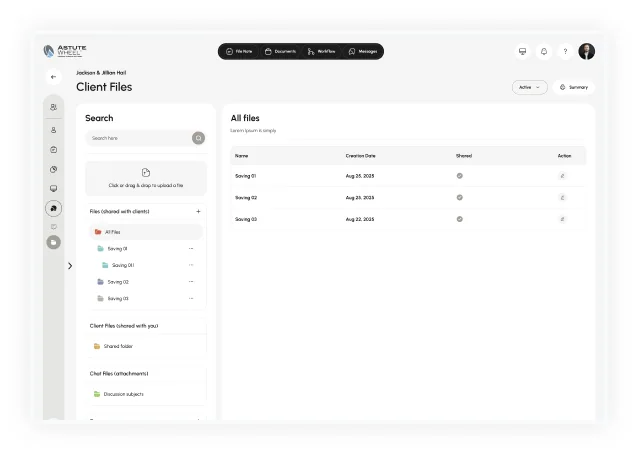
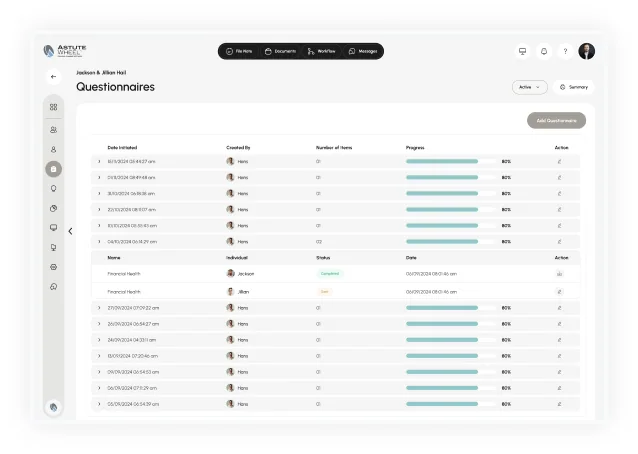
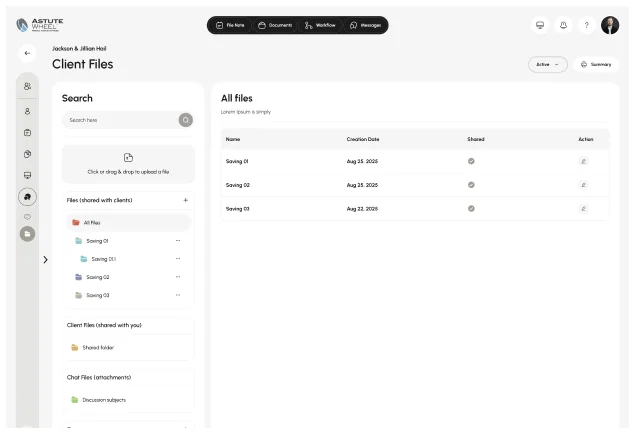
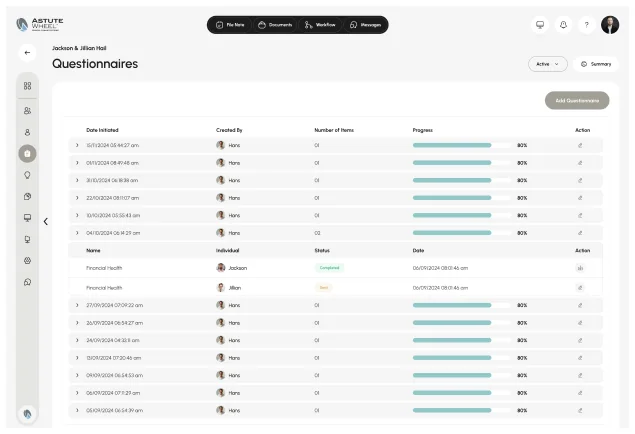
The AstuteWheel Position module: assets, liabilities, liquidity and allocationThe AstuteWheel Client Files module: search, folders shared with the client and the All files tableThe AstuteWheel Practice Setup dialog with adviser and staff invitationsThe AstuteWheel Questionnaires module: a table of questionnaires with creator, number of items and progress

Feature 07

Documents, messages and the compliance trail.

Client files, chat with subjects, questionnaires, the help desk and the training library. In an advice practice these are not secondary screens: a Statement of Advice that cannot be found is a compliance problem, so the advice register now sits beside the documents rather than inside them.

The AstuteWheel Messages screen: chat threads with subjects between adviser and clientThe AstuteWheel Help desk and training library
An adviser working on a laptop in a meeting room

Responsive

Five widths, and the two in the middle are the real ones.

1920 is where the file was drawn; 1440 and 1280 are where advisers actually work. 834 is a tablet in a meeting and 402 is the client answering the questionnaire on a phone in the evening. Every screen exists at all five, which is exactly why scaling them instead of laying them out produced 1,646 fractional type sizes.

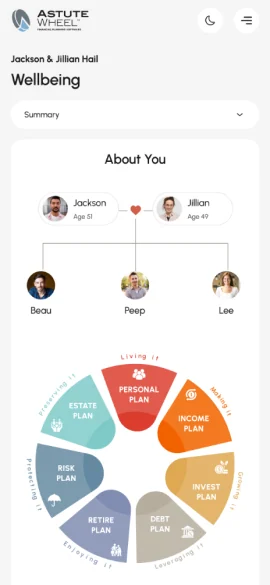
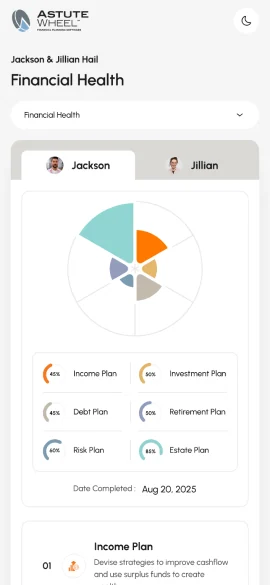
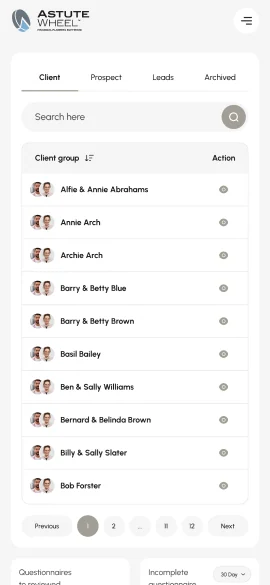
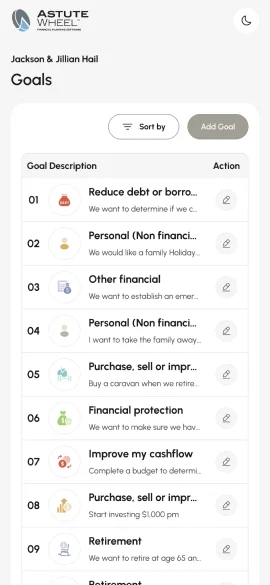
AstuteWheel at 402px: the Wellbeing summary with the About You tree and the wheelAstuteWheel at 402px: Financial Health for Jackson with the plan listAstuteWheel at 402px: the client list with Client, Prospect, Leads and Archived tabsAstuteWheel at 402px: the Goals list with Sort by and Add Goal

Visual language

Stone, ink, seven plan colors and one ring accent.

The palette is warm stone and ink, with seven plan colors and one accent for the ring, all of which only ever appear on the wheel and the things it maps to. Type is Urbanist in five weights across thirty-two styles, twelve of which this pass added, because the screens were already using combinations that had no style behind them.

  • #A19E95
  • #1C1C1C
  • #555555
  • #F6F6F6
  • #494949
  • #E8E8E8
  • #D9D8D5
  • #E5E5E3
  • #92C8C9
  • #8992B3
  • #B8B2A4
  • #CF5F47
  • #D8AF65
  • #A2CF73
  • #53BD88
  • #8D1900

Typography

Before / After

How the rail, the client copy and dark mode changed.

Navigation

Before
  1. Rail: Estate
  2. Click
  3. No screen

Six rail destinations (Advice, Manage, Entities, Estate, Contacts, Administration) led nowhere, while the client was already asked about their estate.

After
  1. Rail: Estate
  2. Estate module
  3. Adviser records it

All six modules now exist on desktop and mobile, built from the same shell, rail and table components.

Client copy

Before
  1. About You
  2. Lorem ipsum
  3. Guess

471 lorem strings were shipping, 253 of them on the client journey across sixty screens.

After
  1. About You
  2. Plain-English question
  3. Answer once

Every string a client sees was rewritten in plain English, without financial-services jargon.

Theming

Before
  1. Light screen
  2. Duplicate dark screen
  3. Edit both by hand

Light and Dark paint styles existed, but nothing linked them, so every dark screen was a hand-kept copy.

After
  1. Token
  2. Light / Dark mode
  3. One screen

Every fill and stroke is bound to a token, so a theme is a mode switch.

Results & Impact

The navigation tells the truth, and the file finally has a system.

Every paint across three products now resolves through a named token, the navigation is true at last, and a second theme is a mode switch rather than a parallel set of screens to maintain by hand.

  • 6 → 0rail destinations with no screen
  • 471 → 0lorem strings on client-facing screens
  • 2 themeslight and dark from one token set
  • 1,646 → 0fractional font sizes left by scaling

Design-level outcomes measured against the source files. Live product data will follow launch.

Learnings

Four lessons from untangling the wheel.

  1. Verify before you call it a bug

    Hundreds of one-letter text layers with a zero line-height looked broken. They are the curved labels around the wheel, and text on a circular path is one layer per letter. Reporting that as a defect would have cost a day and our credibility; checking it cost one screenshot.

  2. Scaling a frame is not a breakpoint

    Five widths looked like a mature responsive system until the type told the truth: eighty-four sizes, most of them fractional. Removing the fractions was a one-hour fix; re-laying 402 and 834 properly is the real work and it is still outstanding.

  3. A styled file can still have no system

    The file had text styles, paint styles, a full component set and a Light Mode / Dark Mode naming convention, but nothing connected them. The convention described an intention nobody could act on, which is why dark mode had become a second copy of the file.

  4. Placeholder copy is a trust problem, not a content problem

    471 lorem strings sat on the screens a client sees while being asked about their will and their income. In financial advice, the moment a screen says lorem ipsum where the explanation belongs, the client stops believing the rest of it.

Let's work together

Building an advice or wealth platform? We can help you ship it.

Team up with us

[email protected]See more case studies

The AstuteWheel Wellbeing summary on a laptop

Thanks for reading.

Have a product like this? Let's talk. Book a call

Or see more case studies, including WorkHub, an HR platform designed on the same template.

Skip to content
Wait! Is Your Website Losing Customers?

Get a free UI/UX audit and discover what’s holding your site back